CORS Security: Origins, Headers, Preflight, Credentials
How CORS actually works: same-origin policy, preflight requests, CORS headers, credential handling, misconfigurations that break production, and the security rules that matter.
Introduction
Every frontend developer has met this error at some point: your React app on localhost:3000 calls an API on localhost:8080, and the browser flatly refuses to hand you the response. Access to fetch has been blocked by CORS policy. The request probably reached the server — you can see it in your API logs — but the browser won’t let your code read the answer.
CORS (Cross-Origin Resource Sharing) is the mechanism behind that behavior, and it’s widely misunderstood. It’s not an authorization system, it doesn’t protect your API from attackers, and misconfiguring it can either lock out legitimate users or quietly punch a hole in your security model.
This guide covers how CORS actually works — the browser handshake, simple vs preflighted requests, every header that matters — how to configure it correctly on Express and NGINX, the misconfigurations that turn it into a vulnerability, and how to debug the cryptic console errors it produces. If you landed here with a specific CORS error to fix right now, the Handle CORS recipe has quick fixes; this guide is for understanding and securing the whole mechanism.
Same-Origin Policy
An origin is the combination of scheme, host, and port — change any of the three and you’re on a different origin:
https://app.example.com:443/page
  │      │       │      │
 scheme   host   port   path

Same origin:      https://app.example.com/other-page
Different origin: http://app.example.com             (different scheme)
Different origin: https://api.example.com            (different host)
Different origin: https://app.example.com:8080       (different port)
The same-origin policy stops JavaScript on https://app.example.com from reading responses that come back from https://api.example.com. Read that again: the request is still sent — the browser just withholds the response from your code. This asymmetry trips people up constantly: “the request worked in Postman” or “I can see it in the Network tab, so why does my code throw?”
CORS is the opt-out mechanism. A server that wants to share responses with other origins sends back Access-Control-* headers saying which origins, methods and headers it trusts. No headers, no access — the browser keeps the response to itself.
How CORS Works: The Browser Handshake
For a “simple” request (more on what makes it simple below), the browser sends it straight through and checks the CORS headers on the response. For anything else, the browser first sends a preflight — an OPTIONS request asking “may I do this?” — and only sends the real request if the server says yes:
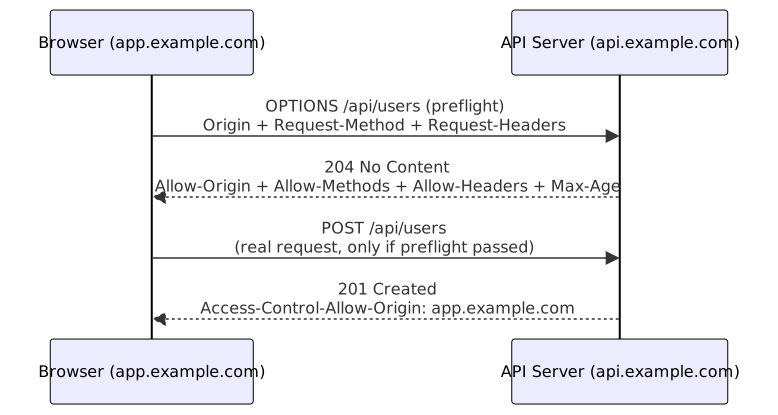
Two consequences worth internalizing:
- The server sees the actual request only after a successful preflight. A failed preflight means the real request never fires — which is why a
405on OPTIONS breaks everything. - Preflights are cached by the browser for
Access-Control-Max-Ageseconds. That’s free performance for chatty APIs — and a debugging trap when you change config and the browser keeps the old answer cached.
A worked example
Say your SPA at https://app.example.com calls fetch('https://api.example.com/users', { method: 'POST', headers: { 'Authorization': 'Bearer ...', 'Content-Type': 'application/json' }, body: '...' }). The browser spots a POST with a non-safelisted Content-Type plus an Authorization header — preflight required.
First it sends OPTIONS with Access-Control-Request-Method: POST and Access-Control-Request-Headers: authorization, content-type. If the API answers 204 with Access-Control-Allow-Origin: https://app.example.com, Allow-Methods including POST, and Allow-Headers including both authorization and content-type, the browser sends the real POST and hands the response to your fetch. If any single check fails, the POST never leaves the browser and you get a CORS error in the console — while the server’s access log shows nothing but a lone OPTIONS.
CORS Headers
Each Access-Control-* header has a single job:
| Header | Direction | Purpose |
|---|---|---|
Access-Control-Allow-Origin | Response | Which origins may read the response |
Access-Control-Allow-Methods | Response (preflight) | Which HTTP methods are permitted |
Access-Control-Allow-Headers | Response (preflight) | Which request headers are permitted |
Access-Control-Expose-Headers | Response | Which response headers JS may read |
Access-Control-Allow-Credentials | Response | Whether cookies/Authorization may be sent |
Access-Control-Max-Age | Response (preflight) | How long to cache the preflight result |
Origin | Request | The origin making the request |
Access-Control-Request-Method | Request (preflight) | The method the browser wants to use |
Access-Control-Request-Headers | Request (preflight) | The headers the browser wants to send |
The last two are browser-generated — you’ll see them in preflight requests, but you never set them yourself.
A subtlety worth knowing: Access-Control-Expose-Headers is the odd one in the group. By default, browser JS can only read a handful of “safe” response headers (like Content-Type). If your API signals pagination via X-Total-Count or a custom rate-limit header, you must explicitly expose it or response.headers.get() returns null — no error, just silence.
Simple Requests
Simple requests skip the preflight entirely. A request is “simple” only when it meets all of these:
- Method is
GET,HEAD, orPOST - Headers are only CORS-safelisted ones (
Accept,Accept-Language,Content-Language,Content-Type) Content-Typeistext/plain,multipart/form-data, orapplication/x-www-form-urlencoded
Notice what’s missing: Authorization isn’t safelisted, and application/json isn’t a safelisted Content-Type. In practice, almost every real API call — POST with a JSON body, or anything carrying a token — is not simple and always preflights. A plain GET with only browser-managed headers, or a legacy form POST, are the typical cases that stay simple.
// Simple GET request — no preflight
GET /api/users HTTP/1.1
Host: api.example.com
Origin: https://app.example.com

// Response
HTTP/1.1 200 OK
Access-Control-Allow-Origin: https://app.example.com
Content-Type: application/json

[{"id": 1, "name": "Alice"}]
Preflight Requests
For any non-simple request, the browser first sends OPTIONS:
// Preflight request
OPTIONS /api/users HTTP/1.1
Host: api.example.com
Origin: https://app.example.com
Access-Control-Request-Method: POST
Access-Control-Request-Headers: Content-Type, Authorization

// Preflight response
HTTP/1.1 204 No Content
Access-Control-Allow-Origin: https://app.example.com
Access-Control-Allow-Methods: GET, POST, PUT, DELETE
Access-Control-Allow-Headers: Content-Type, Authorization
Access-Control-Max-Age: 86400

// Actual request (sent only after a successful preflight)
POST /api/users HTTP/1.1
Host: api.example.com
Origin: https://app.example.com
Content-Type: application/json
Authorization: Bearer eyJhbGci...

{"name": "Bob", "email": "bob@example.com"}

// Actual response
HTTP/1.1 201 Created
Access-Control-Allow-Origin: https://app.example.com
A correct preflight response must return 204 (or 2xx) and echo the allowed method and headers. Returning 405 Method Not Allowed for OPTIONS is the classic way to break an API entirely.
Server Configuration
Express.js
The cors package handles allowlists, preflights and header echoes for you. The origin callback is where you enforce your policy:
// middleware/cors.ts — CORS middleware for Express
import cors from 'cors';

const allowedOrigins = [
  'https://app.example.com',
  'https://admin.example.com',
];

app.use(cors({
  origin: (origin, callback) => {
    // Allow requests with no origin (curl, server-to-server)
    if (!origin) return callback(null, true);

    if (allowedOrigins.includes(origin)) {
      callback(null, true);
    } else {
      callback(new Error('Not allowed by CORS'));
    }
  },
  methods: ['GET', 'POST', 'PUT', 'DELETE', 'PATCH'],
  allowedHeaders: ['Content-Type', 'Authorization', 'X-Request-ID'],
  exposedHeaders: ['X-Total-Count', 'X-Page-Count'],
  credentials: true,
  maxAge: 86400, // Cache preflight for 24 hours
}));
The !origin branch matters: server-to-server calls, curl and mobile apps send no Origin header. Rejecting those would break clients that CORS doesn’t govern anyway.
Manual CORS headers
Without a library, you need to handle both the normal path and the OPTIONS short-circuit yourself:
// middleware/corsManual.ts — Manual CORS header injection
function corsMiddleware(req: Request, res: Response, next: NextFunction) {
  const origin = req.headers.origin;
  const allowedOrigins = ['https://app.example.com', 'https://admin.example.com'];

  if (origin && allowedOrigins.includes(origin)) {
    res.setHeader('Access-Control-Allow-Origin', origin);
    res.setHeader('Vary', 'Origin'); // Critical for caching
  }

  if (req.method === 'OPTIONS') {
    res.setHeader('Access-Control-Allow-Methods', 'GET, POST, PUT, DELETE, PATCH');
    res.setHeader('Access-Control-Allow-Headers', 'Content-Type, Authorization, X-Request-ID');
    res.setHeader('Access-Control-Max-Age', '86400');
    return res.status(204).end();
  }

  next();
}
NGINX
At the edge, a map keeps the allowlist in one place and the preflight block returns early:
# nginx.conf — CORS configuration
server {
    listen 80;

    # Map allowed origins
    map $http_origin $cors_origin {
        default "";
        "https://app.example.com" "https://app.example.com";
        "https://admin.example.com" "https://admin.example.com";
    }

    # CORS headers
    add_header Access-Control-Allow-Origin $cors_origin always;
    add_header Access-Control-Allow-Methods "GET, POST, PUT, DELETE, OPTIONS" always;
    add_header Access-Control-Allow-Headers "Content-Type, Authorization" always;
    add_header Access-Control-Allow-Credentials "true" always;
    add_header Vary "Origin" always;

    # Handle preflight
    if ($request_method = OPTIONS) {
        add_header Access-Control-Allow-Origin $cors_origin;
        add_header Access-Control-Allow-Methods "GET, POST, PUT, DELETE, OPTIONS";
        add_header Access-Control-Allow-Headers "Content-Type, Authorization";
        add_header Access-Control-Max-Age 86400;
        add_header Content-Length 0;
        return 204;
    }
}
Credential Handling
When the browser sends cookies or Authorization headers — credentials: 'include' in fetch, withCredentials in XHR — the rules tighten. The server must answer Access-Control-Allow-Credentials: true, and the Allow-Origin value must be an explicit origin, never *:
// Client: send credentials
fetch('https://api.example.com/users', {
  credentials: 'include', // Send cookies
  headers: { 'Content-Type': 'application/json' },
});

// Server: allow credentials
app.use(cors({
  origin: 'https://app.example.com', // Must be specific origin, NOT wildcard
  credentials: true,
}));Critical: Access-Control-Allow-Origin: * combined with Access-Control-Allow-Credentials: true is invalid — browsers reject it. The rule exists because wildcard+credentials would let any site make authenticated requests on the user’s behalf, which is exactly what the same-origin policy exists to prevent.
CORS Is Not a Security Boundary
This is the most misunderstood part of the mechanism, so it gets its own section.
What CORS does: controls whether browser JavaScript gets to read a cross-origin response. It shields users of one origin from a malicious script on another — it protects the reader, not the server.
What CORS doesn’t do:
- It doesn’t protect your API. curl, Postman, mobile apps and
requestsin Python send noOriginheader — CORS simply doesn’t apply to them. If your API accepts requests without authentication, CORS won’t save you. - It doesn’t stop requests. A plain
<form>POST, an<img>tag or a redirect crosses origins with zero CORS involvement. That’s why CORS is no defense against CSRF — use tokens for that (see CSRF Protection). - It doesn’t authenticate anyone. “Your origin is allowed” isn’t “you are allowed” — server-side authn/authz stays mandatory.
- A permissive CORS doesn’t make an endpoint dangerous by itself.
Access-Control-Allow-Origin: *on a public, read-only, credential-free endpoint is fine — think CDN fonts or a public API. It’s only dangerous combined with credentials.
Choosing a CORS Policy
Which policy fits depends on who’s consuming the API and whether credentials come into play:
| Scenario | Policy | Watch out for |
|---|---|---|
| Public read-only API | Allow-Origin: *, no credentials | Don’t combine with credentials |
| Authenticated web app | Allowlist of explicit origins + credentials | Never wildcard; keep the list tight |
| Multiple subdomains | Allowlist check with subdomain suffix match | evil-example.com — validate carefully |
| Third-party partners | Per-partner origins in a managed list | Audit who gets credentialed access |
| Dev + prod split | Per-environment origin lists | localhost should never reach prod |
When in doubt, prefer the narrowest allowlist that keeps your app working — and consider whether a same-origin proxy (serve the API under the same domain) removes the need for CORS entirely. That’s usually the cleanest answer.
CORS, CSRF and CSP at a glance
These three get confused constantly because they all live near the browser/server boundary:
| Mechanism | What it governs | What it does NOT do |
|---|---|---|
| CORS | Which origins may read your API’s responses in a browser | Stop requests, authenticate, protect non-browser clients |
| CSRF tokens | Whether a request came from your actual app or a forged one | Restrict who can call the API at all |
| CSP | Which scripts, styles and connections a page may execute or reach | Control cross-origin server responses |
They’re complementary, not alternatives. A well-defended app typically runs all three: a tight CORS allowlist, CSRF tokens on state-changing routes, and a CSP that limits what an injected script could reach anyway. See Content Security Policy and Web Security Headers for the other two.
Common Misconfigurations
1. Wildcard origin with credentials
// DANGEROUS: allows any origin with credentials
Access-Control-Allow-Origin: *
Access-Control-Allow-Credentials: true

// Browsers reject this combination.
// But some servers reflect the Origin header instead:
Access-Control-Allow-Origin: https://evil.example.com
Access-Control-Allow-Credentials: true
// This is worse — it allows any site to make authenticated requests.
2. Origin reflection
// DANGEROUS: reflects any origin
app.use((req, res, next) => {
  res.setHeader('Access-Control-Allow-Origin', req.headers.origin);
  res.setHeader('Access-Control-Allow-Credentials', 'true');
  next();
});
// Any website can make authenticated cross-origin requests.
Reflection bypasses the wildcard check by echoing the attacker’s own origin back — it’s the single most common way real-world CORS setups become exploitable. Bug-bounty write-ups on CORS misconfigurations almost always turn out to be some variant of “the server reflects Origin without checking it.”
3. Null origin
// DANGEROUS: null origin is used by sandboxed iframes and data: URIs
Access-Control-Allow-Origin: null
// Attackers can use <iframe sandbox="allow-scripts"> to send requests from null origin.
4. Regex origins done wrong
*.example.com style patterns are convenient, but sloppy matching (endsWith('example.com') without the dot) lets evil-example.com or example.com.attacker.com through. Validate the parsed hostname, not a string suffix.
Production Patterns
Dynamic origin validation
// middleware/corsSecure.ts — Secure dynamic origin validation
const ALLOWED_ORIGINS = new Set([
  'https://app.example.com',
  'https://admin.example.com',
  'https://staging.example.com',
]);

function isAllowedOrigin(origin: string): boolean {
  if (ALLOWED_ORIGINS.has(origin)) return true;

  // Any *.example.com subdomain — parse the hostname, don't string-match
  const url = new URL(origin);
  return url.hostname === 'example.com' || url.hostname.endsWith('.example.com');
}

app.use(cors({
  origin: (origin, callback) => {
    if (!origin) return callback(null, true); // Server-to-server
    if (isAllowedOrigin(origin)) {
      callback(null, true);
    } else {
      callback(new Error(`Origin ${origin} not allowed`));
    }
  },
  credentials: true,
}));
Same-origin proxy as an alternative
When frontend and API live under your control, a same-origin proxy often beats CORS entirely: serve https://app.example.com/api/* and let your web server or edge function forward to the real backend. The browser sees a single origin, no preflights, no headers to misconfigure — and your cookies stay first-party. The trade-off is a bit more infra: you now own a forwarding hop in the request path.
Per-route CORS
Different endpoints can justify different policies — public health check vs authenticated user API:
// Strict CORS for sensitive endpoints, relaxed for public API
app.get('/api/public/health', cors({ origin: '*' }), healthCheck);

app.post('/api/users', cors({
  origin: 'https://app.example.com',
  credentials: true,
}), createUser);

app.delete('/api/users/:id', cors({
  origin: 'https://admin.example.com',
  credentials: true,
}), deleteUser);
Debugging CORS Errors
The console errors are cryptic but they map to a small set of causes:
| Console error | Real cause | Fix |
|---|---|---|
blocked by CORS policy: No 'Access-Control-Allow-Origin' header | Server didn’t send the header at all, or the request failed before CORS middleware ran | Check the preflight/response in DevTools — missing header, 500, or 4xx upstream |
The value of the 'Access-Control-Allow-Origin' header must not be '*' | Wildcard combined with credentials: 'include' | Echo the specific allowed origin instead |
Origin ... is not allowed by Access-Control-Allow-Origin | Your origin isn’t in the allowlist | Add it, or check dev/staging/prod mismatch |
Method POST is not allowed by Access-Control-Allow-Methods | Method missing from the allow list on preflight | Add the method to allowedMethods |
header 'authorization' is not allowed | Authorization header missing from Allow-Headers | Add it to allowedHeaders |
Response to preflight doesn't pass access control check | Preflight returned an error status (405/500) | Your OPTIONS handler is broken — return 204 with the headers |
| Works in Postman, fails in browser | Postman sends no Origin — CORS never applies | Expected; debug from the browser side |
The debugging loop that actually works: open DevTools → Network → find the OPTIONS request → check its status and response headers → compare them with what your server config claims to send. Nine times out of ten the preflight response is missing exactly the header the error names.
If you’re behind a CDN or reverse proxy, also check that it doesn’t strip or override your Access-Control-* headers — some managed proxies add their own CORS layer that silently conflicts with your application headers. When in doubt, hit the backend directly with curl -H 'Origin: https://app.example.com' -X OPTIONS -i to isolate whether the loss happens at your app or at an intermediary.
A word on Vary: if the CDN or the browser caches a response that was tailored for one origin and serves it to another, you get mysterious intermittent CORS failures. Always send Vary: Origin when Allow-Origin depends on the request origin.
Best Practices
- Never use
Access-Control-Allow-Origin: *with credentials — browsers block it, and the workaround (reflection) is a vulnerability - Use an allowlist of specific origins — don’t reflect the Origin header blindly
- Set
Vary: Origin— prevents cache poisoning when origin-based responses are cached - Cache preflight with
Access-Control-Max-Age— reduces OPTIONS requests (86400 seconds is common) - Only allow necessary methods — don’t blanket-allow all HTTP methods
- Only allow necessary headers — don’t allow all request headers
- Expose only needed response headers — don’t expose internal headers
- Handle preflight OPTIONS explicitly — return 204 with correct headers
- Don’t allow
nullorigin — sandboxed iframes use it and can be exploited - Prefer same-origin proxying when it eliminates the cross-origin need entirely
- Test with browser DevTools — check Network tab for preflight and CORS errors
For defense-in-depth beyond CORS, see Content Security Policy: CSP Headers, Nonces, Hashes and Web Security Headers.
Common Mistakes
- Reflecting Origin unchecked: any site can then hit your API cross-origin. Always check against an allowlist.
- Missing
Vary: Originheader: CDN caches a response for one origin and serves it to another. Causes CORS errors or security issues. - Wildcard + credentials:
*alongsidecredentials: truedoesn’t work — browsers reject it on sight. - Not handling OPTIONS: preflight requests need a 204 response with CORS headers. Returning 405 blocks all non-simple requests.
- Allowing every header:
Access-Control-Allow-Headers: *goes wider than needed — list just what your app uses. - Forgetting Content-Type triggers preflight:
application/jsonisn’t safelisted, so a JSON POST always preflights. - Assuming CORS protects the API: it only controls browser-side reads. Non-browser clients bypass it entirely.
See Also
- MDN: Cross-Origin Resource Sharing (CORS) — the reference on headers, preflight and browser behavior
- Handle CORS — quick fixes for the common console errors
- CSRF Protection — the attack CORS doesn’t defend against
- Web Security Headers — the broader header security picture
Frequently Asked Questions
What is CORS?
Cross-Origin Resource Sharing — a browser mechanism that lets JavaScript on one origin read responses from another origin, when the server allows it via Access-Control-* headers. Without CORS, the same-origin policy blocks those reads by default.
What is a preflight request?
An OPTIONS request the browser fires before the real one whenever a request isn't "simple" — POST with JSON, PUT, DELETE, or anything carrying headers like Authorization. The browser asks the server whether the method, headers and origin are OK, and sends the real request only if the answer is yes.
What is the difference between simple and preflighted requests?
Simple requests — GET/HEAD/POST with only safelisted headers and text/plain, multipart/form-data, or application/x-www-form-urlencoded bodies — go straight through and the browser checks CORS on the response. Preflighted requests send an OPTIONS check first, then the actual request only if the preflight passes.
Can CORS prevent CSRF?
No. CORS controls whether browser JavaScript can read cross-origin responses. CSRF attacks don't need to read anything — a <form> or <img> request crosses origins with no CORS involvement at all. CSRF protection needs tokens or SameSite cookies; see CSRF Protection.
Why do I get a CORS error in production but not in development?
In dev, frontend and API usually share localhost, often through a proxy, so there's no cross-origin at all. In production they live on different domains (app.example.com vs api.example.com), which is when CORS rules kick in. Configure CORS on the API server for the exact production origin — and don't leave localhost in the production allowlist.
Why does the request work in Postman but fail in the browser?
Postman, curl and server-to-server code don't send an Origin header, so CORS never applies to them — it's a browser-only mechanism, enforced by browsers rather than servers. A request working outside the browser proves the endpoint is fine; the problem lives in the CORS config, not your API. And if you need to restrict server-to-server access, use authentication, network rules or an API gateway — not CORS headers.
Can I use Access-Control-Allow-Origin: * with credentials?
No — browsers explicitly reject that combination. If you need cookies or Authorization headers cross-origin, you must echo the specific allowed origin and send Access-Control-Allow-Credentials: true. Reflecting arbitrary origins to dodge this is a real vulnerability, not a fix.
Is Access-Control-Allow-Origin: null dangerous?
Yes. The null origin is what sandboxed iframes, data: URLs and local files use. Allowing it means an attacker can put a sandboxed iframe on any page and make requests on behalf of your users. Always validate against explicit origins — never allow null.
How do I stop an old CORS config from being cached?
Preflight results are cached by the browser for Access-Control-Max-Age seconds, so a fix can look like it "doesn't work" while the browser keeps the stale answer. Clear the site's cache, open an incognito window, or temporarily lower Max-Age while you're actively debugging. On the CDN side, Vary: Origin keeps cached responses scoped to their origin instead of leaking across them.
Related Resources
Complete Guide to Web Security Headers
Implement CSP, HSTS, X-Frame-Options, and secure headers. Covers content security policy, CORS, referrer policy, permissions policy, and testing with security scanners.
GuideContent Security Policy: CSP Headers, Nonces, Hashes
Deploy Content Security Policy without breaking your site: directives, nonces, hashes, strict-dynamic, reporting, and framework integration.
RecipeProtect Web Forms Against CSRF Attacks
How to prevent Cross-Site Request Forgery attacks using synchronizer tokens, SameSite cookies, and double-submit cookie patterns.
RecipeHandle CORS in Express, Flask and Spring Boot
How to configure Cross-Origin Resource Sharing (CORS) headers correctly for APIs, SPAs, and serverless functions without opening security holes.
GuideOAuth2 and OIDC: Authorization Code, PKCE, Token Validation
Master OAuth2 and OpenID Connect for production: authorization code flow with PKCE, token validation, refresh tokens, scopes, JWT verification, and security best practices.