Git Branching Strategies Compared (GitFlow, GitHub, Trunk)
Trunk-based development, GitFlow, GitHub Flow, and GitLab Flow compared — with a decision framework for team size, release cadence, and CI/CD maturity.
Introduction
A branching strategy is the set of rules that decides where code lives between “written” and “released”: which branches exist, how long they live, and how they get merged. Pick wrong and you get merge hell, stale release branches, and hotfixes that never reach the places they should. Pick right and merging stops being a topic at all.
The short version: most teams should use GitHub Flow or trunk-based development — a single always-deployable main plus short-lived branches. GitFlow still earns its complexity for scheduled releases with formal QA. GitLab Flow covers the gap when you deploy to staged environments or maintain multiple released versions.
This guide compares all four, with real workflows, honest trade-offs, and a decision section at the end. For the operational side — naming conventions, branch protection, merge requirements — see the Git Branching Strategy Document.
Trunk-Based Development
In trunk-based development, everyone works on a single main branch (the “trunk”). Changes arrive through short-lived branches — hours, occasionally a day — and anything not ready for users hides behind feature flags instead of branches.
# Pull latest main
git pull origin main

# Create a short-lived branch (hours to a day)
git checkout -b feature/login-button

# Commit, open a PR, review, merge quickly
git push origin feature/login-button
# PR merged via squash or rebase, branch deleted
Characteristics
- Branch lifespan: hours, 1-2 days maximum
- Main branch: always deployable — CI green is the gate
- Feature flags: incomplete changes ship inert behind toggles
- CI/CD: fast feedback loops; main deploys automatically
| Pros | Cons |
|---|---|
| Minimal merge conflicts | Requires mature CI/CD |
| Fast feedback | Requires feature flags |
| Simple mental model | Painful for long-running changes |
| Ideal for continuous delivery | Requires real team discipline |
Best For
- Teams practicing continuous delivery
- Microservices with independent deployability
- Organizations with strong automated testing
GitFlow
GitFlow is the heavyweight option: a strict model with dedicated branches for features, releases, and hotfixes. Vincent Driessen introduced it in 2010 and it’s still the default in enterprise teams with scheduled releases.
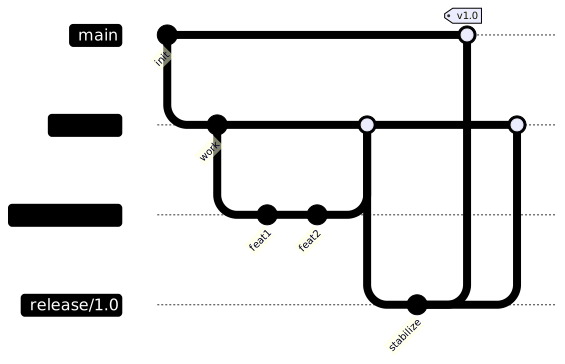
Workflow
# Start a feature from develop
git checkout develop
git checkout -b feature/user-profile

# Finish feature, merge to develop
git checkout develop
git merge --no-ff feature/user-profile

# Start a release
git checkout -b release/1.2.0 develop
# Bump version, fix last bugs
git checkout main
git merge --no-ff release/1.2.0
git tag -a v1.2.0 -m "Release 1.2.0"

# Hotfix from main
git checkout -b hotfix/1.2.1 main
# Fix, merge to main AND develop
git checkout main && git merge hotfix/1.2.1
git checkout develop && git merge hotfix/1.2.1
Characteristics
- Main branch: only production code; tagged releases
- Develop branch: integration branch for features
- Feature branches: spawned from
develop - Release branches: prepare and stabilize releases
- Hotfix branches: emergency fixes from
main, merged back to both
| Pros | Cons |
|---|---|
| Clear separation of concerns | Complex; steep learning curve |
| Supports scheduled releases | Long-lived branches = merge hell |
| Parallel feature development | Slower integration feedback |
| Hotfix isolation | Overkill for small teams |
Best For
- Teams with scheduled releases (weekly/monthly)
- Monolithic applications requiring staged rollouts
- Organizations with formal QA/UAT gates, compliance, or audit trails
GitHub Flow
GitHub Flow strips trunk-based development down to the pull request: one main, short branches, review in the PR, deploy on merge. GitHub documented it in 2011 and it remains the lowest-friction model for web teams.
# Create a feature branch from main
git checkout -b feature/add-search

# Push and open a PR — CI runs, review happens
git push -u origin feature/add-search

# Squash and merge when approved
# Delete branch after merge
git push origin --delete feature/add-search
Characteristics
- Single main branch: always deployable
- Feature branches: from
main, merged via PR - PR as the unit of work: review, CI, and discussion in one place
- Deploy on merge: main deploys automatically
| Pros | Cons |
|---|---|
| Simple and intuitive | Main must stay deployable at all times |
| Great for GitHub-centric teams | No built-in release staging |
| Fast PR review cycle | Less structure than GitFlow |
| Perfect CI/CD integration | Requires good test coverage |
Best For
- SaaS products with continuous deployment
- Small to medium teams on GitHub/GitLab
- Projects where every merge should be releasable
GitLab Flow
GitLab Flow sits between GitHub Flow and GitFlow: main stays deployable, but environment branches (staging, production) represent where code has been released, and release branches support maintaining older versions. GitLab documents it for teams that can’t deploy main to production on every merge.
Two variants cover different needs:
- Environment branches: merge
main → staging, verify, thenstaging → production. Useful for infra changes or staged rollouts — merge only forwards, never back. - Release branches: for versioned software (mobile apps, libraries, on-prem), cut
release/1.xfrommainand cherry-pick bug fixes into it. Newer releases keep the bug surface bounded.
| Pros | Cons |
|---|---|
| Staged environments without GitFlow’s weight | Two mental models to teach |
| Maintains multiple released versions | Cherry-pick discipline required |
main stays deployable | Still heavier than GitHub Flow |
| Fits mobile/library/on-prem releases | Environment branches can drift |
Best For
- Versioned software (mobile apps, libraries, on-prem)
- Teams needing staging environments but not scheduled releases
- Products where “released” differs from “merged”
Which Strategy Should You Choose?
Start from three questions: How often do you release? How mature is your CI/CD? How long can a branch live?

Rule of thumb by team size and cadence:
| Situation | Recommendation |
|---|---|
| Small team, SaaS, daily deploys | GitHub Flow |
| Large team, continuous delivery, strong testing | Trunk-based |
| Scheduled releases, QA/UAT gate, audit trail | GitFlow |
| Mobile app, library, on-prem versions | GitLab Flow (release branches) |
| Staging/prod environments, no scheduled releases | GitLab Flow (environment branches) |
| Migrating from GitFlow | GitHub Flow first, trunk-based once flags are in place |
Comparison Summary
| Aspect | Trunk-Based | GitFlow | GitHub Flow | GitLab Flow |
|---|---|---|---|---|
| Complexity | Low | High | Low | Medium |
| Release model | Continuous | Scheduled | Continuous | Continuous + versions |
| Branch lifetime | Hours | Days/weeks | Hours-days | Hours (features) |
| Team size | Any (with discipline) | Large | Small-medium | Medium |
| CI/CD requirement | Mature pipeline | Optional | Required | Required |
| Merge conflicts | Rare | Common | Rare | Rare-moderate |
| Hotfix handling | Fix on main, flag off | hotfix/ branch | Fix on main, deploy | Cherry-pick to release |
| Feature flags | Required | Optional | Optional | Optional |
| Best fit | Continuous delivery | Scheduled + QA | SaaS/GitHub teams | Versioned software |
Real-World Scenario: Trunk-Based at Scale
What trunk-based looks like for a monorepo with 20 teams and 200 services:
- Developer creates a short branch from
main, commits locally with tests. - Pushes daily — branches stay under 3 days.
- Opens a PR when tests pass; 1 approver + green CI required.
- Squash merge to
main; auto-deploy to staging. - Canary to production behind a feature flag: 1% → 5% → 25% → 100%.
// Feature flag decouples deploy from release
if (featureFlag.isEnabled("payment-v2", user)) {
    return processPaymentV2(payment);
}
return processPaymentV1(payment);
// Rollback = flag off. No revert, no hotfix branch.
The rules that make it work: branches under 3 days, ~400 lines max per PR, squash merge for clean history, CI mandatory, at least one approver, and feature flags for anything risky. Deploy and release become separate events — which is the whole point.
What Works
- Keep branches short-lived — the longer a branch lives, the harder the merge.
- Use feature flags for incomplete capabilities on main.
- Require PR reviews before merging to main.
- Run the full test suite on every PR; block merge on failure. See CI/CD.
- Squash or rebase for linear history — pick one and stay consistent. See Interactive rebase.
- Tag releases on main for traceability.
- Protect main/develop with branch protection rules — no direct pushes, required reviews.
Common Mistakes
- Long-lived feature branches that diverge for weeks — merges become archaeology.
developandmaindiverging in GitFlow until the release merge becomes an event. Merge release branches back todevelopimmediately.- Hotfixes that never get backported — a fix merged to
mainbut notdevelopreappears in the next release. - GitFlow for a SaaS deploying 5x/day — you pay the complexity without using release branches.
- Merging without review or CI checks — the strategy doesn’t matter if the gates aren’t enforced.
- Never deleting merged branches — hundreds of stale branches hide what’s actually in flight.
See Also
- A successful Git branching model — the original GitFlow post (and the author’s later caveats).
- Trunk Based Development — the reference site for trunk-based.
- GitHub Flow — official docs.
- GitLab Flow — environment and release branches.
- Atlassian: Comparing workflows — feature branch, GitFlow, forking.
- Git Branching Strategy Document — operational policy template: naming, protection, merge rules.
Companion resources: branch protection rules and a CI gate workflow live in the companion repo.
Frequently Asked Questions
Which git branching strategy should I use?
For most teams: GitHub Flow or trunk-based — one always-deployable main and short-lived branches. Choose GitFlow only if you have scheduled releases with formal QA gates; choose GitLab Flow if you maintain multiple released versions or staged environments.
GitFlow vs trunk-based development — what's the difference?
GitFlow uses long-lived develop, feature, release, and hotfix branches — designed for scheduled releases. Trunk-based uses a single main with short branches and feature flags — designed for continuous deployment. GitFlow trades merge complexity for release control; trunk trades feature-flag discipline for integration speed.
GitHub Flow vs GitFlow?
GitHub Flow is minimal: branch from main, PR, merge, deploy. GitFlow adds develop, release, and hotfix branches around it. If you deploy continuously, GitFlow's extra branches are overhead you pay for nothing.
How do I handle hotfixes in trunk-based development?
Fix on a short branch, PR, merge to main, deploy — main is always releasable so the fix is the release. For a versioned product, cherry-pick the fix commit onto the affected release branch.
When should I use feature flags instead of release branches?
Feature flags are for incomplete code that can ship inert — deploy behind a flag, release by toggling. Release branches are for code that must stay stable while development continues (versioned software, long QA cycles). If you can deploy main today, use flags.
Should I merge or rebase before merging a PR?
Both work — pick one per team. git rebase keeps history linear (see interactive rebase); git merge --no-ff preserves the branch shape. What breaks teams is mixing them inconsistently.
Can I mix GitFlow and GitHub Flow?
Yes — a common hybrid is GitHub Flow day-to-day with GitFlow-style release branches only for major versions. Keep the boundary explicit: document which branch owns what, or drift is inevitable.
Related Resources
Git Branching Strategy Document
A document template for defining Git workflow, branching conventions, merge requirements, and release procedures for engineering teams.
GuideCI/CD Pipeline Guide
A practical guide to building CI/CD pipelines with GitHub Actions, testing, deployment strategies, and rollback procedures.
GuideWhat Works in Code Review — For Authors and Reviewers
A practical guide to useful code reviews: how to write reviewable code, give constructive feedback, and keep reviews fast and focused.
RecipeClean Git Commit History with Interactive Rebase
Squash, reorder, edit, and split commits with git rebase interactive. Covers pick, squash, fixup, reword, drop, and conflict resolution.
DocPull Request Template
A thorough pull request template to standardize code reviews and improve merge quality.
GuideDeployment Strategies Compared: Blue-Green, Canary, Rolling
A practical guide to deployment strategies: rolling, blue-green, canary, shadow and feature flags. Minimize risk and rollback time when releasing to production.