Bridge Incompatible Interfaces with the Adapter Pattern
Integrate legacy APIs and third-party libraries with object, class, and two-way adapters in Java, TypeScript, and Python.
Overview
Say your app talks to payments through a PaymentProcessor interface: charge(amount), refund(transactionId). Stripe’s SDK calls that charges.create({ amount }). PayPal calls it orders.capture({ amount }). Neither matches. You could scatter Stripe- and PayPal-specific calls through the codebase, but then swapping providers means touching every file that moves money.
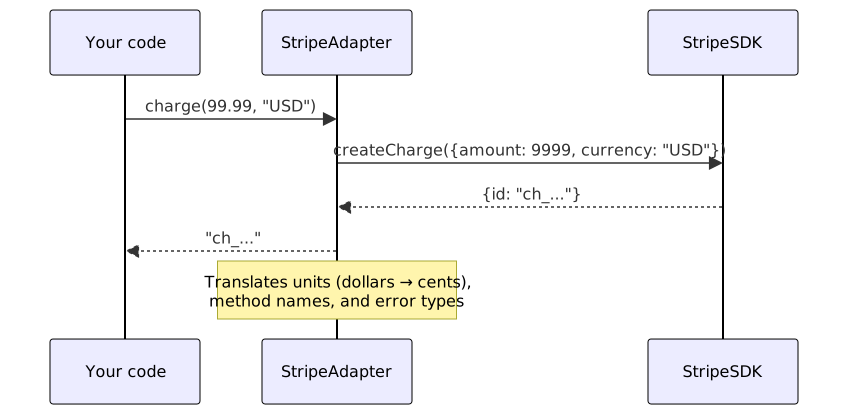
An adapter is a wrapper class that matches your interface and translates each call into whatever the SDK expects. Business code only ever sees the adapter, so swapping Stripe for PayPal costs you one new file — nothing else changes. Below you’ll find object adapters, class adapters, two-way adapters, and adapter registries with working examples. See also Specification Pattern.
When to use it
Use this recipe when:
- Integrating a third-party library whose interface doesn’t match yours. See Hexagonal Architecture for port/adapter isolation.
- Moving off a legacy system while leaving its consumers untouched. See Factory Pattern for creating adapter instances.
- Putting a simplified facade in front of a complex subsystem.
- Running more than one implementation of the same capability (payments, storage, messaging). See Strategy Pattern for runtime algorithm selection.
- Testing code that depends on external services by injecting an in-memory adapter.
Solution
Object Adapter (TypeScript)
interface PaymentProcessor {
  charge(amount: number, currency: string): Promise<string>;
  refund(transactionId: string): Promise<void>;
}

interface Order {
  id: string;
  total: number;
  currency: string;
}

class StripeSDK {
  async createCharge(params: { amount: number; currency: string }) {
    return { id: 'ch_' + Math.random().toString(36) };
  }
  async createRefund(params: { charge: string }) {}
}

class StripeAdapter implements PaymentProcessor {
  constructor(private stripe: StripeSDK) {}

  async charge(amount: number, currency: string): Promise<string> {
    const result = await this.stripe.createCharge({ amount: amount * 100, currency });
    return result.id;
  }

  async refund(transactionId: string): Promise<void> {
    await this.stripe.createRefund({ charge: transactionId });
  }
}

class CheckoutService {
  constructor(private processor: PaymentProcessor) {}

  async process(order: Order): Promise<string> {
    return this.processor.charge(order.total, order.currency);
  }
}
Class Adapter (Java)
interface ModernLogger {
    void log(String level, String message);
}

class LegacyLogger {
    public void writeLogEntry(String entry) {
        System.out.println("[LEGACY] " + entry);
    }
}

class LoggerAdapter extends LegacyLogger implements ModernLogger {
    @Override
    public void log(String level, String message) {
        writeLogEntry(String.format("[%s] %s", level.toUpperCase(), message));
    }
}

ModernLogger logger = new LoggerAdapter();
logger.log("info", "Application started");
Python Adapter with Registry
from abc import ABC, abstractmethod
from typing import Dict

class StorageAdapter(ABC):
    @abstractmethod
    def upload(self, key: str, data: bytes) -> str: pass

    @abstractmethod
    def download(self, key: str) -> bytes: pass

class S3Adapter(StorageAdapter):
    def __init__(self, client):
        self.client = client

    def upload(self, key: str, data: bytes) -> str:
        self.client.put_object(Bucket="my-bucket", Key=key, Body=data)
        return f"s3://my-bucket/{key}"

    def download(self, key: str) -> bytes:
        return self.client.get_object(Bucket="my-bucket", Key=key)["Body"].read()

class AzureBlobAdapter(StorageAdapter):
    def __init__(self, container_client):
        self.container = container_client

    def upload(self, key: str, data: bytes) -> str:
        self.container.upload_blob(name=key, data=data, overwrite=True)
        return f"azure://my-container/{key}"

    def download(self, key: str) -> bytes:
        return self.container.download_blob(key).readall()

class StorageFactory:
    _adapters: Dict[str, type] = {}

    @classmethod
    def register(cls, name: str, adapter_class: type):
        cls._adapters[name] = adapter_class

    @classmethod
    def create(cls, name: str, config: dict) -> StorageAdapter:
        return cls._adapters[name](**config)

StorageFactory.register("s3", S3Adapter)
StorageFactory.register("azure", AzureBlobAdapter)

storage = StorageFactory.create("s3", {"client": boto3_client})
url = storage.upload("report.pdf", pdf_bytes)
PayPal Adapter and Multi-Provider Support
class PayPalSDK {
  async captureOrder(params: { amount: number; currency: string }) {
    return { id: 'PAYID-' + Math.random().toString(36) };
  }
  async refundPayment(params: { captureId: string }) {}
}

class PayPalAdapter implements PaymentProcessor {
  constructor(private paypal: PayPalSDK) {}

  async charge(amount: number, currency: string): Promise<string> {
    const result = await this.paypal.captureOrder({ amount, currency });
    return result.id;
  }

  async refund(transactionId: string): Promise<void> {
    await this.paypal.refundPayment({ captureId: transactionId });
  }
}

// Provider selection via factory
class PaymentProcessorFactory {
  private static providers: Map<string, () => PaymentProcessor> = new Map();

  static register(name: string, factory: () => PaymentProcessor) {
    this.providers.set(name, factory);
  }

  static create(name: string): PaymentProcessor {
    const factory = this.providers.get(name);
    if (!factory) throw new Error(`Unknown provider: ${name}`);
    return factory();
  }
}

PaymentProcessorFactory.register('stripe', () =>
  new StripeAdapter(new StripeSDK()));
PaymentProcessorFactory.register('paypal', () =>
  new PayPalAdapter(new PayPalSDK()));

// Usage — swap providers via config
const processor = PaymentProcessorFactory.create(process.env.PAYMENT_PROVIDER);
Two-Way Adapter for Incremental Migration
// Old interface — being phased out
interface LegacyPaymentApi {
  processPayment(amount: number): Promise<{ txId: string }>;
}

// New interface — target architecture
interface ModernPaymentApi {
  charge(amount: number, currency: string): Promise<string>;
  refund(transactionId: string): Promise<void>;
}

// Two-way adapter — satisfies both interfaces
class PaymentBridge implements LegacyPaymentApi, ModernPaymentApi {
  constructor(private processor: PaymentProcessor) {}

  // Legacy interface — delegates to new
  async processPayment(amount: number): Promise<{ txId: string }> {
    const txId = await this.processor.charge(amount, 'USD');
    return { txId };
  }

  // Modern interface
  async charge(amount: number, currency: string): Promise<string> {
    return this.processor.charge(amount, currency);
  }

  async refund(transactionId: string): Promise<void> {
    return this.processor.refund(transactionId);
  }
}

// Old code can use processPayment(), new code uses charge()
// Both coexist during migration
In-Memory Adapter for Testing
class InMemoryPaymentAdapter implements PaymentProcessor {
  private transactions: Map<string, { amount: number; currency: string }> = new Map();
  private refunded: Set<string> = new Set();

  async charge(amount: number, currency: string): Promise<string> {
    const txId = 'test_' + Math.random().toString(36);
    this.transactions.set(txId, { amount, currency });
    return txId;
  }

  async refund(transactionId: string): Promise<void> {
    if (!this.transactions.has(transactionId)) {
      throw new Error('Transaction not found');
    }
    this.refunded.add(transactionId);
  }

  // Test helpers
  getChargedAmount(txId: string): number | undefined {
    return this.transactions.get(txId)?.amount;
  }

  wasRefunded(txId: string): boolean {
    return this.refunded.has(txId);
  }
}

// Test usage
describe('CheckoutService', () => {
  it('charges the correct amount', async () => {
    const processor = new InMemoryPaymentAdapter();
    const service = new CheckoutService(processor);

    const txId = await service.process({
      id: 'order-1',
      total: 99.99,
      currency: 'USD',
    });

    expect(processor.getChargedAmount(txId)).toBe(99.99);
  });
});
Explanation
- Object adapter: the adapter holds a reference to the adaptee (the third-party class) and delegates calls to it. It’s the most flexible approach — it works with final classes, favors composition over inheritance, and lets one adapter wrap more than one adaptee.
- Class adapter: the adapter inherits from the adaptee and satisfies the target interface. That requires a non-final adaptee, and it only works in single-inheritance languages — if the adapter already extends something, this route is closed. Less flexible, slightly faster.
- Two-way adapter: two systems that have to interoperate but can’t be changed? A two-way adapter satisfies both interfaces and translates calls in each direction, acting as a bridge while you migrate.
- Adapter registry: when you support several providers (Stripe, PayPal, Braintree), a registry maps provider names to adapter classes. The factory picks the right adapter from configuration, so business logic never decides which provider to use.
Variants
| Variant | Flexibility | Performance | Best for |
|---|---|---|---|
| Object adapter | High | Medium | General use, third-party SDKs |
| Class adapter | Low | High | Performance-critical, single adaptee |
| Two-way adapter | Medium | Medium | Incremental migration |
| Facade adapter | High | Medium | Simplifying complex subsystems |
| Registry + adapter | High | Medium | Several provider support |
What Works
- Adapt at the boundary, not everywhere: put adapters where external interfaces meet your internal abstractions, and keep vendor types out of business logic entirely.
- Document the translation: adapters do more than rename methods. They may convert units, transform error types, or batch requests. Write down what each adapter translates.
- Map errors to your taxonomy: third-party APIs throw vendor-specific exceptions. Catch them in the adapter and rethrow your own.
StripeCardErrorbecomesPaymentDeclinedError. - Keep adapters thin: an adapter carrying hundreds of lines of logic is a service, not an adapter. Move complex transformations into application services and let the adapter translate calls, then get out of the way.
- Test with contract tests: check that the adapter satisfies the target interface rather than exercising the third-party SDK. Mock the adaptee, run the adapter in isolation. See Input Validation for boundary contracts.
Common mistakes
- Leaking adaptee details: hand back the adaptee’s native response objects and every consumer ends up learning the third-party API. Return domain types instead.
- Adapter bloat: caching, retries, and metrics inside the adapter make it hard to test and reuse. Use decorators or interceptors for cross-cutting concerns; the adapter only translates.
- Ignoring null/undefined: third-party APIs return
nullwhere your interface expects an empty object or a thrown error. Define a null contract for each adapter and apply it consistently. - Letting the SDK bleed through: when the vendor ships a breaking change, the adapter should absorb it. If business code calls the SDK directly, every breaking change propagates everywhere — the adapter stops being your shock absorber.
Further Reading
- Adapter pattern — Refactoring Guru
- Adapter pattern — Wikipedia
- Stripe API reference — the kind of SDK surface an adapter isolates
Frequently Asked Questions
Is the adapter pattern the same as the facade pattern?
No. An adapter makes one interface compatible with another. A facade gives you a simplified interface over a complex subsystem. You can use both: a facade simplifies a subsystem, and an adapter makes that facade match your application's interface.
Should I write an adapter for every third-party library?
No — only for libraries whose interfaces clash with yours and sit under business code. A logging library speaking SLF4J is already standard; a payment SDK with its own vocabulary is what adapters are for.
How do I handle SDK upgrades with adapters?
The adapter takes the hit. When the SDK ships a breaking change, you edit that one file and run contract tests to confirm it still satisfies the target interface. Nothing in business code moves.
Can adapters be used for testing?
Yes — an InMemoryPaymentAdapter backed by a Map satisfies PaymentProcessor just fine. Inject it in tests instead of the real Stripe adapter and you get fast, deterministic runs with no network.
Related Resources
Build Maintainable Applications with Hexagonal Architecture
Structure applications with ports and adapters to isolate business logic from frameworks, databases, and external services for easier testing.
RecipeCreate Objects Flexibly with the Factory Pattern
How to use factory methods, abstract factories, and dependency injection containers to decouple object creation from usage and improve testability.
RecipeDesign a Scalable API Gateway for Microservices
Build an API gateway that routes requests, handles authentication, rate limiting, caching, and protocol translation between clients and backend microservices.
PatternSingleton Pattern: Java, Python & TypeScript Examples
Ensure a class has only one instance and provide global access to it — the creational design pattern for controlled object creation, with production-ready implementations.
RecipeSwap Algorithms at Runtime with the Strategy Pattern
How to encapsulate interchangeable algorithms and behaviors using the strategy pattern with dependency injection, function pointers, and lambda strategies in Java, TypeScript, and Python.