Implement Graceful Shutdown and Zero-Downtime Restarts
How to implement graceful shutdown and zero-downtime restarts for web servers, workers, and containers
Overview
A graceful shutdown means your app finishes in-flight requests, flushes buffers, closes database connections, and releases locks before it exits. Without it, deployments and scaling events can drop requests, corrupt data, or set off cascading failures.
I once saw a deploy drop 200 requests — the app bailed before draining its connection pool. The orchestrator sent SIGTERM, the process caught it, but nobody had wired up the health endpoint to return 503 — so the load balancer kept routing traffic to a pod that was already shutting down. Took us a week to track down why users kept hitting random 502s mid-deploy.
Below: SIGTERM handling, connection draining, and zero-downtime deployment patterns for web servers, workers, and containers. Examples cover Python (Flask 3.x), JavaScript (Node 20+), Java (Spring Boot 3.x), Go 1.22+, and Kubernetes YAML.
When to Use
Reach for this recipe if you deploy often in Kubernetes, Docker, or auto-scaling groups. Long-polling, WebSocket, and background workers also benefit, as does any process that needs to flush metrics, logs, or database writes before terminating. Zero-downtime deployments with rolling updates or blue/green releases are another common fit — and Traffic Mirroring can help you validate the new version before cutting over.
When NOT to Use
Skip the graceful shutdown layer for short-lived scripts or one-off commands that don’t hold state. When a process exits quickly and has no open connections to drain, the extra complexity usually isn’t worth it.
Solution
Python
import signal
import sys
import time
from concurrent.futures import ThreadPoolExecutor
from flask import Flask

app = Flask(__name__)
executor = ThreadPoolExecutor(max_workers=4)
shutting_down = False

@app.route("/health")
def health():
    if shutting_down:
        return {"status": "shutting-down"}, 503
    return {"status": "ok"}

@app.route("/")
def home():
    if shutting_down:
        return {"error": "server is shutting down"}, 503
    time.sleep(0.5)  # simulate work
    return {"message": "hello"}

def graceful_shutdown(signum, frame):
    global shutting_down
    print("Received SIGTERM, starting graceful shutdown...")
    shutting_down = True

    # Stop accepting new work
    executor.shutdown(wait=True)

    # Allow in-flight requests up to 15 seconds to finish
    time.sleep(15)
    print("Shutdown complete. Exiting.")
    sys.exit(0)

signal.signal(signal.SIGTERM, graceful_shutdown)
signal.signal(signal.SIGINT, graceful_shutdown)

if __name__ == "__main__":
    app.run(host="0.0.0.0", port=8080, threaded=True)
JavaScript
const http = require('http');

const server = http.createServer((req, res) => {
  if (req.url === '/health') {
    res.writeHead(isShuttingDown ? 503 : 200);
    res.end(JSON.stringify({ status: isShuttingDown ? 'shutting-down' : 'ok' }));
    return;
  }

  // Simulate async work
  setTimeout(() => {
    res.writeHead(isShuttingDown ? 503 : 200);
    res.end(JSON.stringify({ message: 'hello' }));
  }, 500);
});

let isShuttingDown = false;
let connections = new Set();

server.on('connection', (conn) => {
  connections.add(conn);
  conn.on('close', () => connections.delete(conn));
});

function shutdown() {
  console.log('Received SIGTERM, starting graceful shutdown...');
  isShuttingDown = true;

  server.close(() => {
    console.log('HTTP server closed. Draining connections...');
  });

  // Force close remaining connections after timeout
  setTimeout(() => {
    connections.forEach((conn) => conn.destroy());
    console.log('Shutdown complete.');
    process.exit(0);
  }, 15000);
}

process.on('SIGTERM', shutdown);
process.on('SIGINT', shutdown);

server.listen(8080);
Java
import org.springframework.boot.SpringApplication;
import org.springframework.boot.autoconfigure.SpringBootApplication;
import org.springframework.context.ConfigurableApplicationContext;

// Spring Boot 3.x handles graceful shutdown natively (since 2.3)
// application.properties:
// server.shutdown=graceful
// spring.lifecycle.timeout-per-shutdown-phase=15s
// management.endpoint.health.probes.enabled=true
// management.health.livenessState.enabled=true
// management.health.readinessState.enabled=true

@SpringBootApplication
public class App {
    public static void main(String[] args) {
        ConfigurableApplicationContext ctx = SpringApplication.run(App.class, args);

        Runtime.getRuntime().addShutdownHook(new Thread(() -> {
            System.out.println("Shutdown hook triggered. Closing context...");
            ctx.close();
            System.out.println("Context closed gracefully.");
        }));
    }
}

// For non-Spring Java (plain Jetty/Netty):
import org.eclipse.jetty.server.Server;

Server server = new Server(8080);
server.setHandler(handler);
server.start();

Runtime.getRuntime().addShutdownHook(new Thread(() -> {
    try {
        server.stop();
        server.join();
    } catch (Exception e) {
        e.printStackTrace();
    }
}));
Explanation
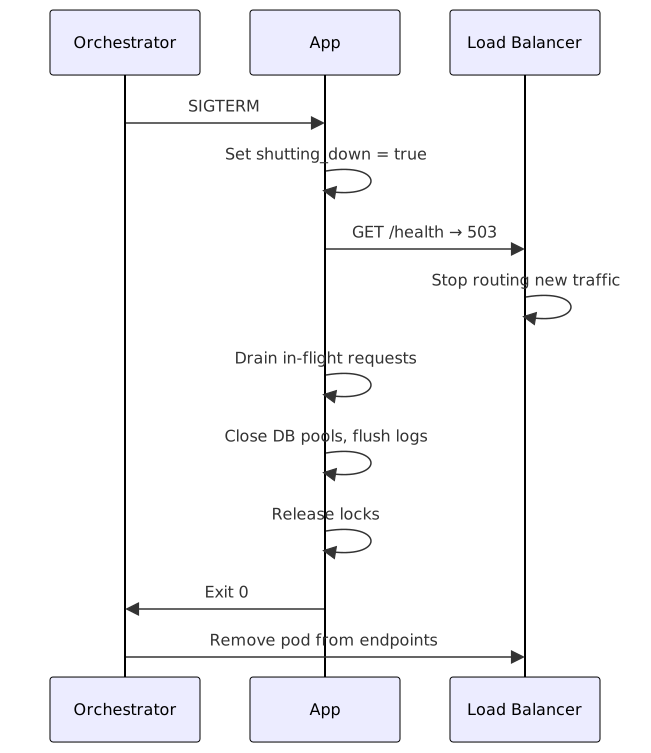
A clean shutdown comes down to three things.
First, the OS or container runtime sends SIGTERM (or SIGINT locally). Your app needs to catch
that signal rather than just quitting.
Second, start draining. Mark the health endpoint as shutting-down so the load balancer stops
sending new traffic, then finish in-flight requests within your timeout window.
Third, clean up. Close database pools first, flush logs and metrics, then release whatever locks you still hold. Exit cleanly after that.
Zero-downtime deployments rely on the orchestrator running the old and new pods at the same time.
The old pod gets SIGTERM, drains, and exits only after the new pod passes its readiness checks.
See the Deployment Strategies Guide for a deeper dive on
rolling, blue/green, and canary patterns.
Variants
Kubernetes preStop hook
# deployment.yaml
spec:
  template:
    spec:
      containers:
        - name: app
          lifecycle:
            preStop:
              exec:
                command:
                  - /bin/sh
                  - -c
                  - |
                    # Mark as not ready
                    curl -X POST http://localhost:8080/admin/shutdown
                    # Wait for endpoint controller to remove pod from Service
                    sleep 10
      terminationGracePeriodSeconds: 45  # Must be > preStop + drain time
Go HTTP server with context cancellation
package main

import (
    "context"
    "log"
    "net/http"
    "os"
    "os/signal"
    "syscall"
    "time"
)

func main() {
    srv := &http.Server{
        Addr:         ":8080",
        Handler:      http.HandlerFunc(handler),
        ReadTimeout:  10 * time.Second,
        WriteTimeout: 30 * time.Second,
    }

    go func() {
        log.Println("Server starting on :8080")
        if err := srv.ListenAndServe(); err != nil && err != http.ErrServerClosed {
            log.Fatalf("Server failed: %v", err)
        }
    }()

    quit := make(chan os.Signal, 1)
    signal.Notify(quit, syscall.SIGINT, syscall.SIGTERM)
    <-quit
    log.Println("Shutdown signal received, draining...")

    ctx, cancel := context.WithTimeout(context.Background(), 30*time.Second)
    defer cancel()

    if err := srv.Shutdown(ctx); err != nil {
        log.Printf("Server forced to shutdown: %v", err)
    }

    cleanupResources()
    log.Println("Server exited gracefully")
}

func cleanupResources() {
    log.Println("Cleaning up resources...")
}

func handler(w http.ResponseWriter, r *http.Request) {
    time.Sleep(100 * time.Millisecond)
    w.WriteHeader(http.StatusOK)
    w.Write([]byte("OK"))
}
Nginx upstream drain
# nginx.conf
upstream backend {
    server 10.0.1.10:8080 max_fails=3 fail_timeout=10s;
    server 10.0.1.11:8080 max_fails=3 fail_timeout=10s;

    # Slow start for new instances
    server 10.0.1.12:8080 slow_start=30s;
}

location /health {
    proxy_pass http://backend;
    proxy_next_upstream error timeout http_502 http_503;
    proxy_connect_timeout 2s;
    proxy_read_timeout 5s;
}
Python (uvicorn) lifespan
import signal
import asyncio
from contextlib import asynccontextmanager

shutdown_event = asyncio.Event()

@asynccontextmanager
async def lifespan(app):
    print("Starting up...")
    yield
    print("Draining connections...")
    await asyncio.sleep(5)
    print("Closing resources...")
    await close_db_pool()
    print("Shutdown complete")

def handle_sigterm(signum, frame):
    print(f"Received signal {signum}, initiating shutdown...")
    shutdown_event.set()

signal.signal(signal.SIGTERM, handle_sigterm)
signal.signal(signal.SIGINT, handle_sigterm)
Technology summary
Each platform handles the same problem a little differently. Kubernetes uses
terminationGracePeriodSeconds plus a preStop hook (default 30s, so tune it to your slowest request).
Docker sends SIGTERM first, then SIGKILL after the stop timeout; use --stop-timeout to extend
that window. In systemd, TimeoutStopSec should line up with the application’s drain timeout. For
Node.js, the trick is server.close() plus connection tracking to destroy lingering sockets. Spring
Boot has
built-in graceful shutdown since 2.3 (now in 3.x) and works well with Kubernetes readiness probes.
Gunicorn 22.x exposes a graceful-timeout config that lets pre-fork workers finish requests
before they exit.
Best Practices
- Always expose a
/healthendpoint that returns 503 during shutdown so the load balancer routes away. - Make
terminationGracePeriodSeconds(Kubernetes) orstop-timeout(Docker) line up with your drain timeout. - Emit a structured
shutdown_initiatedlog event for observability and alerting. - Handle
SIGTERM,SIGINT, and platform-specific signals like WindowsCTRL_CLOSE_EVENT. - Test graceful shutdown in CI: send
SIGTERMduring a load test and confirm zero failed requests. - Parallelize cleanup tasks. Close database, cache, and message-queue connections together instead of one by one.
Common Mistakes
- Exiting immediately on SIGTERM kills in-flight requests, so always drain first.
- Not changing the readiness check means the load balancer keeps routing traffic to a pod that’s already shutting down.
- Blocking the shutdown hook is a problem because hooks run in parallel; use a latch or single-threaded executor to sequence cleanup.
- Forgetting to close the database pool leaves leaked connections that can make the next startup fail with “too many connections”.
- Ignoring the preStop hook is risky because Kubernetes may send
SIGTERMbefore the pod is removed from service endpoints, so a shortsleepin the preStop hook prevents that race. - Using abrupt socket close instead of draining causes client-side errors and unnecessary retries.
Summary
- Catch SIGTERM, don’t just exit — the first thing your app should do is stop accepting new traffic and mark the health endpoint as 503.
- Drain before you clean up — finish in-flight requests within your timeout window, then close database pools, flush logs, and release locks.
- Tune your grace period —
terminationGracePeriodSeconds(Kubernetes) or--stop-timeout(Docker) must be longer than your slowest request plus the preStop hook delay. - Test it in CI — send SIGTERM during a load test and confirm zero failed requests. Skip the test and it’ll bite you in production.
- Use the preStop hook — a short
sleepprevents the race between SIGTERM and endpoint removal in Kubernetes.
Companion code: The graceful-shutdown companion repo has runnable Python, JavaScript, Java, and Go examples plus a Kubernetes deployment YAML and a CI test script.
See Also
- Kubernetes — Termination of Pods — official documentation on pod termination grace period, preStop hooks, and endpoint removal.
- Docker — Stop containers with grace period
— official reference for
docker stopand--stop-timeoutconfiguration. - Spring Boot — Graceful Shutdown
— official Spring Boot 3.x guide on
server.shutdown=gracefuland lifecycle timeout. - Node.js — server.close() — official Node 20+ API reference for stopping the HTTP server and draining connections.
- Go — http.Server.Shutdown — official Go 1.22+ documentation for graceful HTTP server shutdown with context cancellation.
- Graceful Shutdown pattern — the pattern-level view: ordered shutdown phases, drain budget sizing, and trade-offs across any stack.
Frequently Asked Questions
What is the difference between SIGTERM and SIGKILL?
SIGTERM asks politely. Your application can catch it, drain connections, and exit cleanly.
SIGKILL can't be caught; the OS forcefully terminates the process. Kubernetes only sends SIGKILL
once terminationGracePeriodSeconds expires.
How long should my grace period be?
Make it at least as long as your slowest endpoint or job timeout. For HTTP APIs, 10–30 seconds is usually enough; batch workers may need minutes. Add a small buffer on top, so one slow task doesn't force a kill.
Can I achieve zero-downtime without Kubernetes?
Yes. Use a reverse proxy (Nginx, HAProxy) or service mesh (Envoy) with health checks. Deploy new instances, warm them, then drain and remove the old ones. Blue/green and rolling deployments are possible with any load balancer.
Should I drain connections or just stop accepting new ones?
Both. First stop accepting new connections (close the listener), then wait for in-flight requests to complete. Set a hard timeout to force-kill long-running requests:
server.close(() => {
    console.log("All connections closed");
});

// Force close after 30s
setTimeout(() => {
    console.error("Force closing remaining connections");
    process.exit(1);
}, 30000);
How do I test graceful shutdown in CI?
Use a load test with SIGTERM injection:
#!/bin/bash
# ci/test-graceful-shutdown.sh
start_server &
SERVER_PID=$!
sleep 2  # Wait for startup

# Start load test in background
vegeta attack -duration=30s -rate=100 | vegeta report &
LOAD_PID=$!

# Send SIGTERM after 10s
sleep 10
kill -TERM $SERVER_PID

# Wait for load test to finish
wait $LOAD_PID

# Check results: success rate should be 100%
vegeta attack -duration=30s -rate=100 | vegeta report | grep -q "100.00%"
How do I track in-flight requests?
Use a counter to know when the drain is complete:
var inFlight int32

func handler(w http.ResponseWriter, r *http.Request) {
    atomic.AddInt32(&inFlight, 1)
    defer atomic.AddInt32(&inFlight, -1)
    // ... handle request
}

func shutdown() {
    for atomic.LoadInt32(&inFlight) > 0 {
        time.Sleep(100 * time.Millisecond)
    }
}
Can I use SO_REUSEPORT for zero-downtime restarts?
Yes. SO_REUSEPORT allows the new and old processes to share the port while they hand off traffic:
import socket
sock = socket.socket(socket.AF_INET, socket.SOCK_STREAM)
sock.setsockopt(socket.SOL_SOCKET, socket.SO_REUSEPORT, 1)
sock.bind(("0.0.0.0", 8080))
Related Resources
Deployment Strategies Compared: Blue-Green, Canary, Rolling
A practical guide to deployment strategies: rolling, blue-green, canary, shadow and feature flags. Minimize risk and rollback time when releasing to production.
DocPost-Deployment Verification Checklist Template
A checklist template for verifying deployments: health checks, smoke tests, metric validation, and rollback readiness before declaring all-clear.
GuideCI/CD Pipeline Guide: From Commit to Production
A practical guide to building CI/CD pipelines with GitHub Actions, testing gates, deployment strategies, and rollback procedures.
GuideDocker for Developers — A Complete Guide
Learn Docker from the ground up: images, containers, Dockerfiles, networks, volumes, and Docker Compose for local development.
GuideKubernetes Basics for Application Developers
Learn the core Kubernetes concepts every developer needs: Pods, Services, Deployments, ConfigMaps, and basic kubectl commands.
RecipeTraffic Mirroring for Production Testing
Mirror production traffic to staging environments for realistic testing, shadow deployments, and performance validation without user impact.