Overview
Cross-Origin Resource Sharing (CORS) is what the browser consults before it lets one origin read another origin’s responses. Misconfigured CORS is one of the most common sources of frontend-backend friction and of real security holes. What follows configures CORS middleware properly (allowlist validation, preflight handling, credentials and explicit method/header declarations) in Python, JavaScript and Java.
When to Use
Use this resource when:
- Your frontend (an SPA, mobile app or third-party widget) runs on a different origin than your API
- You need to support authenticated cross-origin requests with cookies or authorization headers
- You’re building a public API consumed by external domains
- You’re chasing a cryptic “blocked by CORS policy” error in the browser console
Solution
Runnable versions of these examples, plus a curl script that verifies the headers, live in the companion repository.
Python (Flask)
from flask import Flask, request, make_response
from urllib.parse import urlparse

app = Flask(__name__)

ALLOWED_ORIGINS = {
    "https://app.example.com",
    "https://admin.example.com",
    "http://localhost:3000",
}
ALLOWED_METHODS = ["GET", "POST", "PUT", "DELETE", "PATCH"]
ALLOWED_HEADERS = ["Content-Type", "Authorization", "X-Request-ID"]
ALLOW_CREDENTIALS = True

@app.after_request
def add_cors_headers(response):
    origin = request.headers.get("Origin")

    # Only reflect allowed origins; never use "*" with credentials
    if origin in ALLOWED_ORIGINS:
        response.headers["Access-Control-Allow-Origin"] = origin
        response.headers["Vary"] = "Origin"

    if ALLOW_CREDENTIALS:
        response.headers["Access-Control-Allow-Credentials"] = "true"

    return response

@app.route("/api/<path:path>", methods=["OPTIONS"])
def handle_preflight(path):
    origin = request.headers.get("Origin")
    if origin not in ALLOWED_ORIGINS:
        return make_response(("", 204))  # No CORS headers for disallowed origins

    response = make_response(("", 204))
    response.headers["Access-Control-Allow-Origin"] = origin
    response.headers["Access-Control-Allow-Methods"] = ", ".join(ALLOWED_METHODS)
    response.headers["Access-Control-Allow-Headers"] = ", ".join(ALLOWED_HEADERS)
    response.headers["Access-Control-Allow-Credentials"] = "true"
    response.headers["Access-Control-Max-Age"] = "86400"
    return response
JavaScript (Express)
import express from "express";

const app = express();

const ALLOWED_ORIGINS = new Set([
  "https://app.example.com",
  "https://admin.example.com",
  "http://localhost:3000",
]);

function corsMiddleware(req, res, next) {
  const origin = req.headers.origin;

  if (origin && ALLOWED_ORIGINS.has(origin)) {
    res.header("Access-Control-Allow-Origin", origin);
    res.header("Vary", "Origin");
  }

  res.header("Access-Control-Allow-Credentials", "true");

  // Preflight request
  if (req.method === "OPTIONS") {
    if (origin && !ALLOWED_ORIGINS.has(origin)) {
      return res.sendStatus(204);
    }
    res.header("Access-Control-Allow-Methods", "GET, POST, PUT, DELETE, PATCH");
    res.header("Access-Control-Allow-Headers", "Content-Type, Authorization, X-Request-ID");
    res.header("Access-Control-Max-Age", "86400");
    return res.sendStatus(204);
  }

  next();
}

app.use(corsMiddleware);
app.use(express.json());

// Alternative: using cors package with explicit allowlist
// import cors from "cors";
// app.use(cors({
//   origin: (origin, callback) => {
//     if (!origin || ALLOWED_ORIGINS.has(origin)) {
//       callback(null, true);
//     } else {
//       callback(new Error("Not allowed by CORS"));
//     }
//   },
//   credentials: true,
//   methods: ["GET", "POST", "PUT", "DELETE", "PATCH"],
//   allowedHeaders: ["Content-Type", "Authorization", "X-Request-ID"],
// }));
Java (Spring Boot)
import org.springframework.context.annotation.Bean;
import org.springframework.context.annotation.Configuration;
import org.springframework.web.servlet.config.annotation.CorsRegistry;
import org.springframework.web.servlet.config.annotation.WebMvcConfigurer;

@Configuration
public class CorsConfig {

  private static final String[] ALLOWED_ORIGINS = {
    "https://app.example.com",
    "https://admin.example.com",
    "http://localhost:3000"
  };

  @Bean
  public WebMvcConfigurer corsConfigurer() {
    return new WebMvcConfigurer() {
      @Override
      public void addCorsMappings(CorsRegistry registry) {
        registry.addMapping("/api/**")
          .allowedOrigins(ALLOWED_ORIGINS)
          .allowedMethods("GET", "POST", "PUT", "DELETE", "PATCH")
          .allowedHeaders("Content-Type", "Authorization", "X-Request-ID")
          .allowCredentials(true)
          .maxAge(86400);
      }
    };
  }
}

// Spring Security integration (if using SecurityFilterChain)
import org.springframework.security.config.annotation.web.builders.HttpSecurity;
import org.springframework.security.web.SecurityFilterChain;

@Configuration
public class SecurityConfig {

  @Bean
  public SecurityFilterChain filterChain(HttpSecurity http) throws Exception {
    http.cors(cors -> {})
        .csrf(csrf -> csrf.disable()) // only if API is stateless with tokens
        .authorizeHttpRequests(auth -> auth
          .requestMatchers("/api/**").authenticated()
          .anyRequest().permitAll()
        );
    // For auth patterns, see the API Security Checklist guide on StackPractices.
    return http.build();
  }
}
Explanation
- Same-Origin Policy: browsers block requests from
origin-a.comtoorigin-b.comby default, and CORS is the controlled way to relax that policy. - Preflight (OPTIONS): browsers send a preflight request for non-simple methods (PUT, DELETE, PATCH) and custom headers; the server has to answer with the allowed origins, methods and headers.
Access-Control-Allow-Originwants a literal origin (https://app.example.com), and the only available shortcut is*. Never combine*withAccess-Control-Allow-Credentials: true, because browsers reject that combination outright.- Reach for
Vary: Originwhenever the CORS headers depend on who asked. Without it, a CDN can cache a response stamped with one origin and serve it to requests from another. Access-Control-Allow-Credentialsis the switch that lets cookies andAuthorizationheaders travel cross-origin. Both client (withCredentials: true/credentials: 'include') and server must opt in.
In sequence, the exchange looks like this:
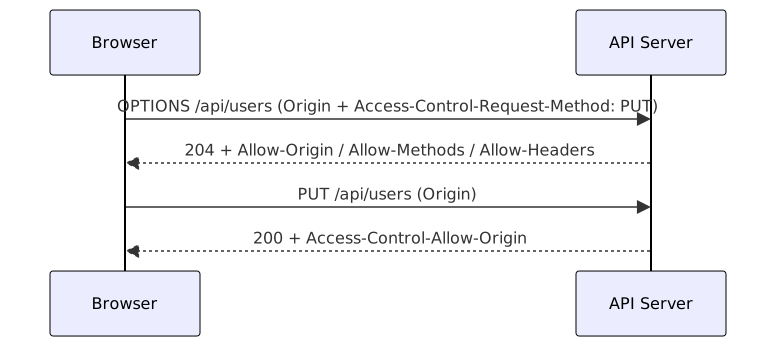
A preflight only happens for non-simple requests. Plain GETs with standard headers skip it and go straight to the actual call.
Variants
| Approach | Configuration | Best For |
|---|---|---|
| Allowlist | Explicit origin list | Production APIs with known consumers |
| Regex pattern | *.example.com | Subdomain wildcards (validate carefully) |
| Live origin | Origin validated at runtime | Multi-tenant APIs with per-tenant origins |
* wildcard | No origin restriction | Public read-only APIs without credentials |
| Proxy | Frontend proxy to API | Development, same-origin deployment |
What Works
- Never use
*with credentials: browsers rejectAccess-Control-Allow-Origin: *the momentAllow-Credentials: trueis present, so reflect the requesting origin instead, after checking it against your allowlist. - Validate origins explicitly: an allowlist holds exact matches, nothing fuzzier. Loose regexes are risky here: a sloppy
*.example.comcheck also acceptsattacker-example.com. - Set
Vary: Origin: without it, a shared cache will happily serve a response stamped for domain A to a request from domain B. - Keep preflight max-age reasonable:
86400seconds (one day) is a typical value: much longer and policy changes take a day to propagate, much shorter and you waste preflight requests. - Restrict allowed methods and headers: declare only what the API actually supports, since an over-permissive policy just widens the attack surface.
Common Mistakes
- Setting
Access-Control-Allow-Origin: *and wondering why cookies don’t work cross-origin. - Reflecting the request
Originheader without validation, allowing any website to call your API. - Forgetting to handle the
OPTIONSpreflight, causing browser CORS errors on PUT/DELETE requests. - Not setting
Vary: Origin, which lets a CDN cache one origin’s response and serve it to another. - Turning
allowCredentialson for a public API without origin validation, which exposes your authenticated endpoints to any malicious site. See API Security Checklist for origin validation.
Troubleshooting
- Preflight returns 204 but the browser still blocks the call: a bare 204 fails the preflight unless the OPTIONS response itself carries the
Access-Control-Allow-*headers. Access-Control-Allow-Origindoesn’t match: an origin isscheme + host + port, sohttps://www.app.comandhttps://app.comare different, and so ishttpvshttps. Log the incomingOriginheader and compare it byte-for-byte against the allowlist.- CDN serves another origin’s response: without
Vary: Origin, a shared cache can serve a response stamped for origin A to a request from origin B. For dynamic origin validation, also setCache-Control: no-storeon preflight responses. - File uploads blocked: a
multipart/form-datapost triggers preflight, so it fails unlessPOSTsits inAccess-Control-Allow-MethodsandContent-TypeinAccess-Control-Allow-Headers. For presigned S3 uploads, the bucket needs its own CORS rule, because the request never reaches your server. - SSE or WebSocket connections fail:
EventSourcecan’t send custom headers, so authenticate with cookies pluswithCredentialsor a token in the query string. WebSockets skip CORS entirely; validate theOriginheader during the handshake instead. - OAuth token exchange blocked: redirects don’t hit CORS, but the
fetchcall that swaps an authorization code for a token does. The provider’s token endpoint must returnAccess-Control-Allow-Originfor your domain (Google and GitHub allow all origins; a self-hosted provider needs configuring).
See Also
- MDN: Cross-Origin Resource Sharing: the reference walkthrough of simple vs preflighted requests.
- MDN: Access-Control-Allow-Origin: exact header semantics, including why
*breaks with credentials. - expressjs/cors middleware: the de facto Node package for this, with origin callbacks and credentials support.
- Spring CORS documentation: global and per-controller CORS configuration for Spring Boot.
Frequently Asked Questions
Why does my API work in Postman but fail in the browser?
Postman skips the Same-Origin Policy entirely because it isn't a browser. Browsers discard the response of a cross-origin request unless the server sends the right Access-Control-Allow-* headers. Reproduce the browser's checks with curl and an explicit Origin header instead of guessing.
Can I use a wildcard for subdomains like *.example.com?
The header won't take a pattern: Access-Control-Allow-Origin wants the exact origin string. What you can do is validate live: check whether the request origin ends in .example.com, then reflect the exact value back. Spring Boot exposes this as allowedOriginPatterns; in Express or Flask you write the check yourself. Watch the trailing-dot bypass too: evil-example.com should fail a proper check.
Do I need CORS if my frontend and API share a domain?
No. CORS only matters when the origin (scheme + host + port) differs. If both live on https://example.com nothing extra is needed. Routing /api through a reverse proxy is the usual same-origin setup when the backend sits elsewhere.
How do I debug a CORS error?
Open DevTools and look at the failing request in the Network tab, then compare the Access-Control-Allow-Origin response header with the Origin the browser sent. For preflight failures, inspect the OPTIONS response. You don't need a browser to check either case: curl -H "Origin: https://yourapp.com" -X OPTIONS https://api.example.com/endpoint does the job.
How do I allow cookies in cross-origin requests?
Set Access-Control-Allow-Credentials: true on the server and credentials: 'include' (fetch) or withCredentials: true (axios) on the client. The allow-origin must then be an exact origin, since * gets rejected. The cookies also need SameSite=None; Secure of their own, or the browser will drop them cross-site anyway.
How do I configure CORS in serverless functions?
Return the CORS headers from the function response itself and answer OPTIONS with a 204 plus the allow headers. With API Gateway + Lambda you can configure it at the gateway level instead. Whichever level you configure it at, check the live response and confirm the headers are actually there.
Do WebSockets use CORS?
No. WebSocket handshakes sit outside the Same-Origin Policy, so enforcement is on you: the server must check Origin during the upgrade request itself and drop anything unexpected. CORS isn't a substitute for authentication here; put a token in the URL or subprotocol.
How do I handle CORS behind an API gateway in microservices?
Configure it once at the gateway (Kong, Envoy and AWS API Gateway all handle preflight and stamp the headers) rather than in every service. A service that stays reachable without going through the gateway still needs its own CORS handling. Internal service-to-service calls don't involve browsers, so CORS doesn't apply to them at all.
How do I manage allowed origins across environments?
Keep the allowlist in an environment variable like CORS_ORIGINS=https://yourapp.com,https://www.yourapp.com, parse it at startup, and validate each incoming Origin against it. Hardcoding origins in source makes environment promotion error-prone.
Can I verify my CORS config without a browser?
Yes. A simple request is just curl -H "Origin: https://example.com" -I https://api.example.com/endpoint; add -X OPTIONS -H "Access-Control-Request-Method: PUT" to probe the preflight instead. If you want end-to-end coverage, a Playwright test can fire real cross-origin requests from an actual browser context.
Related Resources
Call a REST API: Python, JavaScript, Java & Go Examples
How to make HTTP requests to a REST API and handle the JSON response in Python, JavaScript, Java, and Go.
RecipeAPI Versioning: URL, Header & Media Type Strategies
How to version REST APIs with URL path, header, and media-type strategies while keeping backward compatibility for existing clients.
RecipeHandle API Errors with RFC 7807 and HTTP Status Codes
Patterns for consistent, predictable API error handling across multiple languages and frameworks.
RecipeRate Limiting
How to implement API rate limiting using token bucket, sliding window, and fixed window algorithms across Python, JavaScript, and Java.
RecipeInput Validation: Schema-First Examples in 3 Languages
Validate user input at the API boundary with schema libraries. Pydantic, Zod, and Jakarta Validation examples with sanitization and structured errors.
RecipeSecure APIs with HTTP Security Headers
How to configure essential security headers like HSTS, CSP, and X-Frame-Options to protect APIs and web applications from common attacks.