Stub External HTTP APIs with WireMock in Java
Use WireMock in Java tests to stub external HTTP services. Covers response templating, delay simulation, stateful stubs, and request verification.
Overview
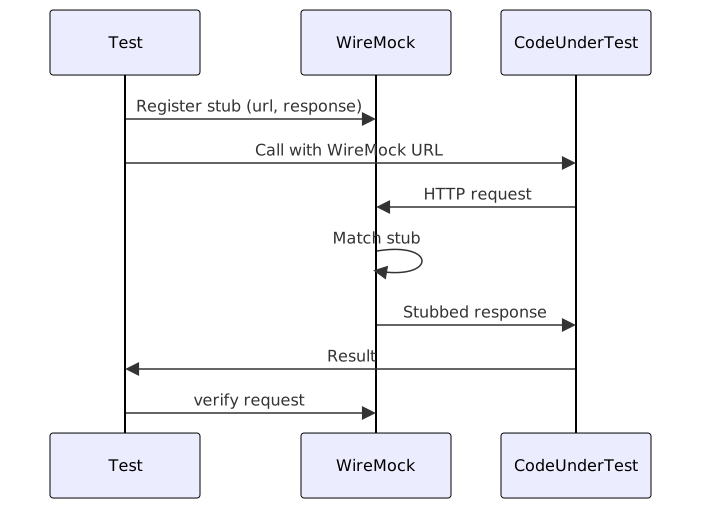
WireMock is a Java library that starts a real HTTP server inside the test process. Instead of calling a real third-party API, the code under test calls WireMock, which returns the responses you define. That means you control status codes, headers, body, delays, and even stateful behavior — all without leaving the test JVM.
I’ve reached for WireMock on three or four projects — mostly payment gateway integrations where hitting the real API in tests wasn’t an option. It’s my go-to when the code under test makes real HTTP calls and I need to control exactly what comes back. For broader integration testing strategies, see our integration testing strategies recipe. If you’re testing containerized services like databases or message brokers, check our Testcontainers recipe instead.
When to Use
- Testing code that talks to an external REST API — payment gateways, SMS providers, email services, that kind of thing — without depending on the real service.
- Simulating failures — timeouts, 500s, slow responses, rate limits — so your retry and fallback logic actually gets exercised.
- Verifying the exact request your code sends, not just the response it receives.
- Building a webhook receiver and needing a fake sender without setting up a real one.
- Running integration tests in CI where network access isn’t guaranteed.
When NOT to Use
- Testing your own endpoints. For Spring, use
MockMvcorWebTestClient. - Pure business-logic unit tests. Just mock the interface with Mockito — you don’t need a real HTTP server for those.
- Load testing. WireMock adds overhead — use a real test environment for load.
- Database interactions. Reach for Testcontainers with a real database instead.
Solution
Setup with JUnit 5
<dependency>
    <groupId>com.github.tomakehurst</groupId>
    <artifactId>wiremock-jre8</artifactId>
    <version>3.9.1</version>
    <scope>test</scope>
</dependency>
Basic stub with the JUnit 5 extension
import com.github.tomakehurst.wiremock.client.WireMock;
import com.github.tomakehurst.wiremock.junit5.WireMockExtension;
import org.junit.jupiter.api.Test;
import org.junit.jupiter.api.extension.RegisterExtension;

import java.net.URI;
import java.net.http.HttpClient;
import java.net.http.HttpRequest;
import java.net.http.HttpResponse;

import static com.github.tomakehurst.wiremock.core.WireMockConfiguration.wireMockConfig;
import static org.junit.jupiter.api.Assertions.assertEquals;

class ExternalServiceTest {

    @RegisterExtension
    static WireMockExtension wireMock = WireMockExtension.newInstance()
        .options(wireMockConfig().dynamicPort())
        .build();

    @Test
    void shouldStubGetRequest() throws Exception {
        wireMock.stubFor(WireMock.get(WireMock.urlEqualTo("/api/users/1"))
            .willReturn(WireMock.aResponse()
                .withStatus(200)
                .withHeader("Content-Type", "application/json")
                .withBody("{\"id\":1,\"name\":\"Alice\"}")));

        HttpResponse<String> response = HttpClient.newHttpClient()
            .send(HttpRequest.newBuilder()
                .uri(URI.create(wireMock.getRuntimeInfo().getHttpBaseUrl() + "/api/users/1"))
                .GET().build(), HttpResponse.BodyHandlers.ofString());

        assertEquals(200, response.statusCode());
        assertEquals("Alice", parseJson(response.body(), "name"));
    }
}
This test starts WireMock on a random port, registers a stub for /api/users/1, then makes a real
HTTP call to it.
Stub with a JSON body from a file
wireMock.stubFor(WireMock.get(WireMock.urlPathEqualTo("/api/products"))
    .willReturn(WireMock.aResponse()
        .withStatus(200)
        .withBodyFile("products-response.json")));
Put products-response.json under src/test/resources/__files/.
Simulate delay and timeout
wireMock.stubFor(WireMock.get(WireMock.urlEqualTo("/api/slow"))
    .willReturn(WireMock.aResponse()
        .withStatus(200)
        .withFixedDelay(5000)
        .withBody("{\"data\":\"delayed\"}")));
Simulate error responses
wireMock.stubFor(WireMock.get(WireMock.urlEqualTo("/api/error"))
    .willReturn(WireMock.aResponse()
        .withStatus(500)
        .withBody("{\"error\":\"Internal Server Error\"}")));

wireMock.stubFor(WireMock.post(WireMock.urlEqualTo("/api/rate-limited"))
    .willReturn(WireMock.aResponse()
        .withStatus(429)
        .withHeader("Retry-After", "60")
        .withBody("{\"error\":\"Rate limit exceeded\"}")));
Verify requests were made
wireMock.verify(WireMock.postRequestedFor(WireMock.urlEqualTo("/api/orders"))
    .withRequestBody(WireMock.matchingJsonPath("$.product_id", WireMock.equalTo("10")))
    .withHeader("Authorization", WireMock.matching("Bearer .*")));
Stateful stubbing with scenarios
wireMock.stubFor(WireMock.get(WireMock.urlEqualTo("/api/order/status"))
    .inScenario("Order Processing")
    .whenScenarioStateIs("Started")
    .willReturn(WireMock.aResponse().withBody("{\"status\":\"pending\"}"))
    .willSetStateTo("Processing"));

wireMock.stubFor(WireMock.get(WireMock.urlEqualTo("/api/order/status"))
    .inScenario("Order Processing")
    .whenScenarioStateIs("Processing")
    .willReturn(WireMock.aResponse().withBody("{\"status\":\"shipped\"}"))
    .willSetStateTo("Completed"));

wireMock.stubFor(WireMock.get(WireMock.urlEqualTo("/api/order/status"))
    .inScenario("Order Processing")
    .whenScenarioStateIs("Completed")
    .willReturn(WireMock.aResponse().withBody("{\"status\":\"delivered\"}")));
Response templating with Handlebars
wireMock.stubFor(WireMock.get(WireMock.urlPathMatching("/api/users/([0-9]+)"))
    .willReturn(WireMock.aResponse()
        .withStatus(200)
        .withTransformers("response-template")
        .withBody("{\"id\":{{request.path.[1]}},\"name\":\"User {{request.path.[1]}}\"}")));
WireMock as a standalone server
import com.github.tomakehurst.wiremock.WireMockServer;

WireMockServer server = new WireMockServer(8089);
server.start();
server.stubFor(WireMock.get("/api/test").willReturn(WireMock.ok("hello")));
// ... run tests ...
server.stop();
Explanation
WireMock works by embedding a Jetty HTTP server inside the test JVM. When you call
stubFor(), WireMock registers a mapping in its internal store. When the code under test makes an
HTTP request to WireMock’s URL, the server matches the request against registered stubs using URL
path, method, headers, and body patterns. The first matching stub wins — registration order
matters when stubs overlap.
The key difference between WireMock and Mockito is scope. Mockito mocks Java interfaces — it
intercepts method calls at the language level. WireMock mocks HTTP — it stands up a real server
that speaks the protocol. Use Mockito when your code calls an interface you control. Use WireMock
when your code talks to an external service over HTTP — HttpClient, RestTemplate, OkHttp,
doesn’t matter which client.
I’ve seen teams try to mock HttpClient with Mockito and end up with brittle tests that pass but
don’t catch real serialization or header issues. WireMock catches those because the HTTP call is
real — only the server on the other end is fake.
WireMock vs Mockito vs MockWebServer
| Feature | WireMock | Mockito | MockWebServer |
|---|---|---|---|
| Scope | HTTP-level stubbing | Interface-level mocking | HTTP-level stubbing |
| HTTP server | Real Jetty server | No server | Real OkHttp server |
| Response templating | Handlebars | N/A | N/A |
| Stateful stubs | Scenarios | N/A | N/A |
| Delay simulation | Built-in | N/A | Manual |
| Request verification | URL, body, headers | Method args | Recorded requests |
| Standalone/Docker | Yes | No | No |
| Language | Java, Kotlin, any JVM | Java, Kotlin | Java, Kotlin |
| Best for | External API stubbing | Unit testing interfaces | Simple HTTP mocking |
I prefer WireMock over MockWebServer for anything beyond the simplest stubs. MockWebServer is fine for a quick “return 200 for this URL” test, but WireMock’s scenarios, templating, and recording mode save real time when the API you’re mocking has complex behavior.
Recording mode
WireMock can record real API calls and generate stubs from them. I use this when I’m integrating with an API for the first time and want to capture real responses:
wireMock.startRecording("https://real-api.example.com");
// ... run code that calls the real API through WireMock ...
List<StubMapping> recordedStubs = wireMock.stopRecording().getStubMappings();
Recording mode proxies requests to the real API, captures the responses, and creates stub mappings you can save and replay later. That’s the quickest way I’ve found to bootstrap a test suite for a gnarly API.
WireMock in Docker
For tests that need a shared WireMock instance across two or more services or languages, run it as a Docker container:
docker run -d --name wiremock -p 8080:8080 \
  wiremock/wiremock:3.9.1 --verbose
Mount stubs and files via volumes:
docker run -d -p 8080:8080 \
  -v ./stubs:/home/wiremock/mappings \
  -v ./responses:/home/wiremock/__files \
  wiremock/wiremock:3.9.1
This is useful for contract testing across microservices — each team can share the same WireMock Docker image with pre-loaded stubs.
Variants
Using the @WireMockTest annotation (WireMock 3+)
@WireMockTest(httpPort = 8089)
class AnnotationTest {

    @Test
    void testWithAnnotation(WireMock wireMock) {
        wireMock.register(WireMock.get("/api/test")
            .willReturn(WireMock.ok("hello")));
        // test code
    }
}
WireMock with Spring Boot
@SpringBootTest
class SpringIntegrationTest {

    @RegisterExtension
    static WireMockExtension wireMock = WireMockExtension.newInstance()
        .options(wireMockConfig().dynamicPort())
        .build();

    @DynamicPropertySource
    static void configure(DynamicPropertyRegistry registry) {
        registry.add("external.api.url", wireMock::getRuntimeInfo);
    }
}
Best Practices
- Let WireMock pick the port with
dynamicPort(). Hard-coded ports are a recipe for conflicts when tests run in parallel. - Store large response bodies in files under
__files/instead of inlining long JSON strings in Java. - Use
verify()to confirm your code sent the right request, not only that it got a response. - Reset WireMock between tests with
wireMock.resetAll()or the@ResetWireMockannotation. - Use response templating for dynamic IDs so you don’t need one stub per value.
- Always exercise the failure paths — delays, errors, and slow responses — or your retry and fallback logic stays untested.
Common Mistakes
- Using fixed ports — port 8080 might already be in use. Use
dynamicPort(). - Not resetting between tests — stubs from one test can leak into the next. Call
resetAll()in@AfterEach. - Stubbing too broadly —
urlMatching(".*")catches every request and hides missing stubs. - Not verifying requests — stubbing responses without checking the request misses bugs in how your code calls the API.
- Ignoring WireMock logs — when a stub won’t match, turn on verbose output with
.notifier(new ConsoleNotifier(true))and WireMock’ll tell you exactly what it tried.
See Also
- WireMock documentation — the official docs, covering every config option and feature WireMock ships with.
- WireMock JUnit 5 extension — official JUnit 5 integration guide.
- WireMock response templating — Handlebars templating reference for dynamic responses.
- WireMock Docker images — official Docker images for standalone and Docker Compose setups.
- JUnit 5 assertions recipe — our guide to JUnit 5 assertion patterns including soft assertions.
- MSW recipe — Mock Service Worker for JavaScript/TypeScript projects, the WireMock equivalent in the JS ecosystem.
Frequently Asked Questions
What's the best way to match request bodies with JSON path?
wireMock.stubFor(WireMock.post(WireMock.urlEqualTo("/api/orders"))
    .withRequestBody(WireMock.matchingJsonPath("$.total", WireMockGreaterThan.greaterThan(100)))
    .willReturn(WireMock.ok()));
Can WireMock proxy requests to a real server?
Yes. Proxy mode forwards any request that doesn't match a stub to a real server:
wireMock.stubFor(WireMock.any(WireMock.anyUrl())
    .willReturn(WireMock.aResponse().proxiedFrom("https://real-api.example.com")));
Why would I simulate a connection reset?
wireMock.stubFor(WireMock.get("/api/down")
    .willReturn(WireMock.aResponse()
        .withFault(Fault.CONNECTION_RESET_BY_PEER)));
Can I use WireMock with Kotlin?
Yes — the API is the same. In Kotlin, use a companion object for the extension:
companion object {
    @RegisterExtension
    @JvmStatic
    val wireMock = WireMockExtension.newInstance()
        .options(wireMockConfig().dynamicPort())
        .build()
}
How do I debug why a stub isn't matching?
Enable console logging and WireMock prints every incoming request, plus the stubs it tried to match:
wireMockConfig()
    .notifier(new ConsoleNotifier(true))
Related Resources
Java Testcontainers Integration Tests
How to use Testcontainers in JUnit5 to spin up real Postgres, Redis, and Kafka containers for integration tests that are reliable and reproducible.
RecipeAssertJ Soft Assertions in JUnit5: Collect All Failures
How to use AssertJ soft assertions in JUnit5 to collect multiple assertion failures in a single test instead of stopping at the first failure.
RecipeDesign Effective Integration Tests for Reliable Systems
How to write integration tests that verify component interactions using test containers, API contracts, consumer-driven contracts, and contract testing in Java, TypeScript, and Python.
RecipeMock Network Requests with MSW
How to use Mock Service Worker (MSW) to intercept network requests in JavaScript tests and development, including REST and GraphQL mocking.
RecipeAPI Mocking for Testing
Build reliable tests by mocking external APIs with WireMock, MockServer, and MSW to eliminate flakiness and test edge cases.
RecipeSet Up Test Fixtures (pytest, Jest, JUnit)
How to create, scope, and clean up test fixtures with pytest fixtures, Jest hooks, and JUnit 5 lifecycle — plus conftest.py, factory fixtures, and teardown patterns.