OAuth 2.0 Login
How to implement OAuth 2.0 authentication with Google, GitHub, and other providers. Covers the Authorization Code flow with PKCE, state validation, and refresh tokens.
Overview
OAuth 2.0 is the industry standard for delegated authorization, defined in RFC 6749. It lets people sign in with an account they already have — Google, GitHub, Microsoft — instead of trusting your app with yet another password. This recipe walks through the Authorization Code flow with PKCE in Flask, Express, and Spring, with state validation and token refresh.
When to Use
Use this resource when:
- You want to offer “Sign in with Google / GitHub” on your platform. For a passwordless alternative that skips the provider round-trip, see Magic Links.
- Your app needs to call third-party APIs as the user: their GitHub repos, their Google Calendar.
- You’d rather not take on the liability of storing passwords when the provider already handles them.
- Enterprise customers keep asking for SSO on your SaaS.
Solution
Python (Flask + Authlib)
import os
from flask import Flask, redirect, session, url_for
from authlib.integrations.flask_client import OAuth

app = Flask(__name__)
app.secret_key = os.environ["FLASK_SECRET_KEY"]
oauth = OAuth(app)

google = oauth.register(
    name="google",
    client_id=os.environ["GOOGLE_CLIENT_ID"],
    client_secret=os.environ["GOOGLE_CLIENT_SECRET"],
    access_token_url="https://oauth2.googleapis.com/token",
    authorize_url="https://accounts.google.com/o/oauth2/auth",
    api_base_url="https://www.googleapis.com/oauth2/v1/",
    client_kwargs={"scope": "openid email profile"},
)

@app.route("/login")
def login():
    redirect_uri = url_for("callback", _external=True)
    # Authlib generates and stores `state` automatically
    return google.authorize_redirect(redirect_uri)

@app.route("/callback")
def callback():
    token = google.authorize_access_token()  # validates `state`, exchanges the code
    user = google.get("userinfo").json()
    session["user"] = user
    return redirect("/dashboard")
JavaScript (Express + Passport)
const express = require("express");
const session = require("express-session");
const passport = require("passport");
const GoogleStrategy = require("passport-google-oauth20").Strategy;

passport.use(
  new GoogleStrategy(
    {
      clientID: process.env.GOOGLE_CLIENT_ID,
      clientSecret: process.env.GOOGLE_CLIENT_SECRET,
      callbackURL: "/auth/google/callback",
      state: true, // generates + validates the state parameter for you
      pkce: true,
    },
    (accessToken, refreshToken, profile, done) => {
      // Find or create the user in your DB here
      return done(null, profile);
    }
  )
);

passport.serializeUser((user, done) => done(null, user.id));
passport.deserializeUser((id, done) => done(null, { id }));

const app = express();
// express-session is required — passport.session() reads from it
app.use(session({
  secret: process.env.SESSION_SECRET,
  resave: false,
  saveUninitialized: false,
  cookie: { secure: true, httpOnly: true, sameSite: "lax" },
}));
app.use(passport.initialize());
app.use(passport.session());

app.get("/auth/google", passport.authenticate("google", { scope: ["profile", "email"] }));
app.get(
  "/auth/google/callback",
  passport.authenticate("google", { failureRedirect: "/login" }),
  (req, res) => res.redirect("/dashboard")
);
Java (Spring Security + OAuth2 Client)
import org.springframework.context.annotation.Bean;
import org.springframework.context.annotation.Configuration;
import org.springframework.security.config.annotation.web.builders.HttpSecurity;
import org.springframework.security.web.SecurityFilterChain;

@Configuration
public class SecurityConfig {
    @Bean
    public SecurityFilterChain filterChain(HttpSecurity http) throws Exception {
        http
            .authorizeHttpRequests(auth -> auth
                .requestMatchers("/", "/login").permitAll()
                .anyRequest().authenticated()
            )
            .oauth2Login(oauth2 -> oauth2
                .defaultSuccessUrl("/dashboard", true)
            )
            .logout(logout -> logout
                .logoutSuccessUrl("/")
            );
        return http.build();
    }
}
Spring Security handles state and PKCE automatically when you configure the client registration in application.yml.
Explanation
Four steps make up the Authorization Code flow:
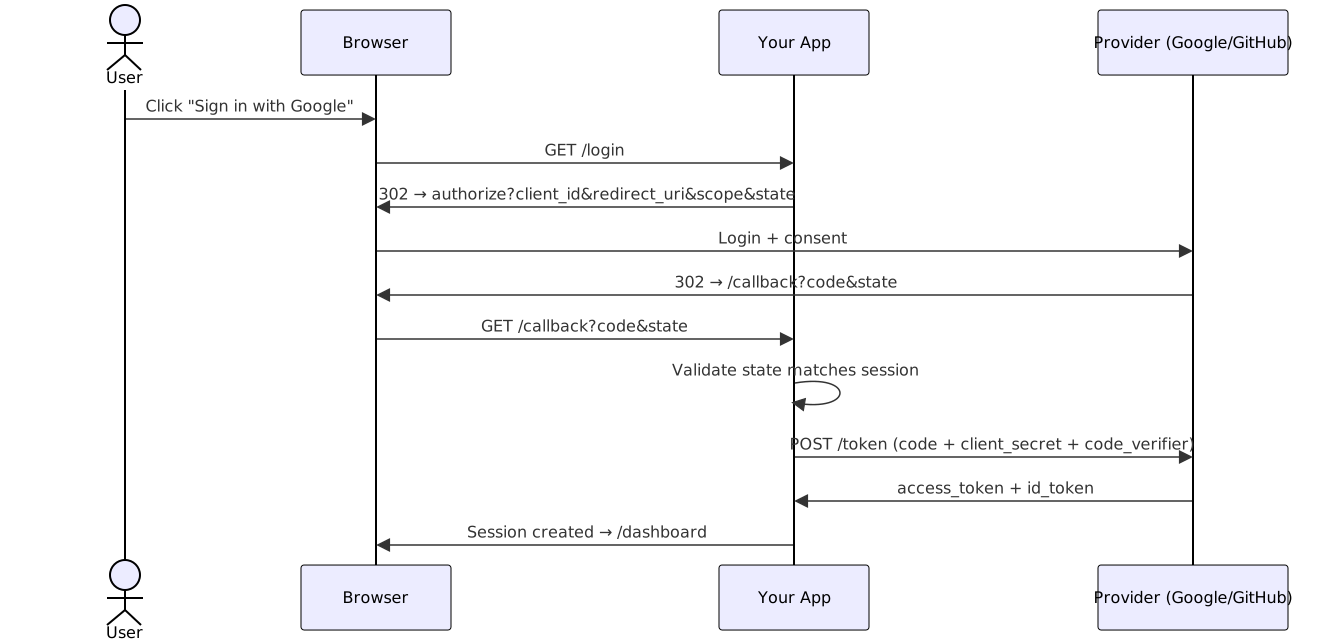
- Redirect: your app bounces the user to the provider’s authorize URL carrying
client_id,redirect_uri,scope, and a randomstate. - Consent: at the provider’s site the user signs in and approves the scopes you asked for.
- Callback: the provider bounces the user back to your
redirect_uriwith a short-lived authorizationcode. - Token exchange: your backend trades that
code(plus thecode_verifierunder PKCE) for anaccess_tokenandid_token.
PKCE adds a secret verifier so an intercepted code is useless without it — required for SPAs and mobile, and cheap enough to enable everywhere. state binds the callback to the request that started it; without it the callback endpoint is open to CSRF login attacks. The OAuth 2.0 Security Best Current Practice (RFC 9700) covers both, plus everything else you’d otherwise learn the hard way.
Variants
| Flow | Use case | Client secret? | PKCE? |
|---|---|---|---|
| Authorization Code | Server-side web apps | Yes | Recommended |
| Authorization Code + PKCE | SPAs, mobile apps | No | Required |
| Client Credentials | Machine-to-machine | Yes | No |
| Device Code | TVs, CLI tools | No | No |

The Implicit flow is deprecated. It returned tokens in the URL fragment where any script could read them, and RFC 9700 explicitly says don’t use it.
What Works
- Enable PKCE even for server apps. It’s a one-flag addition and removes the code-interception class of attacks entirely.
- Let the library validate
state. Authlib, Passport (state: true), and Spring Security all do it; just don’t bypass them with manual callbacks. - Request minimal scopes.
openid email profilecovers login; add more only when a feature needs them. - Store tokens server-side. Keep access and refresh tokens out of
localStorage; an XSS payload shouldn’t be able to walk off with them. - Normalize provider profiles. Store
provider+provider_user_idand map email/name into one shape, so adding GitHub later is data work, not auth work.
Common Mistakes
- Skipping state validation. Rolling your own callback handler and forgetting
stateopens the door to login CSRF. - Tokens in
localStorage. Any injected script can read them. An HttpOnly cookie or a server-side session keeps them out of reach. redirect_urimismatches. Providers compare byte-for-byte: a trailing slash or port difference fails the callback. Register the exact URI.- Asking for broad scopes upfront. Users bail on consent screens that ask for more than the login needs.
- Treating OAuth as authentication. OAuth is authorization; the
id_tokenand/userinfocome from the OpenID Connect layer on top. Confusing the two leads to accepting tokens meant for someone else.
Security Checklist
The OAuth-specific essentials, condensed from RFC 9700:
-
stategenerated per request and validated on callback - PKCE required; don’t let the provider downgrade the flow
-
redirect_uriregistered and matched exactly, never by prefix - Refresh tokens rotated on each use where the provider supports it
- Scopes checked per endpoint: a
readtoken shouldn’t reachwriteendpoints - No tokens in URLs, query params, or fragments (they leak via logs and Referer)
- Tokens never in
localStorage(XSS steals them) - HTTPS everywhere in the flow, no mixed content
- Refresh tokens invalidated on logout
- Implicit flow disabled (it’s deprecated)
Troubleshooting
invalid_stateon callback. Thestatein the callback doesn’t match the one in the session, usually a lost session cookie (checkSameSite) or the user starting login in one tab and finishing in another.redirect_uri_mismatch. The URI sent doesn’t byte-match the registered one. Compare protocol, host, port, and trailing slash.- Consent screen shows
access_denied. The user declined, or your app isn’t verified for a sensitive scope. Compare your scopes against Google’s verification requirements before shipping. - Token exchange returns
invalid_grant. The code expired (they live ~10 minutes), was already used, or theredirect_uriin the exchange doesn’t match the authorize step. - Login loops. The callback succeeds but the session cookie isn’t set — check
Secure,SameSite, and whether you’re behind a proxy that stripsSet-Cookie.
Frequently Asked Questions
Can I use OAuth 2.0 for machine-to-machine authentication?
Yes, with the Client Credentials flow: the service authenticates with its own client ID and secret, no user involved. For simpler internal APIs, API keys may be enough.
How do I support multiple providers (Google, GitHub, Microsoft)?
Use a library that abstracts the differences (Authlib, Passport, Spring Security). Store provider and provider_user_id in your user table and normalize email/name into one profile shape. Each provider documents its own quirks — GitHub's OAuth flow, for instance, differs from Google's in scope format and token types. For a GitHub-specific walkthrough in Node.js, see Node.js OAuth2 GitHub Login.
What's the difference between OAuth 2.0 and OpenID Connect?
OAuth 2.0 is an authorization framework ("can this app access my data?"). OpenID Connect is an authentication layer on top that standardizes identity claims via the id_token and /userinfo. If you only need to know who the user is, OIDC covers it; if you need API access on their behalf, you need OAuth scopes too.
Do I really need PKCE for a server-side app?
RFC 9700 recommends it for all clients, confidential or not. It costs one flag and kills code-interception attacks even if the authorization response leaks through logs or browser extensions. Leaving it off buys you nothing.
Where should I store the tokens?
Server-side, tied to the user's session. Browser localStorage and cookies-without-HttpOnly expose tokens to any script that lands on the page. If the provider has refresh token rotation, turn it on — a stolen token then dies after first use.
Why is the Implicit flow deprecated?
It returned access tokens in the URL fragment, where browser extensions, history, and logs could all pick them up, and it couldn't use PKCE or refresh tokens. Authorization Code + PKCE replaced it; see oauth.net's migration notes.
Companion code: The oauth2-login companion repo has all three examples as complete runnable apps, plus the Spring application.yml registration for Google and GitHub.
Related Resources
JWT Authentication
Sign, verify, and refresh JWTs in Python, JavaScript, and Java — access/refresh flows, RS256 key pairs, and token revocation done right.
RecipeNode.js OAuth2 GitHub Login with Express
Implement GitHub OAuth2 login flow in Node.js with Express and Passport
RecipeImplement Passwordless Login with Magic Links
How to build secure passwordless authentication using time-limited magic links sent via email, with token generation, validation, and replay attack prevention.
RecipeSecure API Key Authentication for Services and Clients
How to generate, distribute, validate, and rotate API keys for machine-to-machine authentication using HMAC signatures, scopes, and rate-limited key policies.
RecipeImplement Secure Session Management
How to create, validate, and expire user sessions securely using HTTP-only cookies, server-side stores like Redis, and CSRF protection.
RecipeTwo-Factor Authentication (2FA / TOTP)
How to implement time-based one-time password (TOTP) two-factor authentication for secure user login.