Implementa Server-Sent Events en Go para Actualizaciones
Construí un endpoint de Server-Sent Events en Go listo para producción con gestión de conexiones, heartbeats y manejo graceful de desconexiones de clientes.
Overview
Server-Sent Events te dan un canal ligero y unidireccional para enviar actualizaciones en tiempo
real del servidor al cliente sobre HTTP. A diferencia de WebSockets, SSE no necesita un upgrade
de protocolo. Reusa conexiones HTTP estándar, y la API EventSource del navegador maneja la
reconexión automáticamente.
Una vez pasé dos días debuggeando un endpoint SSE que funcionaba perfecto en desarrollo pero
perdía eventos en producción. El culpable? Un proxy nginx que bufferaba la respuesta. La solución
fue una sola línea — proxy_buffering off; — pero encontrarla me enseñó que la simplicidad de
SSE esconde un par de gotchas de infraestructura. Este recipe recorre los gotchas en los que
sangré — de los que me devoraron una tarde entera y me dejaron con un guardia de mala leche.
Qué vas a obtener: un handler SSE listo para producción en Go con gestión de conexiones vía
hub, heartbeat pings, manejo graceful de desconexiones, código EventSource del cliente, broadcast
con Redis para escalar horizontalmente, autenticación, y testing con httptest.
Cuándo Usarlo
Usá SSE cuando el servidor necesita enviar notificaciones, logs o métricas en vivo a navegadores y los clientes solo reciben. Brilla cuando querés apoyarte en infraestructura HTTP existente — load balancers, CDNs, auth middleware — en vez de boltear una capa WebSocket para tráfico unidireccional. Ver también Debounce y Throttle.
Cuándo NO Usarlo
No uses SSE cuando los clientes necesiten enviar mensajes de vuelta al servidor en tiempo real — los WebSockets son la herramienta correcta para eso. Evitalo también para datos binarios o de muy alta frecuencia; WebSockets o WebTransport se ajustan mejor ahí. Y si no podés controlar timeouts de proxies o load balancers que pueden cerrar conexiones inactivas, mantener SSE vivo puede ser un dolor.
Solución
Handler SSE básico
// handlers/sse.go
package handlers

import (
    "fmt"
    "net/http"
    "time"
)

type Event struct {
    ID    string
    Type  string
    Data  string
    Retry int
}

func (e Event) String() string {
    var result string
    if e.ID != "" {
        result += fmt.Sprintf("id: %s\n", e.ID)
    }
    if e.Type != "" {
        result += fmt.Sprintf("event: %s\n", e.Type)
    }
    if e.Retry > 0 {
        result += fmt.Sprintf("retry: %d\n", e.Retry)
    }
    result += fmt.Sprintf("data: %s\n\n", e.Data)
    return result
}

func SSEHandler(w http.ResponseWriter, r *http.Request) {
    w.Header().Set("Content-Type", "text/event-stream")
    w.Header().Set("Cache-Control", "no-cache")
    w.Header().Set("Connection", "keep-alive")
    w.Header().Set("Access-Control-Allow-Origin", "*")

    flusher, ok := w.(http.Flusher)
    if !ok {
        http.Error(w, "Streaming unsupported", http.StatusInternalServerError)
        return
    }

    ticker := time.NewTicker(2 * time.Second)
    defer ticker.Stop()

    clientGone := r.Context().Done()

    for {
        select {
        case <-clientGone:
            return
        case <-ticker.C:
            now := time.Now().Unix()
            event := Event{
                ID:   fmt.Sprintf("%d", now),
                Type: "ping",
                Data: fmt.Sprintf(`{"timestamp": %d}`, now),
            }
            fmt.Fprint(w, event.String())
            flusher.Flush()
        }
    }
}
Gestión de conexiones con un hub
// sse/hub.go
package sse

import "sync"

type Hub struct {
    clients map[chan Event]bool
    mu      sync.RWMutex
}

func NewHub() *Hub {
    return &Hub{clients: make(map[chan Event]bool)}
}

func (h *Hub) Subscribe() chan Event {
    ch := make(chan Event, 10)
    h.mu.Lock()
    h.clients[ch] = true
    h.mu.Unlock()
    return ch
}

func (h *Hub) Unsubscribe(ch chan Event) {
    h.mu.Lock()
    delete(h.clients, ch)
    h.mu.Unlock()
    close(ch)
}

func (h *Hub) Broadcast(event Event) {
    h.mu.RLock()
    defer h.mu.RUnlock()

    for ch := range h.clients {
        select {
        case ch <- event:
        default:
            // Channel full, drop event for this client
        }
    }
}
Handler de producción con heartbeat
// handlers/events.go
func EventStream(hub *sse.Hub) http.HandlerFunc {
    return func(w http.ResponseWriter, r *http.Request) {
        w.Header().Set("Content-Type", "text/event-stream")
        w.Header().Set("Cache-Control", "no-cache")
        w.Header().Set("Connection", "keep-alive")

        flusher, ok := w.(http.Flusher)
        if !ok {
            http.Error(w, "Streaming unsupported", http.StatusInternalServerError)
            return
        }

        client := hub.Subscribe()
        defer hub.Unsubscribe(client)

        heartbeat := time.NewTicker(30 * time.Second)
        defer heartbeat.Stop()

        clientGone := r.Context().Done()

        // Send initial connection event
        fmt.Fprintf(w, "event: connected\ndata: %s\n\n", `{"status": "ok"}`)
        flusher.Flush()

        for {
            select {
            case <-clientGone:
                return
            case event := <-client:
                fmt.Fprint(w, event.String())
                flusher.Flush()
            case <-heartbeat.C:
                fmt.Fprint(w, ": heartbeat\n\n")
                flusher.Flush()
            }
        }
    }
}
EventSource del cliente
// client.js
const evtSource = new EventSource('/api/events');

evtSource.addEventListener('connected', (e) => {
  console.log('Connected:', JSON.parse(e.data));
});

evtSource.addEventListener('price-update', (e) => {
  const update = JSON.parse(e.data);
  document.getElementById('price').textContent = update.price;
});

evtSource.onerror = (err) => {
  console.error('SSE error:', err);
  // Browser auto-reconnects with exponential backoff
};

window.addEventListener('beforeunload', () => {
  evtSource.close();
});
Explicación
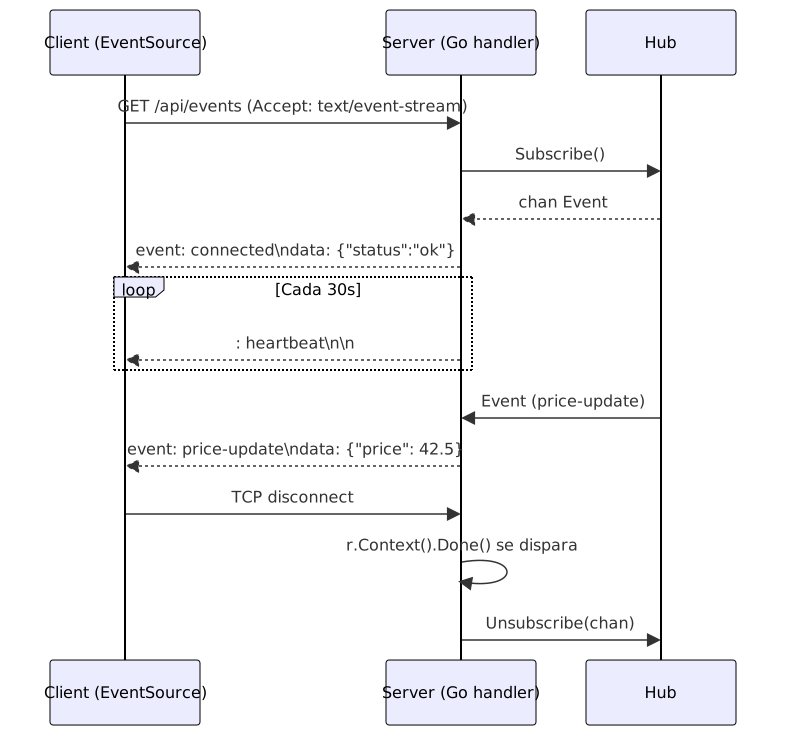
¿Y qué está pasando realmente en el wire? Tu handler setea Content-Type: text/event-stream
y empieza a escribir eventos en texto plano — sin framing, sin binario, solo líneas de texto.
Cada evento puede llevar cuatro campos (data, event, id, retry), pero siendo honesto
la mayoría solo usa data. El navegador recuerda el último id que vio y lo envía de vuelta en el header
Last-Event-ID al reconectar, lo que le permite a tu servidor reproducir lo que el cliente se
perdió. Las líneas que empiezan con : son heartbeat comments — los proxies ven tráfico y
mantienen el socket abierto, pero el navegador los ignora. Cuando el cliente cierra la pestaña,
r.Context().Done() se dispara, tu handler retorna y el Unsubscribe diferido limpia el
channel. Si te salteas ese cleanup, tenés un leak de goroutines que te va a morder a las 3am.
Variantes
Broadcast con Redis para múltiples instancias de Go
Para escalar horizontalmente, publicá eventos en Redis Pub/Sub y que cada proceso Go se suscriba, luego fan-out a sus clientes SSE locales. Consultá Real-Time Notifications para patrones de Redis pub/sub.
Autenticar conexiones SSE
El problema es que los navegadores no pueden setear headers custom a través de EventSource. En vez
de eso, pasá un token de corta duración como query parameter y validalo antes de suscribir:
token := r.URL.Query().Get("token")
if !validateToken(token) {
    http.Error(w, "Unauthorized", http.StatusUnauthorized)
    return
}
Para SSE cross-origin, seteá los headers CORS explícitamente en el endpoint.
Test con httptest
func TestSSEHandler(t *testing.T) {
    req := httptest.NewRequest(http.MethodGet, "/events", nil)
    rec := httptest.NewRecorder()

    SSEHandler(rec, req)

    res := rec.Result()
    if res.Header.Get("Content-Type") != "text/event-stream" {
        t.Fatalf("expected text/event-stream, got %s", res.Header.Get("Content-Type"))
    }
}
Buenas Prácticas
- Siempre llamá a
Flusher.Flush()después de cada evento, o el cliente no va a ver nada hasta que el buffer se llene. - Ejecutá SSE detrás de load balancers con HTTP/2 para distribuir muchos streams sobre una sola conexión.
- Seteá
Cache-Control: no-cacheyConnection: keep-alive, o los proxies van a bufferar tu stream y los eventos van a llegar en ráfagas. - Enviá un heartbeat comment cada 25–30 segundos para mantener conexiones abiertas a través de proxies corporativos.
- Limitá conexiones por IP de cliente — o requerí auth — para que un solo bad actor no agote tus file descriptors.
- Subí los write timeouts bien por encima de los defaults REST — un timeout de 30 segundos va a matar un stream SSE de larga duración que solo manda heartbeats.
Errores Comunes
- Olvidar
Flush(). Sin flush, el evento queda en el buffer y el cliente no ve nada. - Ignorar la desconexión del cliente. Sin chequear
r.Context().Done(), dejás goroutines y channels corriendo para siempre. - Faltar
Cache-Control: no-cache. Los proxies bufferan la respuesta y los eventos llegan en ráfagas o no llegan. - Enviar eventos sin IDs. Sin campos
id:, el navegador no puede reproducir eventos perdidos al reconectar. - Correr el handler sin aislamiento de estado. Cada proceso Go tiene su propio hub — no asumas un solo proceso, o clientes en distintos backends se van a perder eventos. Usá Redis fan-out.
See Also
- MDN: SSE docs
— docs oficiales del navegador para la API EventSource, incluyendo
reconexión y el header
Last-Event-ID. - HTML spec: Server-Sent Events
— la spec autoritativa para el formato
text/event-stream, nombres de campos y reglas de parsing. - Go net/http package —
http.Flusher,http.ResponseWriter,r.Context(). - Redis Pub/Sub — docs de Redis Pub/Sub para la variante de broadcast.
Preguntas frecuentes
¿Cómo se compara SSE con WebSockets?
SSE es más simple para push servidor-a-cliente — usá WebSockets cuando necesites comunicación bidireccional o datos binarios.
¿Puede SSE funcionar a través de proxies corporativos?
Sí, pero algunos proxies tienen timeouts cortos. Enviá heartbeat comments cada 30 segundos para mantener conexiones abiertas.
¿Cuál es el número máximo de conexiones SSE concurrentes?
Sobre HTTP/1.1, los navegadores permiten unas 6 conexiones por dominio. HTTP/2 elimina ese límite.
¿Cómo manejo la reconexión del cliente con Last-Event-ID?
Leé el header Last-Event-ID y reproducí eventos con IDs mayores. Asigná IDs secuenciales con el
campo id: y guardá eventos recientes en un pequeño ring buffer en memoria.
¿Cómo broadcasteo SSE a múltiples clientes en Go?
Mantené un map de channels suscritos. Usá un send non-blocking con un case default en un
select para que clientes lentos no bloqueen el broadcast. Para fan-out entre instancias, agregá
Redis Pub/Sub.
¿Cómo manejo SSE detrás de un load balancer?
Usá timeouts largos, deshabilitá el response buffering en nginx con proxy_buffering off;, y usá
Redis Pub/Sub para compartir eventos entre instancias si los clientes pueden caer en distintos
backends.
¿Por qué mi stream SSE funciona local pero falla en producción?
Casi siempre es un proxy o load balancer que buffera la respuesta. Nginx, Cloudflare y algunos
CDNs bufferan por defecto. Seteá proxy_buffering off; en nginx, Cache-Control: no-cache en los
headers de respuesta, y enviá heartbeats cada 25-30 segundos para mantener la conexión abierta a
través de proxies corporativos con timeouts cortos de inactividad.
¿Cuál es la diferencia entre SSE y long polling?
Long polling hace un nuevo HTTP request después de cada evento (o timeout). SSE mantiene una sola conexión abierta y streamea decenas o cientos de eventos sobre ella. SSE es más eficiente para actualizaciones de alta frecuencia porque se saltea el overhead de repeated HTTP handshakes. Long polling funciona en todos lados pero gasta ancho de banda y agrega latencia.
Recursos Relacionados
Server-Sent Events (SSE): Streaming en Tiempo Real
Implementá streaming unidireccional en tiempo real del servidor al navegador con Server-Sent Events. Cubre Python, Node.js, Java, tipos de eventos, reconexión y broadcasting.
RecipeServer-Sent Events con Node.js y Express
Construí push de servidor a cliente con Server-Sent Events en Node.js y Express. Cubre conexiones, heartbeats, reconexión y broadcast seguro.
RecipeConstruir APIs en Tiempo Real con WebSockets en Serverless
Cómo implementar comunicación bidireccional en tiempo real usando WebSockets con AWS API Gateway, Lambda, DynamoDB y lo que funciona en gestión de conexiones.
RecipeAutenticacion y Patrones de Seguridad para WebSockets
Como autenticar conexiones WebSocket, implementar validacion de tokens y manejar autorizacion para mensajeria en tiempo real en produccion
RecipeREST API en Go con Gin y Middleware
Construye APIs REST listas para producción en Go usando el framework Gin con middleware custom para logging, autenticación, validación y manejo de errores.
RecipeConstruir notificaciones en tiempo real con WebSockets
Implementa un sistema de notificaciones en tiempo real usando WebSockets y Redis pub/sub para difundir mensajes entre clientes.