Implement Server-Sent Events in Go for Real-Time Updates
Build a production-ready Server-Sent Events endpoint in Go with connection management, heartbeat pings, and graceful client disconnect handling.
Overview
Server-Sent Events give you a lightweight, one-way channel for pushing real-time updates from
server to client over plain HTTP. Unlike WebSockets, SSE doesn’t need a protocol upgrade. It
reuses standard HTTP connections, and the browser’s built-in EventSource API handles
reconnection automatically.
I once spent two days debugging an SSE endpoint that worked perfectly in development but dropped
events in production. The culprit? An nginx proxy buffering the response. The fix was a single
line — proxy_buffering off; — but finding it taught me that SSE’s simplicity hides a few
infrastructure gotchas. This recipe walks through the gotchas I’ve bled on — the kind that ate a full afternoon and
left me with a grumpy on-call shift.
What you’ll get: a production-ready SSE handler in Go with hub-based connection management,
heartbeat pings, graceful disconnect handling, client-side EventSource code, Redis broadcast for
horizontal scaling, authentication, and testing with httptest.
When to Use
Reach for SSE when the server needs to push notifications, logs, or live metrics to browsers and the clients only receive. It shines when you want to lean on existing HTTP infrastructure — load balancers, CDNs, auth middleware — instead of bolting on a WebSocket layer for one-way traffic. See also Debounce and Throttle.
When NOT to Use
Don’t reach for SSE when clients need to send messages back to the server in real time — WebSockets are the right tool for that. Skip it for binary or very high-frequency data too; WebSockets or WebTransport fit better there. And if you can’t control proxy or load-balancer timeouts that may close idle connections, SSE can be a pain to keep alive.
Solution
Basic SSE handler
// handlers/sse.go
package handlers

import (
    "fmt"
    "net/http"
    "time"
)

type Event struct {
    ID    string
    Type  string
    Data  string
    Retry int
}

func (e Event) String() string {
    var result string
    if e.ID != "" {
        result += fmt.Sprintf("id: %s\n", e.ID)
    }
    if e.Type != "" {
        result += fmt.Sprintf("event: %s\n", e.Type)
    }
    if e.Retry > 0 {
        result += fmt.Sprintf("retry: %d\n", e.Retry)
    }
    result += fmt.Sprintf("data: %s\n\n", e.Data)
    return result
}

func SSEHandler(w http.ResponseWriter, r *http.Request) {
    w.Header().Set("Content-Type", "text/event-stream")
    w.Header().Set("Cache-Control", "no-cache")
    w.Header().Set("Connection", "keep-alive")
    w.Header().Set("Access-Control-Allow-Origin", "*")

    flusher, ok := w.(http.Flusher)
    if !ok {
        http.Error(w, "Streaming unsupported", http.StatusInternalServerError)
        return
    }

    ticker := time.NewTicker(2 * time.Second)
    defer ticker.Stop()

    clientGone := r.Context().Done()

    for {
        select {
        case <-clientGone:
            return
        case <-ticker.C:
            now := time.Now().Unix()
            event := Event{
                ID:   fmt.Sprintf("%d", now),
                Type: "ping",
                Data: fmt.Sprintf(`{"timestamp": %d}`, now),
            }
            fmt.Fprint(w, event.String())
            flusher.Flush()
        }
    }
}
Hub-based connection management
// sse/hub.go
package sse

import "sync"

type Hub struct {
    clients map[chan Event]bool
    mu      sync.RWMutex
}

func NewHub() *Hub {
    return &Hub{clients: make(map[chan Event]bool)}
}

func (h *Hub) Subscribe() chan Event {
    ch := make(chan Event, 10)
    h.mu.Lock()
    h.clients[ch] = true
    h.mu.Unlock()
    return ch
}

func (h *Hub) Unsubscribe(ch chan Event) {
    h.mu.Lock()
    delete(h.clients, ch)
    h.mu.Unlock()
    close(ch)
}

func (h *Hub) Broadcast(event Event) {
    h.mu.RLock()
    defer h.mu.RUnlock()

    for ch := range h.clients {
        select {
        case ch <- event:
        default:
            // Channel full, drop event for this client
        }
    }
}
Production handler with heartbeat
// handlers/events.go
func EventStream(hub *sse.Hub) http.HandlerFunc {
    return func(w http.ResponseWriter, r *http.Request) {
        w.Header().Set("Content-Type", "text/event-stream")
        w.Header().Set("Cache-Control", "no-cache")
        w.Header().Set("Connection", "keep-alive")

        flusher, ok := w.(http.Flusher)
        if !ok {
            http.Error(w, "Streaming unsupported", http.StatusInternalServerError)
            return
        }

        client := hub.Subscribe()
        defer hub.Unsubscribe(client)

        heartbeat := time.NewTicker(30 * time.Second)
        defer heartbeat.Stop()

        clientGone := r.Context().Done()

        // Send initial connection event
        fmt.Fprintf(w, "event: connected\ndata: %s\n\n", `{"status": "ok"}`)
        flusher.Flush()

        for {
            select {
            case <-clientGone:
                return
            case event := <-client:
                fmt.Fprint(w, event.String())
                flusher.Flush()
            case <-heartbeat.C:
                fmt.Fprint(w, ": heartbeat\n\n")
                flusher.Flush()
            }
        }
    }
}
Client-side EventSource
// client.js
const evtSource = new EventSource('/api/events');

evtSource.addEventListener('connected', (e) => {
  console.log('Connected:', JSON.parse(e.data));
});

evtSource.addEventListener('price-update', (e) => {
  const update = JSON.parse(e.data);
  document.getElementById('price').textContent = update.price;
});

evtSource.onerror = (err) => {
  console.error('SSE error:', err);
  // Browser auto-reconnects with exponential backoff
};

window.addEventListener('beforeunload', () => {
  evtSource.close();
});
Explanation
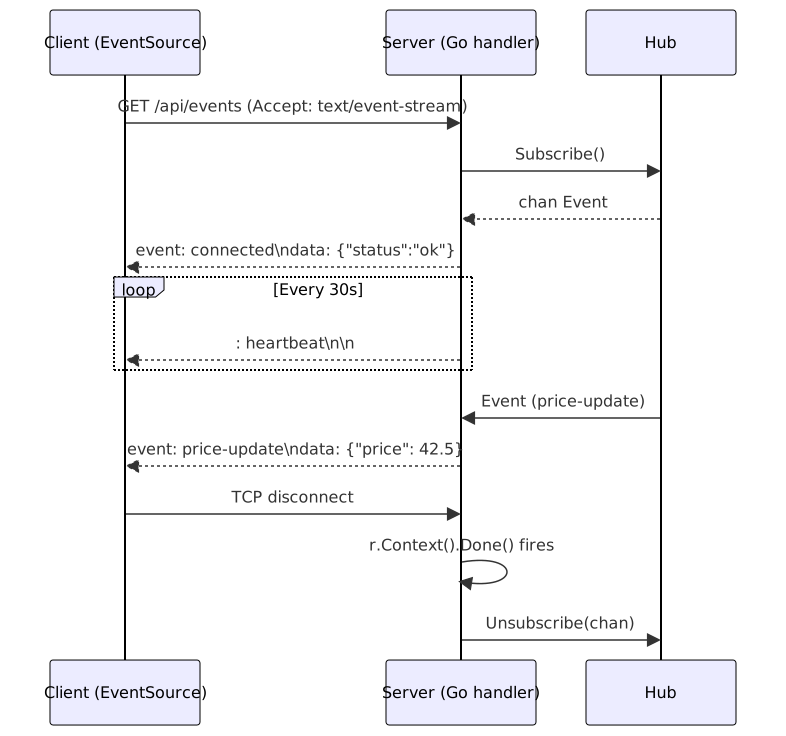
So what’s actually happening on the wire? Your handler sets Content-Type: text/event-stream
and starts writing plain text events — no framing, no binary, just lines of text. Each event can
carry four fields (data, event, id, retry), but honestly most events only use data.
The browser remembers the last id it saw and sends it back in the Last-Event-ID header when
it reconnects, which lets your server replay anything the client missed. Lines beginning with :
are heartbeat comments — proxies see traffic and keep the socket open, but the browser ignores
them. When the client closes the tab, r.Context().Done() fires, your handler returns, and the
deferred Unsubscribe cleans up the channel. Skip that cleanup and you’ve got a goroutine leak
that’ll bite you at 3am.
Variants
Broadcast with Redis for multiple Go instances
For horizontal scaling, publish events to Redis Pub/Sub and have each Go process subscribe, then fan them out to its local SSE clients. See Real-Time Notifications for Redis pub/sub patterns.
Authenticate SSE connections
The catch is that browsers can’t set custom headers through EventSource. Instead, pass a
short-lived token as a query parameter and validate it before subscribing:
token := r.URL.Query().Get("token")
if !validateToken(token) {
    http.Error(w, "Unauthorized", http.StatusUnauthorized)
    return
}
For cross-origin SSE, set CORS headers explicitly on the endpoint.
Test with httptest
func TestSSEHandler(t *testing.T) {
    req := httptest.NewRequest(http.MethodGet, "/events", nil)
    rec := httptest.NewRecorder()

    SSEHandler(rec, req)

    res := rec.Result()
    if res.Header.Get("Content-Type") != "text/event-stream" {
        t.Fatalf("expected text/event-stream, got %s", res.Header.Get("Content-Type"))
    }
}
Best Practices
- Always call
Flusher.Flush()after each event, or the client will see nothing until the buffer fills. - Run SSE behind HTTP/2-capable load balancers so many streams can share a single connection.
- Set
Cache-Control: no-cacheandConnection: keep-alive, or proxies will buffer your stream and events will arrive in bursts. - Send a heartbeat comment every 25–30 seconds to keep connections alive through corporate proxies.
- Limit connections per client IP — or require auth — so a single bad actor can’t exhaust your file descriptors.
- Bump your write timeouts well above the REST defaults — a 30-second timeout will kill a long-lived SSE stream that’s just sending heartbeats.
Common Mistakes
- Forgetting to call
Flush(). Without flushing, the event sits buffered and the client sees nothing. - Ignoring client disconnect. A missing
r.Context().Done()check leaves goroutines and channels running forever. - Missing
Cache-Control: no-cache. Proxies buffer the response, so events arrive in bursts or not at all. - Sending events without IDs. Without
id:fields, the browser can’t replay missed events after reconnecting. - Running the same handler without state isolation. Each Go process gets its own hub — don’t assume a single process, or clients on different backends will miss events. Use Redis fan-out.
See Also
- MDN: SSE docs
— official browser docs for the EventSource API, including reconnection
behavior and the
Last-Event-IDheader. - HTML spec: Server-Sent Events
— the authoritative spec for the
text/event-streamformat, field names, and parsing rules. - Go net/http package —
http.Flusher,http.ResponseWriter,r.Context()reference. - Redis Pub/Sub — Redis Pub/Sub docs for the broadcast variant.
Frequently Asked Questions
How does SSE compare to WebSockets?
SSE is simpler for server-to-client push — use WebSockets when you need bi-directional communication or binary data.
Can SSE work through corporate proxies?
Yes, but some proxies have short timeouts. Send heartbeat comments every 30 seconds to keep connections open.
What is the maximum number of concurrent SSE connections?
Over HTTP/1.1, browsers allow about 6 connections per domain. HTTP/2 removes this limit.
How do I handle client reconnection with Last-Event-ID?
Read the Last-Event-ID header and replay any events with higher IDs. Assign sequential IDs with
the
id: field and store recent events in a small in-memory ring buffer.
How do I broadcast SSE to multiple clients in Go?
Maintain a map of subscribed channels. Use a non-blocking send with a default case in a
select so slow clients don't block the broadcast. For fan-out across instances, add Redis
Pub/Sub.
How do I handle SSE behind a load balancer?
Use long timeouts, disable response buffering in nginx with proxy_buffering off;, and use Redis
Pub/Sub to share events across instances if clients may land on different backends.
Why does my SSE stream work locally but break in production?
It's almost always a proxy or load balancer buffering the response. Nginx, Cloudflare, and some
CDNs buffer by default. Set proxy_buffering off; in nginx, Cache-Control: no-cache in your
response headers, and send heartbeats every 25-30 seconds to keep the connection alive through
corporate proxies with short idle timeouts.
What's the difference between SSE and long polling?
Long polling makes a new HTTP request after each event (or timeout). SSE keeps a single connection open and streams dozens or hundreds of events over it. SSE is more efficient for high-frequency updates because it skips the overhead of repeated HTTP handshakes. Long polling works everywhere but wastes bandwidth and adds latency.
Related Resources
Server-Sent Events (SSE): One-Way Real-Time Streaming
Implement one-way real-time streaming from server to browser using Server-Sent Events. Covers Python, Node.js, Java, event types, reconnection, and broadcasting.
RecipeServer-Sent Events with Node.js and Express
Build server-to-client push with Server-Sent Events in Node.js and Express. Covers connections, heartbeats, reconnection, and safe broadcasting.
RecipeBuild Real-Time APIs with WebSockets on Serverless
How to implement bidirectional real-time communication using WebSockets with AWS API Gateway, Lambda, DynamoDB, and what works in connection management.
RecipeWebSocket Authentication and Security Patterns
How to authenticate WebSocket connections, implement token validation, and handle authorization for real-time messaging in production
RecipeGo REST API with Gin and Middleware
Build production-ready REST APIs in Go using the Gin framework with custom middleware for logging, authentication, validation, and error handling.
RecipeBuild Real-Time Notifications with WebSockets
Implement a real-time notification system using WebSockets and Redis pub/sub for broadcasting messages across clients.