Adapter Pattern
Convert the interface of a class into another interface clients expect. A structural design pattern for interface compatibility.
Overview
The Adapter Pattern is a structural design pattern that lets objects with incompatible interfaces work together. In practice it wraps an existing class behind the interface the client already expects.
Think of a travel adapter: it doesn’t change the device or the wall socket — it just makes the two fit.
Real systems are full of adapters that nobody calls that. A payment SDK wrapped behind your own PaymentGateway interface, an ORM repository translating domain objects into database rows, a notification service that normalizes email, SMS, and push providers behind a single send(recipient, message) — all of these are adapters. The pattern earns its keep whenever a boundary you don’t control meets an interface you do.
When to Use
Use the Adapter Pattern when:
- A class already does the job you need — it just doesn’t match the interface the rest of your code expects. See Strategy Pattern for runtime behavior selection.
- You need to reuse legacy or third-party code that does not match your interfaces. See Facade Pattern for simplifying complex APIs.
- You want to create a unified interface across several classes with different APIs
- You cannot or should not modify the source code of the incompatible class. See Decorator Pattern for extending behavior without subclassing.
- You need to translate data formats or calling conventions between systems
Skip the pattern when you own the incompatible code — just change it. An adapter is the price you pay for a boundary you can’t modify: a vendor SDK, a legacy module, a generated client. Introducing one between two classes your own team writes usually adds indirection without buying anything.
Solution
Python
class OldPrinter:
    def old_print(self, text: str):
        print(f"OldPrinter: {text}")

class PrinterAdapter:
    def __init__(self, old_printer: OldPrinter):
        self._old = old_printer

    def print(self, text: str):
        self._old.old_print(text)

# Usage
adapter = PrinterAdapter(OldPrinter())
adapter.print("Hello World")  # OldPrinter: Hello World
JavaScript
class OldPrinter {
  oldPrint(text) {
    console.log(`OldPrinter: ${text}`);
  }
}

class PrinterAdapter {
  constructor(oldPrinter) {
    this.old = oldPrinter;
  }

  print(text) {
    this.old.oldPrint(text);
  }
}

// Usage
const adapter = new PrinterAdapter(new OldPrinter());
adapter.print("Hello World"); // OldPrinter: Hello World
Java
class OldPrinter {
    void oldPrint(String text) {
        System.out.println("OldPrinter: " + text);
    }
}

interface ModernPrinter {
    void print(String text);
}

class PrinterAdapter implements ModernPrinter {
    private final OldPrinter oldPrinter;

    PrinterAdapter(OldPrinter oldPrinter) {
        this.oldPrinter = oldPrinter;
    }

    public void print(String text) {
        oldPrinter.oldPrint(text);
    }
}

// Usage
ModernPrinter printer = new PrinterAdapter(new OldPrinter());
printer.print("Hello World"); // OldPrinter: Hello World
Explanation
The Adapter Pattern consists of:
- Target Interface (
ModernPrinter): The interface the client expects - Adaptee (
OldPrinter): The existing class with the incompatible interface - Adapter (
PrinterAdapter): Wraps the adaptee and exposes the target interface
The adapter translates calls from the target interface into calls the adaptee understands. Neither the client nor the adaptee needs to change.
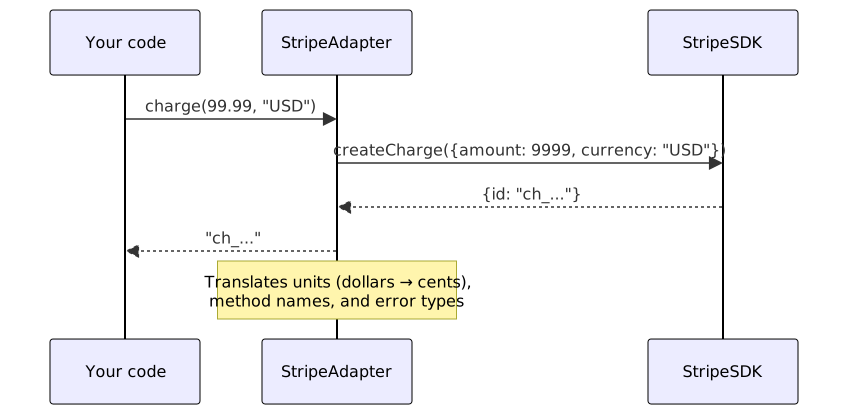
The client codes against Target, the adapter holds an OldPrinter reference and forwards translated calls, and OldPrinter stays untouched. That indirection is the whole mechanism — and also its cost. Every adapter adds one more type to name, test, and navigate when debugging, so the pattern pays off when the alternative is worse: rewriting the adaptee, forking a vendor library, or letting legacy-shaped objects leak into your domain model.
Variants
The object adapter — composition — is the default choice: it works in every language and can wrap an entire class hierarchy. The class adapter only exists in languages with multiple inheritance (C++, Python) and couples you to the adaptee’s concrete type. A two-way adapter shows up mostly in boundary layers that must satisfy two existing contracts at once.
| Variant | Use Case | Trade-off |
|---|---|---|
| Object Adapter | Wraps an instance (composition) | Flexible, can adapt subclasses |
| Class Adapter | Inherits from adaptee (multiple inheritance) | Less flexible, not possible in all languages |
| Two-way Adapter | Both interfaces are usable | More complex, but bidirectional |
Adapter vs Related Patterns
Adapter is easy to confuse with the other structural wrappers. The difference is intent:
| Pattern | What it changes | Typical question it answers |
|---|---|---|
| Adapter | The interface, so two incompatible types can work together | ”How do I call this legacy/vendor class?” |
| Facade | Nothing — it simplifies an existing complex API | ”How do I hide this subsystem’s complexity?” |
| Decorator | Behavior — it adds responsibilities, same interface | ”How do I extend this without subclassing?” |
| Proxy | Access — it controls how the real object is reached | ”How do I gate or lazy-load this object?” |
If the interfaces already match and you just want a simpler entry point, you want Facade. If the goal is adding behavior, Decorator. Adapter is only about making mismatched signatures meet.
What Works
- Favor composition over inheritance for adapters (object adapter pattern)
- Keep the adapter thin: It should translate calls, not add business logic
- Document the mapping: Explain how target methods map to adaptee methods
- Handle nulls and exceptions gracefully during translation
- Consider caching: If translation involves heavy computation, cache results
Advanced Techniques
Two-way adapter for bidirectional compatibility
Support both target and adaptee interfaces for maximum flexibility:
# Python: Two-way adapter
class OldPrinter:
    def old_print(self, text: str):
        print(f"OldPrinter: {text}")

class ModernPrinter:
    def print(self, text: str):
        print(f"ModernPrinter: {text}")

class BiDirectionalPrinterAdapter:
    def __init__(self, old_printer: OldPrinter, new_printer: ModernPrinter):
        self._old = old_printer
        self._new = new_printer

    def print(self, text: str):
        # Target interface (ModernPrinter)
        self._old.old_print(text)

    def old_print(self, text: str):
        # Adaptee interface (OldPrinter)
        self._new.print(text)

# Usage with both interfaces
adapter = BiDirectionalPrinterAdapter(OldPrinter(), ModernPrinter())
adapter.print("Hello")  # Uses ModernPrinter interface, calls OldPrinter
adapter.old_print("World")  # Uses OldPrinter interface, calls ModernPrinter
Adapter with data transformation
Transform data formats between incompatible representations:
// Java: Data transformation adapter
class LegacyData {
    String[] names;
    int[] ages;
}

class ModernPerson {
    String name;
    int age;
}

interface PersonRepository {
    List<ModernPerson> getAllPeople();
}

class LegacyDataAdapter implements PersonRepository {
    private final LegacyData legacyData;

    LegacyDataAdapter(LegacyData legacyData) {
        this.legacyData = legacyData;
    }

    public List<ModernPerson> getAllPeople() {
        List<ModernPerson> people = new ArrayList<>();
        for (int i = 0; i < legacyData.names.length; i++) {
            ModernPerson person = new ModernPerson();
            person.name = legacyData.names[i];
            person.age = legacyData.ages[i];
            people.add(person);
        }
        return people;
    }
}
Adapter with caching for performance
Add caching to expensive translation operations:
// JavaScript: Cached adapter
class CachedAdapter {
  constructor(adaptee) {
    this.adaptee = adaptee;
    this.cache = new Map();
  }

  async getData(key) {
    if (this.cache.has(key)) {
      return this.cache.get(key);
    }

    const data = await this.adaptee.fetchLegacyData(key);
    const transformed = this.transform(data);
    this.cache.set(key, transformed);
    return transformed;
  }

  transform(data) {
    // Expensive transformation logic
    return data.map(item => ({
      id: item.legacyId,
      name: item.legacyName,
      value: item.legacyValue * 2
    }));
  }

  invalidate(key) {
    this.cache.delete(key);
  }
}
Adapter composition for multiple adaptees
Wrap multiple adaptees to provide a unified interface:
# Python: Multi-adaptee adapter
class DatabaseReader:
    def read_user(self, user_id: int) -> dict:
        return {"id": user_id, "name": "DB User"}

class CacheReader:
    def get_user(self, user_id: int) -> dict:
        return {"id": user_id, "name": "Cached User"}

class UnifiedUserAdapter:
    def __init__(self, db_reader: DatabaseReader, cache_reader: CacheReader):
        self.db = db_reader
        self.cache = cache_reader

    def get_user(self, user_id: int) -> dict:
        # Try cache first, fall back to database
        try:
            return self.cache.get_user(user_id)
        except KeyError:
            return self.db.read_user(user_id)

# Usage
adapter = UnifiedUserAdapter(DatabaseReader(), CacheReader())
user = adapter.get_user(123)
Adapter with retry logic
Add retry logic for unreliable adaptees:
// Java: Adapter with retry
class RetryAdapter implements ModernPrinter {
    private final OldPrinter adaptee;
    private final int maxRetries;
    private final long retryDelayMs;

    RetryAdapter(OldPrinter adaptee, int maxRetries, long retryDelayMs) {
        this.adaptee = adaptee;
        this.maxRetries = maxRetries;
        this.retryDelayMs = retryDelayMs;
    }

    public void print(String text) {
        int attempts = 0;
        while (attempts <= maxRetries) {
            try {
                adaptee.oldPrint(text);
                return;
            } catch (Exception e) {
                attempts++;
                if (attempts <= maxRetries) {
                    try {
                        Thread.sleep(retryDelayMs);
                    } catch (InterruptedException ie) {
                        Thread.currentThread().interrupt();
                        throw new RuntimeException("Interrupted during retry", ie);
                    }
                }
            }
        }
        throw new RuntimeException("Failed after " + maxRetries + " retries");
    }
}
Adapter with logging and monitoring
Add observability to adapter operations:
// JavaScript: Adapter with logging
class LoggingAdapter {
  constructor(adaptee, logger) {
    this.adaptee = adaptee;
    this.logger = logger;
  }

  print(text) {
    const startTime = Date.now();
    this.logger.info('Adapter: Calling adaptee with text', { text });

    try {
      this.adaptee.oldPrint(text);
      const duration = Date.now() - startTime;
      this.logger.info('Adapter: Call succeeded', { duration });
    } catch (error) {
      const duration = Date.now() - startTime;
      this.logger.error('Adapter: Call failed', { error: error.message, duration });
      throw error;
    }
  }
}
Testing an Adapter
Testing an adapter is mostly testing the mapping. Mock the adaptee, call each target method, and assert the adaptee saw the right arguments and the client got the right translated result. The failure modes worth covering aren’t the happy path — they’re the translation edges: nulls the adaptee doesn’t expect, exceptions in the adaptee’s own type, and units or enums that don’t line up between the two interfaces. If the adapter adds caching or retries, cover those behaviors separately so a cache hit doesn’t mask a broken adaptee in your tests.
Best Practices
- Favor composition over inheritance. Object adapters wrap an instance and stay flexible; class adapters inherit and couple you to the adaptee’s concrete type.
- Keep adapters thin. Adapters should only translate interfaces, not add business logic or complex behavior.
- Document the mapping. Clearly document how target methods map to adaptee methods to aid future maintenance.
- Handle exceptions gracefully. Translate adaptee exceptions into appropriate target exceptions or handle them appropriately.
- Consider caching. When the translation is expensive, keep the result around instead of recomputing it.
- Use interfaces for targets. Define clear target interfaces to make adapters interchangeable and testable.
- Avoid cascading adapters. An adapter calling another adapter piles up indirection — flatten it into one layer.
- Test adapters thoroughly. Write unit tests for the translation logic and integration tests with real adaptees.
- Monitor adapter performance. Latency, error rates, and cache hits tell you when the translation layer becomes the bottleneck.
- Version adapters when needed. If the adaptee interface changes, version your adapters to support multiple versions simultaneously.
Common Mistakes
- Fat adapters. Adding business logic instead of just interface translation. Keep adapters focused on translation only.
- Leaky adapters. Exposing adaptee methods through the adapter interface, breaking the abstraction.
- Cascading adapters. Adapter calling adapter is indirection hell — flatten it instead.
- Ignoring exceptions. Letting the adaptee’s own error types leak out instead of mapping them onto what the target interface promises.
- Modifying the adaptee. The whole point of the adapter pattern is to leave the original class untouched.
- Over-engineering simple cases. Using adapters when a simple wrapper function would suffice.
- Tight coupling to adaptee. Making the adapter too dependent on specific implementation details of the adaptee.
- Forgetting null checks. Letting a null or undefined slip through from the adaptee and blow up at runtime.
- Skipping documentation. Failing to document the translation logic makes future maintenance difficult.
- Mixing concerns. Combining adapter logic with other concerns like logging, caching, or retry logic in a single class.
See Also
- Adapter Pattern for Integrating External REST APIs — the same pattern specialized for normalizing third-party API responses
- Bridge Incompatible Interfaces with the Adapter Pattern — a shorter, code-first walkthrough
- Companion repository — the adapter examples as runnable Python, JavaScript, and Java files
- Adapter — Refactoring.Guru — canonical reference with more examples and diagrams
- Design Patterns (GoF) — the original catalog the pattern comes from
Frequently Asked Questions
What is the difference between Adapter and Facade?
Adapter makes one incompatible interface compatible. Facade hides a complex subsystem behind one simpler entry point.
Can I adapt multiple classes at once?
You can — the multi-adaptee example above shows one adapter coordinating two readers behind a single interface.
Is Adapter a workaround for bad design?
Occasionally. More often it's what you reach for when code you can't change has to meet code you own.
How does Adapter differ from Decorator?
Adapter rewrites the interface of an object; Decorator keeps the interface and piles on behavior.
Should I use Adapter or Strategy for runtime behavior selection?
Use Strategy to swap algorithms at runtime. Reach for Adapter when the problem is mismatched signatures.
Can adapters be nested?
It's possible, but an adapter calling another adapter piles up indirection fast — treat it as a smell and flatten the chain.
How do I test an adapter?
Mock the adaptee and verify each target method maps correctly; the Testing section above walks through the edge cases worth covering.
Should adapters handle authentication?
No — keep auth in the HTTP client or an interceptor. Adapters translate interfaces, nothing more.
Can I use Adapter for data format conversion?
Yes — converting XML to JSON or a legacy schema into a modern one is a classic adapter job.
Related Resources
Decorator Pattern
Add new functionality to objects dynamically by wrapping them. A structural design pattern for flexible behavior extension.
PatternBridge Pattern: Decouple Abstraction from Implementation
Split a class into two hierarchies — abstraction and implementation — so both can evolve independently. Includes Python, Java, and JavaScript examples.
PatternFacade Pattern
Provide a simplified interface to a complex subsystem. A structural pattern that hides implementation details behind a clean API.
PatternProxy Pattern
Provide a surrogate or placeholder for another object to control access to it. A structural design pattern for access control, lazy loading, and logging.
PatternAdapter Pattern for Integrating External REST APIs
Use the Adapter pattern to normalize responses from external REST APIs into a consistent internal model without leaking third-party formats into your domain
RecipeBridge Incompatible Interfaces with the Adapter Pattern
Integrate legacy APIs and third-party libraries with object, class, and two-way adapters in Java, TypeScript, and Python.