Caching with Redis
How to implement application caching using Redis for performance and scalability.
Overview
Your product page runs the same SELECT two thousand times a minute, and every copy of it returns identical data. That’s the workload caching is built for — and why a single Redis instance sitting in front of the database can cut query load by an order of magnitude.
Redis is an in-memory data store: reads land in microseconds instead of the milliseconds a database round-trip costs. This recipe covers the patterns that matter in practice — cache-aside for reads, TTLs to bound staleness, safe invalidation on writes — in Python, JavaScript and Java. For a Node.js-focused walkthrough see Node.js caching with Redis; for the strategy-level view, the Redis caching strategies guide compares every pattern in depth.
When to Use
Use this resource when:
- Database queries are slow and return the same results frequently
- You need to reduce load on downstream APIs or databases
- Session data, user profiles, or configuration needs fast read access
- Real-time leaderboards, rate limiting, or temporary locks are required
Solution
Python (redis-py)
import json
import redis
from functools import wraps

r = redis.Redis(host="localhost", port=6379, decode_responses=True)

# Cache-aside helper
def cached(key_prefix, ttl=300):
    def decorator(func):
        @wraps(func)
        def wrapper(*args, **kwargs):
            cache_key = f"{key_prefix}:{args}:{kwargs}"
            cached = r.get(cache_key)
            if cached:
                return json.loads(cached)
            result = func(*args, **kwargs)
            r.setex(cache_key, ttl, json.dumps(result))
            return result
        return wrapper
    return decorator

@cached("user_profile", ttl=600)
def get_user(user_id):
    # Expensive DB query
    return {"id": user_id, "name": "Alice", "orders": 42}

# Manual cache invalidation
r.delete("user_profile:(1,):{}")

# Redis as session store
r.setex("session:abc123", 3600, json.dumps({"user_id": 1, "role": "admin"}))
JavaScript (ioredis)
const Redis = require("ioredis");
const redis = new Redis({ host: "localhost", port: 6379 });

async function getCached(key, fetcher, ttl = 300) {
  const cached = await redis.get(key);
  if (cached) return JSON.parse(cached);

  const data = await fetcher();
  await redis.setex(key, ttl, JSON.stringify(data));
  return data;
}

async function getUser(userId) {
  return getCached(`user:${userId}`, async () => {
    // Expensive DB query
    return { id: userId, name: "Alice", orders: 42 };
  }, 600);
}

// Invalidate cache
async function invalidateUser(userId) {
  await redis.del(`user:${userId}`);
}

// Redis as rate limiter
async function rateLimit(key, maxRequests = 100, window = 60) {
  const current = await redis.incr(key);
  if (current === 1) await redis.expire(key, window);
  return current <= maxRequests;
}
Java (Jedis + Spring Cache)
import redis.clients.jedis.Jedis;
import redis.clients.jedis.JedisPool;
import org.springframework.cache.annotation.Cacheable;
import org.springframework.cache.annotation.CacheEvict;
import org.springframework.stereotype.Service;

@Service
public class UserService {

    // Spring declarative caching
    @Cacheable(value = "users", key = "#userId")
    public User getUser(Long userId) {
        // Expensive DB query
        return new User(userId, "Alice", 42);
    }

    @CacheEvict(value = "users", key = "#userId")
    public void updateUser(Long userId, User user) {
        // Update DB
    }
}

// Manual Jedis caching
public class CacheClient {
    private final JedisPool pool = new JedisPool("localhost", 6379);

    public String get(String key) {
        try (Jedis jedis = pool.getResource()) {
            return jedis.get(key);
        }
    }

    public void setex(String key, int seconds, String value) {
        try (Jedis jedis = pool.getResource()) {
            jedis.setex(key, seconds, value);
        }
    }
}
Explanation
The cache-aside (or lazy-loading) pattern is the most common caching strategy:
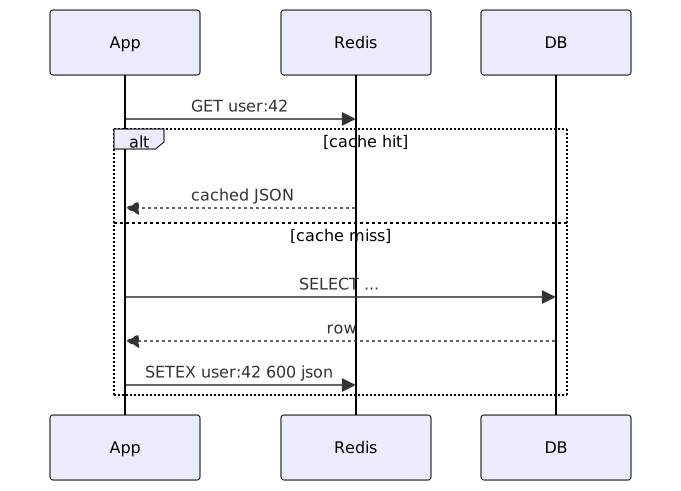
- Read: Check cache first. If hit, return immediately. If miss, fetch from DB, store in cache, then return.
- Write: Update the database, then invalidate or update the cache.
- TTL: Every cached entry has a Time-To-Live. When TTL expires, the entry is evicted and the next read fetches fresh data.
The TTL is doing more work than it looks: it bounds how stale a cached value can get, which means you can be sloppy about invalidation in exchange for a known worst case. Short TTL on volatile data, long on reference data — the freshness guarantee is a tuning knob, not a switch.
This pattern is simple, works with any database, and handles cache failures gracefully: if Redis is down, the app falls back to the database (cache degradation, not outage).
Variants
| Strategy | When to Use | Trade-off |
|---|---|---|
| Cache-Aside | Most read-heavy apps | Simple, but cache and DB can drift |
| Write-Through | Strong consistency required | Slower writes, cache always fresh |
| Write-Behind | High write throughput | Risk of data loss if cache crashes before flush |
| Read-Through | Complex invalidation logic | Cache library handles fetching |
| Redis Pub/Sub | Cache invalidation across instances | Real-time sync, but adds complexity |
Advanced Patterns
The table above is the menu; the implementations below are the ones you’ll actually write. Two pattern families show up in every production cache: write-side strategies (what happens when data changes) and the Redis-specific tricks that keep cache-aside safe under load. The core helpers are runnable in the companion repository.
Write-Through Cache Pattern
Pick write-through when a read must never see stale data: every write updates the database and the cache together, so the cache is always fresh at the cost of write latency.
import json
import redis

r = redis.Redis(host="localhost", port=6379, decode_responses=True)

def write_through_user(user_id: int, data: dict, db_update_fn):
    """Write to cache and database atomically."""
    cache_key = f"user:{user_id}"

    # Update database first
    db_update_fn(user_id, data)

    # Then update cache
    r.setex(cache_key, 600, json.dumps(data))

# Usage
def db_update_user(user_id, data):
    # Execute SQL UPDATE
    pass

write_through_user(42, {"id": 42, "name": "Alice", "email": "alice@new.com"}, db_update_user)
async function writeThroughProduct(productId, data, dbUpdateFn) {
const cacheKey = `product:${productId}`;
// Update database
await dbUpdateFn(productId, data);
// Update cache
await redis.setex(cacheKey, 300, JSON.stringify(data));
}Write-Behind (Write-Back) Pattern
The opposite trade: the write lands in Redis immediately and a background worker drains it to the database in batches. Writes stay fast even under burst load — but anything sitting in pending_writes when Redis dies is gone. Use it for counters, events and anything you can afford to lose a second of.
import json
import redis
import threading
import time

r = redis.Redis(host="localhost", port=6379, decode_responses=True)

def write_behind_update(entity_type: str, entity_id: int, data: dict):
    """Write to cache immediately, queue for async DB write."""
    cache_key = f"{entity_type}:{entity_id}"

    # Write to cache
    r.setex(cache_key, 300, json.dumps(data))

    # Queue for async persistence
    r.lpush("pending_writes", json.dumps({
        "type": entity_type,
        "id": entity_id,
        "data": data,
        "timestamp": int(time.time())
    }))

# Background worker that flushes pending writes
def flush_pending_writes(db_write_fn, batch_size=100):
    while True:
        items = r.rpop("pending_writes", batch_size)
        if not items:
            threading.Event().wait(1)
            continue

        for item in items:
            entry = json.loads(item)
            try:
                db_write_fn(entry["type"], entry["id"], entry["data"])
            except Exception as e:
                # Re-queue failed writes
                r.lpush("pending_writes", json.dumps(entry))
                print(f"Write failed: {e}")
Cache Stampede Prevention with Locks
When a hot key expires under traffic, every concurrent request sees the same miss and hits the database at once — the stampede that took your DB down was probably a hot key, not real load. Two defenses: a lease lock so exactly one request refills the entry while the others wait, and probabilistic early refresh so the entry gets rebuilt before it expires.
import json
import redis
import time
import random

r = redis.Redis(host="localhost", port=6379, decode_responses=True)

def get_with_stampede_protection(cache_key: str, fetcher, ttl: int = 300):
    """Prevent cache stampede using a Redis lock."""
    cached = r.get(cache_key)
    if cached:
        return json.loads(cached)

    lock_key = f"lock:{cache_key}"
    # Try to acquire lock with NX + expiry
    acquired = r.set(lock_key, "1", ex=10, nx=True)

    if acquired:
        try:
            result = fetcher()
            r.setex(cache_key, ttl, json.dumps(result))
            return result
        finally:
            r.delete(lock_key)
    else:
        # Wait briefly and retry
        time.sleep(0.1)
        return get_with_stampede_protection(cache_key, fetcher, ttl)

# Probabilistic early expiration (reduces stampede without locks)
def get_with_early_refresh(cache_key: str, fetcher, ttl: int = 300, early_refresh_pct: float = 0.1):
    cached = r.get(cache_key)
    if cached:
        ttl_remaining = r.ttl(cache_key)
        # Refresh early with small probability
        if ttl_remaining < ttl * early_refresh_pct and random.random() < 0.1:
            try:
                result = fetcher()
                r.setex(cache_key, ttl, json.dumps(result))
                return result
            except Exception:
                pass  # Serve stale on refresh failure
        return json.loads(cached)

    # Cache miss
    result = fetcher()
    r.setex(cache_key, ttl, json.dumps(result))
    return result
Redis Pub/Sub for Cross-Instance Invalidation
When several app instances hold their own cached copies, deleting a key on one instance leaves the others stale. Publish an invalidation event and let every subscriber clear the same key — it scales better than versioned keys for shared, frequently-updated data.
const Redis = require("ioredis");
const pub = new Redis();
const sub = new Redis();

// Subscribe to invalidation channel
sub.subscribe("cache:invalidate");
sub.on("message", (channel, message) => {
  const { key } = JSON.parse(message);
  redis.del(key);
  console.log(`Invalidated: ${key}`);
});

// Publish invalidation on data update
async function updateUser(userId, data) {
  await db.query("UPDATE users SET ... WHERE id = ?", [userId]);
  const cacheKey = `user:${userId}`;
  await redis.del(cacheKey);
  await pub.publish("cache:invalidate", JSON.stringify({ key: cacheKey }));
}
import redis
import json
r = redis.Redis(host="localhost", port=6379, decode_responses=True)
pubsub = r.pubsub()
# Subscriber
pubsub.subscribe("cache:invalidate")
for message in pubsub.listen():
if message["type"] == "message":
data = json.loads(message["data"])
r.delete(data["key"])
# Publisher
def invalidate_cache(key: str):
r.delete(key)
r.publish("cache:invalidate", json.dumps({"key": key}))Redis Lua Script for Atomic Operations
INCR then EXPIRE as two calls races under concurrency — a second request can slip between them and the key never gets a TTL. A Lua script runs atomically inside Redis, so the pair always executes as one operation.
import redis

r = redis.Redis(host="localhost", port=6379)

# Atomic rate limiter using Lua
RATE_LIMIT_SCRIPT = """
local current = redis.call('INCR', KEYS[1])
if current == 1 then
    redis.call('EXPIRE', KEYS[1], ARGV[1])
end
return current
"""

rate_limiter = r.register_script(RATE_LIMIT_SCRIPT)

def is_rate_limited(key: str, max_requests: int, window: int) -> bool:
    current = rate_limiter(keys=[key], args=[window])
    return current > max_requests

# Atomic compare-and-swap for cache
CAS_SCRIPT = """
local cached = redis.call('GET', KEYS[1])
if cached == ARGV[1] then
    redis.call('SET', KEYS[1], ARGV[2], 'EX', ARGV[3])
    return 1
end
return 0
"""

cas = r.register_script(CAS_SCRIPT)
Redis Sentinel for High Availability
In production Redis isn’t a single process. Sentinel watches the primary, fails over to a replica when it dies, and lets clients discover whichever node is currently writable. Reads can also be spread to replicas to offload the primary.
from redis.sentinel import Sentinel

sentinel = Sentinel([
    ("sentinel1", 26379),
    ("sentinel2", 26379),
    ("sentinel3", 26379),
])

# Get master connection
master = sentinel.master_for("mymaster", socket_timeout=0.5)

# Get replica connection for reads
replica = sentinel.slave_for("mymaster", socket_timeout=0.5)

# Writes go to master
master.set("key", "value")

# Reads can go to replica
value = replica.get("key")
const Redis = require("ioredis");
// Sentinel-aware client
const redis = new Redis({
sentinels: [
{ host: "sentinel1", port: 26379 },
{ host: "sentinel2", port: 26379 },
],
name: "mymaster",
role: "master",
});What Works
- Set TTLs on everything: A cache entry without TTL lives forever — and so does the stale data inside it. Five to fifteen minutes for volatile data, hours for stable reference data.
- Use cache key versioning:
user:v2:123lets you retire an entire schema by bumping the version prefix — no explicit invalidation needed. - Serialize to JSON or MessagePack: JSON you can read in
redis-cli; MessagePack is smaller and faster. Skip Pythonpickleand Java native serialization — both execute code on deserialize. - Handle cache misses gracefully: A Redis failure should degrade to the database, never take the app down. Wrap connections in a circuit breaker.
- Monitor hit rates: Below ~80%, something’s off — either the TTL is too short for the access pattern or you’re caching data nobody re-reads.
Common Mistakes
- Cache stampede: A hot key expires and two hundred concurrent requests all miss at once — straight into the database. Use probabilistic early expiration or locks to prevent this.
- Caching without TTL: The cache grows unbounded until Redis starts evicting keys — possibly the ones you cared about.
- Storing large objects: A 10MB JSON blob blocks the connection on every read and write. Cache smaller, denormalized fragments instead.
- Not invalidating on writes: Update a user’s email without clearing the cached profile and the old address keeps serving for as long as the TTL allows.
- Using Redis as a primary database: It’s an in-memory store. Restart without persistence (AOF/RDB) configured and everything is gone — keep the source of truth in a real database.
Further Reading
- Redis eviction policies — how Redis picks keys to drop when memory fills up.
- Distributed locks with Redis — the SET NX/EX lease pattern behind stampede protection.
- Caching strategies on AWS — authoritative reference for the four cache patterns.
- Runnable companion — cache-aside decorator, stampede defenses and the ioredis helper ready to run.
Performance Tips
- Use
PIPELINEfor batch writes. Reduce network round-trips by 10-100x:
pipe = r.pipeline(transaction=False)
for i in range(1000):
    pipe.setex(f"cache:{i}", 300, f"value:{i}")
pipe.execute()- Use
HSET/HGETALLfor structured data. Hashes are more memory-efficient than separate string keys for related fields:
r.hset("user:42", mapping={"name": "Alice", "email": "alice@example.com", "role": "admin"})
user = r.hgetall("user:42") # {'name': 'Alice', 'email': 'alice@example.com', 'role': 'admin'}- Use
ZSETfor sorted data. Sorted sets enable efficient leaderboard and ranking queries:
r.zadd("leaderboard", {"alice": 1500, "bob": 1200, "carol": 2000})
top_10 = r.zrevrange("leaderboard", 0, 9, withscores=True)- Enable
lazyfree-lazy-evictionfor large keys. Deleting large keys synchronously blocks Redis. Enable lazy freeing:
# redis.conf
lazyfree-lazy-eviction yes
lazyfree-lazy-expire yes
lazyfree-lazy-server-del yes- Use
EXPIREwithNXflag (Redis 7+). Set expiry only if the key has no TTL:
r.expire("user:42", 3600, nx=True) # Only sets TTL if none existsFrequently Asked Questions
How do I prevent cache stampede?
Probabilistic early expiration: Refresh the cache a few seconds before TTL expires, but only on a fraction of requests. Alternatively, use a lease lock: the first request that gets a cache miss acquires a lock, fetches from DB, and updates the cache. Other requests wait or serve slightly stale data.
What should I cache and what should I not cache?
Cache: User profiles, product catalogs, configuration, reference data, computed aggregates, and frequently-read query results.
Don't cache: Rapidly changing data (stock prices, real-time analytics), large blobs (videos, images), or data where consistency is critical and the DB can handle the load.
How do I invalidate caches across multiple app instances?
Use Redis Pub/Sub or a cache versioning prefix. When data changes, publish an invalidation message to a Redis channel. All app instances subscribe to the channel and clear their local or remote caches. Alternatively, change a version prefix (v1 → v2) in your cache keys to silently invalidate old entries without explicit messaging.
How long should my TTL be?
As short as the freshness requirements allow. Five to fifteen minutes works for most volatile data; hours or a day for reference data that changes rarely. If you're unsure, start at 10 minutes and check your hit rate — below ~80%, the TTL is probably too short or the key selection wrong.
Does caching replace database indexing?
No. Caching masks slow queries; indexing fixes them. Optimize the query first — a cache on top of a broken query hides a problem that resurfaces on every miss.
Related Resources
Caching & Memoization in Python, JavaScript, and Java
How to cache expensive computations and API responses using in-memory LRU, TTL, and distributed caches across Python, JavaScript, and Java.
RecipeNode.js Caching with Redis: Cache-Aside and TTL Patterns
Cache API responses in Node.js with Redis using cache-aside and TTL patterns
GuideComplete Guide to Redis Caching Strategies
Master Redis caching with cache-aside, read-through, write-through, write-behind, and refresh-ahead patterns. Covers eviction policies, TTL tuning, serialization, and production operations.
RecipeRate Limiting
How to implement API rate limiting using token bucket, sliding window, and fixed window algorithms across Python, JavaScript, and Java.
RecipeCache Database Query Results with Redis and Python
Cache expensive database query results in Redis with cache-aside pattern, TTL management, and invalidation on writes for Python applications.
PatternCircuit Breaker Pattern in Python, JavaScript, and Java
Prevent cascading failures by stopping requests to failing services. An architectural pattern for resilient distributed systems.