Middleware: HTTP Request Interceptors
How to implement request/response middleware for logging, auth, and error handling across Python, JavaScript, and Java.
Overview
Every request to your API needs the same plumbing: log it, check the auth token, add CORS headers, time how long it takes, catch whatever blows up. Middleware is the layer that does that plumbing — functions that sit between the incoming request and your route handler, running in a pipeline before (and sometimes after) the handler executes.
Each middleware in the chain can inspect or modify the request, abort it early (a 401 from an auth check), or pass control to the next layer with next(). The order you register them in is the order they run — which is why the classic bug is putting the error handler before the routes. This recipe builds the three most common layers — logging, CORS and auth — plus the error handler that catches everything downstream, in three frameworks: FastAPI (Python), Express (Node.js) and Spring Boot (Java).
When to Use
Use this recipe when:
- Enforcing authentication before route handlers execute. See JWT Authentication for auth patterns.
- Logging all incoming requests and response times. See Logging for structured logging.
- Adding CORS headers or security headers to every response. See Handle CORS for CORS configuration.
- Validating request bodies or query parameters in one place instead of inside every handler.
- Implementing rate limiting or request throttling. See Rate Limiting with Redis for Redis-based rate limiting.
This recipe shows the framework-agnostic shape of middleware — the Express and FastAPI chains below are runnable in the companion repository. For Express-specific compositions — async wrappers, mount-path scoping, error boundaries — see Express middleware patterns.
Solution
Python (FastAPI)
from fastapi import Request, HTTPException
from fastapi.middleware.cors import CORSMiddleware
import time

# Custom middleware
@app.middleware("http")
async def log_requests(request: Request, call_next):
    start = time.time()
    response = await call_next(request)
    duration = time.time() - start
    print(f"{request.method} {request.url.path} - {response.status_code} ({duration:.3f}s)")
    return response

# CORS middleware
app.add_middleware(
    CORSMiddleware,
    allow_origins=["https://example.com"],
    allow_methods=["GET", "POST"],
)

# Auth dependency (used as middleware in routes)
async def verify_token(request: Request):
    token = request.headers.get("Authorization")
    if not token or not token.startswith("Bearer "):
        raise HTTPException(status_code=401, detail="Missing token")
    return token

@app.get("/protected", dependencies=[Depends(verify_token)])
async def protected():
    return {"message": "Secret data"}
JavaScript (Express)
const express = require('express');
const app = express();

// Logging middleware
app.use((req, res, next) => {
  const start = Date.now();
  res.on('finish', () => {
    const duration = Date.now() - start;
    console.log(`${req.method} ${req.path} - ${res.statusCode} (${duration}ms)`);
  });
  next();
});

// Auth middleware
function authMiddleware(req, res, next) {
  const token = req.headers.authorization;
  if (!token || !token.startsWith('Bearer ')) {
    return res.status(401).json({ error: 'Unauthorized' });
  }
  req.user = verifyToken(token); // your token verification logic
  next();
}

app.use('/api/protected', authMiddleware);

// Error handling middleware (must be last)
app.use((err, req, res, next) => {
  console.error(err);
  res.status(err.status || 500).json({ error: err.message || 'Internal Server Error' });
});
Java (Spring Boot)
@Component
public class LoggingInterceptor implements HandlerInterceptor {
    @Override
    public boolean preHandle(HttpServletRequest req, HttpServletResponse res, Object handler) {
        req.setAttribute("startTime", System.currentTimeMillis());
        return true;
    }

    @Override
    public void afterCompletion(HttpServletRequest req, HttpServletResponse res, Object handler, Exception ex) {
        long start = (Long) req.getAttribute("startTime");
        long duration = System.currentTimeMillis() - start;
        System.out.println(req.getMethod() + " " + req.getRequestURI() + " - " + res.getStatus() + " (" + duration + "ms)");
    }
}

// Register interceptor
@Configuration
public class WebConfig implements WebMvcConfigurer {
    @Autowired
    private LoggingInterceptor loggingInterceptor;

    @Override
    public void addInterceptors(InterceptorRegistry registry) {
        registry.addInterceptor(loggingInterceptor).addPathPatterns("/api/**");
    }
}
Explanation
The pipeline is the whole idea. A request enters at the outermost layer and travels inward through each middleware until it reaches the handler; the response then travels back out through the same layers in reverse:
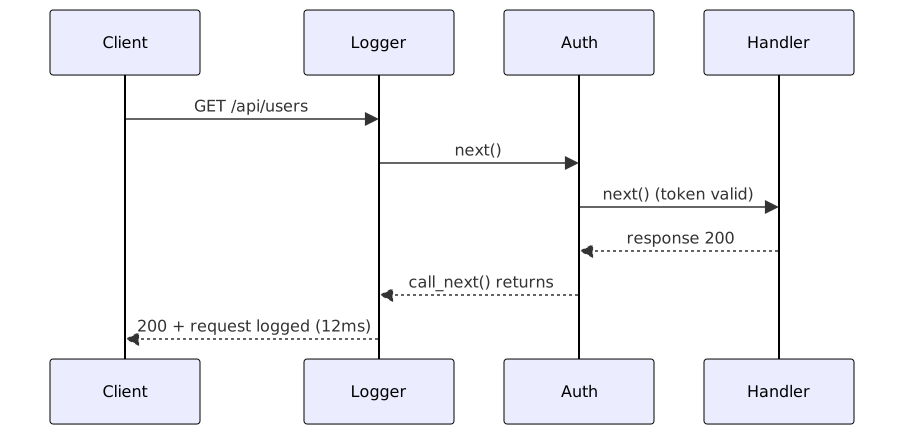
When auth rejects the request, next() is never called and the handler never runs — that’s the “fail fast” behavior that makes middleware the right home for auth, validation and rate limiting.
Each framework exposes hooks at different points in the pipeline:
- Before the handler (Express
app.use, FastAPIcall_next, SpringpreHandle): inspect, modify or block the request. - On the way out (Express
res.on('finish'), SpringpostHandle): add headers, log, record metrics. - After the response is sent (Spring
afterCompletion): cleanup, async logging. - Error middleware (Express’s four-argument
(err, req, res, next)signature): catches anything thrown downstream. Express identifies it purely by argument count — a three-arg function is never called for errors. It must be registered last.
Middleware vs decorators and guards: middleware runs for every request matching its mount path; a decorator or dependency (FastAPI Depends, NestJS guard, Spring @PreAuthorize) attaches to a single route. Reach for middleware when the concern is genuinely cross-cutting — logging, CORS, correlation IDs — and for per-endpoint rules use a dependency or guard instead. A per-route auth check done as global middleware forces you to maintain an exception list, and that’s the part everyone forgets.
A concrete example of why order matters: browsers send an OPTIONS preflight before any cross-origin request — and preflights carry no credentials. Register auth before CORS and every preflight dies on a 401 before the CORS headers ever get attached; the browser reports a “CORS error” that isn’t really a CORS problem. Put CORS first and the preflight gets its headers and short-circuits, while real requests still hit auth. Most “mysterious” middleware bugs trace back to this kind of ordering assumption.
What Works
- Register in the order the request should flow: logging and correlation IDs first (so everything downstream gets traced), then CORS and security headers, then auth, then routes — error handler dead last.
- Fail fast: an auth middleware returning 401 saves the handler from running at all. Cheap rejection beats expensive processing.
- Don’t swallow errors: in Express, wrap async middleware in try/catch and forward with
next(err)— an unhandled async rejection bypasses the error handler entirely. - Stay stateless: request-scoped data in module-level variables bleeds between concurrent requests. Attach to
req(Express),request.state(FastAPI) or request attributes (Spring) instead. - Use the framework’s built-ins for the boring stuff: Express’s
helmetandmorgan, FastAPI’sCORSMiddlewareandGZipMiddleware, Spring’sWebMvcConfigurerhooks are all battle-tested — write custom middleware only where they stop. - Inject, don’t construct: in Spring and FastAPI, inject services into the interceptor rather than building them inside it — cheaper and testable.
Common Mistakes
- Forgetting
next(): the request hangs forever — no response, no error, just a timeout. Still the most common Express middleware bug by a wide margin. - Error handler not last: register the four-arg error middleware before your routes and it silently never fires.
- Mutating
reqwith untrusted data: assigningreq.userfrom query params or unvalidated headers overwrites trusted state with attacker input. - Heavy synchronous work in the chain: middleware runs on every request — a blocking CPU spike stalls every other request in the process.
- Calling
next()twice: usually from a branch that forgot toreturnafter calling it once. In older Express versions it crashes the process; newer ones produce corrupted responses.
Troubleshooting
- Requests hang in Express: a middleware upstream isn’t calling
next(). Bisect by commenting outapp.uselines, or add aconsole.logbreadcrumb per layer and watch where the trace stops. - CORS errors in the browser: the preflight
OPTIONSneeds headers too — register CORS middleware before auth, or the preflight dies on a 401. - Auth runs but the route never does: you’re missing
next()after successful verification. - Middleware silent on some routes: check the mount path —
app.use('/api', mw)skips everything outside/api. - Handler throws but you get an HTML error page: the error never reached your middleware — it’s missing the
errfirst parameter, and three-argument functions are skipped for errors.
Further Reading
- Express middleware docs —
app.use, mount paths and error middleware semantics. - FastAPI middleware —
call_next-based middleware and the built-in middleware list. - Spring HandlerInterceptor — preHandle/postHandle/afterCompletion lifecycle.
- Runnable companion — Express and FastAPI middleware chains ready to run.
Frequently Asked Questions
What does next() actually do in Express middleware?
It hands control to the next function in the chain — either the next registered middleware or the route handler. Skip it and the request stalls forever. Call it with an argument (next(err)) and Express jumps straight to the error-handling middleware, skipping everything between.
Can middleware modify the response body?
In Express, not cleanly — the body may already be streamed by the time middleware sees the response. You can wrap res.send/res.json, but it's fiddly. FastAPI and Spring make post-processing easier; either way, headers and status codes are the safe things to touch.
How many middleware layers are too many?
No hard limit, but every layer adds latency to every request. If your chain is past a dozen items, some of them probably belong at the route level instead. Profile before cutting — a logging middleware costs microseconds; a synchronous token verification on every request is the expensive one.
Should validation live in middleware or in the handler?
Either works; what matters is where the rule applies. Middleware is right when the same validation covers many routes ("every POST body under 1MB, valid JSON"). Per-route validation — "user_id must exist" — belongs in a dependency, guard or the handler itself.
Why isn't my Express error handler being called?
Two usual suspects: it's registered before the routes (it must come last), or it's missing the err first parameter — Express recognizes error middleware only by its four-argument signature.
Related Resources
Call a REST API: Python, JavaScript, Java & Go Examples
How to make HTTP requests to a REST API and handle the JSON response in Python, JavaScript, Java, and Go.
RecipeHandle API Errors with RFC 7807 and HTTP Status Codes
Patterns for consistent, predictable API error handling across multiple languages and frameworks.
RecipeJWT Authentication
Sign, verify, and refresh JWTs in Python, JavaScript, and Java — access/refresh flows, RS256 key pairs, and token revocation done right.
RecipeExpress.js Middleware Composition Patterns
Build maintainable Express applications using middleware composition patterns for authentication, validation, error handling, request context propagation, and async route wrappers
RecipeHandle CORS in Express, Flask and Spring Boot
How to configure Cross-Origin Resource Sharing (CORS) headers correctly for APIs, SPAs, and serverless functions without opening security holes.
RecipeImplement API Rate Limiting with Redis
Protect APIs from abuse with Redis-backed token bucket and sliding window limiters, including burst handling and distributed coordination