Build a WebSocket Server (Python, Node.js, Java)
How to build a WebSocket server for bidirectional real-time communication, with connection management, message broadcasting, and heartbeat keepalive.
Overview
HTTP polling can’t deliver a chat message the moment it happens — you either burn requests asking “anything new?” or accept seconds of lag. WebSockets fix this with a single TCP connection that stays open so both sides can push frames whenever they need to, and that’s exactly what this recipe builds: WebSocket servers in Python, Node.js, and Java (Spring Boot), covering connection management, heartbeat keepalive, room-based broadcasting, and a browser client that reconnects itself.
When to Use
Use this resource when:
- You need true bidirectional real-time communication (chat, collaborative editing, multiplayer games)
- Your application requires low-latency updates in both directions (client → server and server → client)
- You want to avoid the overhead of HTTP polling or the unidirectional limitation of SSE
- You need to push data to specific clients or groups (rooms/channels) based on business logic
Don’t reach for WebSockets when server→client push is all you need — Server-Sent Events gives you that over plain HTTP, with automatic reconnection and no connection registry to maintain. And if plain request/response covers the case, a WebSocket only adds a connection lifecycle to babysit.
Solution
Python (websockets library)
import asyncio
import json
import websockets

connected = set()
rooms = {}  # room_name -> set of websockets

async def register(websocket):
    connected.add(websocket)

async def unregister(websocket):
    connected.discard(websocket)
    # Remove from all rooms
    for room in rooms.values():
        room.discard(websocket)

async def broadcast_to_room(room, message):
    if room in rooms:
        # Copy the set: clients may disconnect mid-iteration
        for client in rooms[room].copy():
            try:
                await client.send(message)
            except websockets.ConnectionClosed:
                pass

async def handler(websocket):
    await register(websocket)
    try:
        async for message in websocket:
            try:
                data = json.loads(message)
            except json.JSONDecodeError:
                await websocket.send(json.dumps({"error": "invalid JSON"}))
                continue

            action = data.get("action")
            room = data.get("room")

            if action == "join" and room:
                rooms.setdefault(room, set()).add(websocket)
                await websocket.send(json.dumps({"status": "joined", "room": room}))

            elif action == "message" and room:
                await broadcast_to_room(room, json.dumps({
                    "room": room,
                    "user": data.get("user", "anonymous"),
                    "message": data.get("message", "")
                }))

            elif action == "broadcast":
                for client in connected.copy():
                    if client != websocket:
                        try:
                            await client.send(json.dumps({"message": data.get("message", "")}))
                        except websockets.ConnectionClosed:
                            pass
    finally:
        await unregister(websocket)

async def main():
    # ping_interval/ping_timeout detect dead connections killed silently
    # by proxies, NAT gateways, or load balancers
    async with websockets.serve(
        handler, "localhost", 8765,
        ping_interval=30, ping_timeout=10
    ):
        await asyncio.Future()  # run forever

if __name__ == "__main__":
    asyncio.run(main())
Requires websockets 10.1+, where the handler takes a single websocket argument (the old path parameter was removed) and protocol-level keepalive is built in via ping_interval/ping_timeout — no manual heartbeat loop needed.
JavaScript (Node.js with ws)
const WebSocket = require("ws");

const wss = new WebSocket.Server({ port: 8765 });
const clients = new Map(); // websocket -> metadata
const rooms = new Map();   // room -> Set of websockets

wss.on("connection", (ws, req) => {
  const clientId = generateId();
  clients.set(ws, { id: clientId, rooms: new Set() });
  ws.isAlive = true;
  ws.on("pong", () => { ws.isAlive = true; });

  console.log(`Client ${clientId} connected`);
  ws.send(JSON.stringify({ type: "welcome", id: clientId }));

  ws.on("message", (rawMessage) => {
    let data;
    try {
      data = JSON.parse(rawMessage);
    } catch {
      ws.send(JSON.stringify({ type: "error", message: "Invalid JSON" }));
      return;
    }

    if (data.action === "join") {
      const room = data.room;
      clients.get(ws).rooms.add(room);
      if (!rooms.has(room)) rooms.set(room, new Set());
      rooms.get(room).add(ws);
      ws.send(JSON.stringify({ type: "joined", room }));
    } else if (data.action === "message") {
      broadcastToRoom(data.room, JSON.stringify({
        type: "message",
        room: data.room,
        user: data.user || "anonymous",
        message: data.message
      }));
    } else if (data.action === "broadcast") {
      const message = JSON.stringify({ type: "broadcast", message: data.message });
      wss.clients.forEach(client => {
        if (client.readyState === WebSocket.OPEN) client.send(message);
      });
    }
  });

  ws.on("close", () => {
    const meta = clients.get(ws);
    if (meta) {
      meta.rooms.forEach(room => rooms.get(room)?.delete(ws));
      clients.delete(ws);
      console.log(`Client ${meta.id} disconnected`);
    }
  });

  ws.on("error", (err) => {
    console.error("WebSocket error:", err);
  });
});

function broadcastToRoom(room, message) {
  const members = rooms.get(room);
  if (!members) return;
  members.forEach(ws => {
    if (ws.readyState === WebSocket.OPEN) ws.send(message);
  });
}

function generateId() {
  return Math.random().toString(36).substring(2, 9);
}

// Heartbeat: ping every 30s, terminate clients that didn't pong back
const heartbeat = setInterval(() => {
  wss.clients.forEach(ws => {
    if (!ws.isAlive) return ws.terminate();
    ws.isAlive = false;
    ws.ping();
  });
}, 30000);

wss.on("close", () => clearInterval(heartbeat));
Unlike a bare ws.ping() loop, this tracks isAlive per connection: any client that fails to pong back before the next interval gets terminated, so dead connections can’t accumulate silently.
Java (Spring Boot with STOMP)
import org.springframework.context.annotation.Configuration;
import org.springframework.messaging.simp.config.MessageBrokerRegistry;
import org.springframework.web.socket.config.annotation.*;

@Configuration
@EnableWebSocketMessageBroker
public class WebSocketConfig implements WebSocketMessageBrokerConfigurer {

  @Override
  public void configureMessageBroker(MessageBrokerRegistry config) {
    config.enableSimpleBroker("/topic", "/queue");
    config.setApplicationDestinationPrefixes("/app");
  }

  @Override
  public void registerStompEndpoints(StompEndpointRegistry registry) {
    registry.addEndpoint("/ws")
            // "*" accepts upgrades from any origin — dev only.
            // In production, list your real domains and reject the rest
            // to prevent cross-site WebSocket hijacking (CSWSH).
            .setAllowedOriginPatterns("*")
            .withSockJS();
  }
}

// Controller
import org.springframework.messaging.handler.annotation.*;
import org.springframework.stereotype.Controller;

@Controller
public class ChatController {

  @MessageMapping("/chat/{room}")
  @SendTo("/topic/rooms/{room}")
  public ChatMessage send(@DestinationVariable String room,
                          @Payload ChatMessage message) {
    return message;
  }

  @MessageMapping("/broadcast")
  @SendTo("/topic/broadcast")
  public String broadcast(@Payload String message) {
    return message;
  }
}

// Message class
public record ChatMessage(String user, String message, long timestamp) {}
Browser Client (with reconnection)
class ReconnectingWebSocket {
  constructor(url) {
    this.url = url;
    this.ws = null;
    this.reconnectDelay = 1000;
    this.maxDelay = 30000;
    this.onMessage = () => {};
    this.connect();
  }

  connect() {
    this.ws = new WebSocket(this.url);

    this.ws.onopen = () => {
      this.reconnectDelay = 1000; // reset backoff
      // Rejoin rooms here — reconnections lose server-side state
      this.send({ action: "join", room: "general" });
    };

    this.ws.onmessage = (event) => {
      this.onMessage(JSON.parse(event.data));
    };

    this.ws.onclose = () => {
      setTimeout(() => this.connect(), this.reconnectDelay);
      this.reconnectDelay = Math.min(this.reconnectDelay * 2, this.maxDelay);
    };
  }

  send(data) {
    if (this.ws.readyState === WebSocket.OPEN) {
      this.ws.send(JSON.stringify(data));
    }
  }
}

const socket = new ReconnectingWebSocket("ws://localhost:8765");

socket.onMessage = (data) => {
  if (data.type === "message") appendMessage(data.room, data.user, data.message);
  if (data.type === "broadcast") showNotification(data.message);
};

function sendMessage(room, text) {
  socket.send({ action: "message", room, user: "alice", message: text });
}
Browsers don’t auto-reconnect WebSockets. The exponential backoff above (1s → 2s → 4s … capped at 30s) is the minimum viable version — production clients usually add random jitter so hundreds of users don’t hammer the server at the same instant after an outage.
To smoke-test any of the servers above without writing a client, install wscat (npm i -g wscat) and run wscat -c ws://localhost:8765, or just paste the new WebSocket(...) line into your browser’s DevTools console.
Explanation
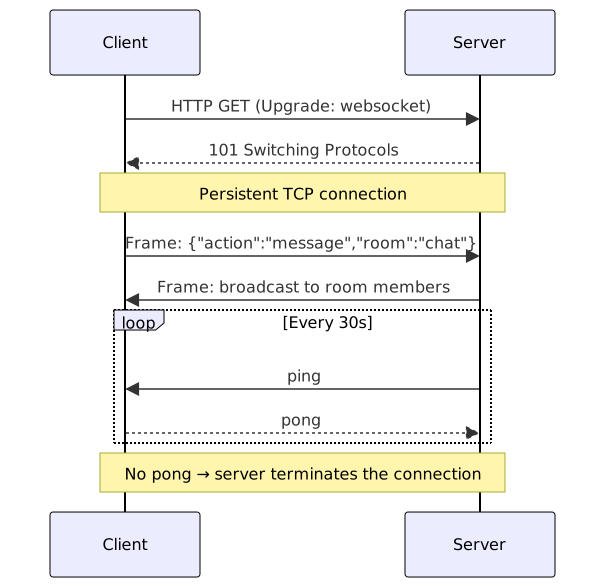
- Protocol handshake — WebSockets start as an HTTP request with
Upgrade: websocketandConnection: Upgradeheaders. The server returns a101 Switching Protocolsresponse, after which the TCP connection transitions to the WebSocket binary framing protocol. - Connection management — maintain a registry of active connections (sets or maps). When a client disconnects, remove it from the registry to prevent memory leaks and phantom broadcasts. Iterate over a copy of the set when broadcasting, because sending to a dying socket mutates the registry mid-loop.
- Heartbeat keepalive — WebSocket connections get silently dropped by proxies, NAT gateways, and load balancers, and neither side notices until a send fails. Protocol-level
ping/pongevery ~30 seconds is what actually detects the dead ones — but only if you also close the connections that don’t answer, as in theisAlivepattern above. - Room/channel architecture — map room names to sets of connections and fan out only to members. Broadcasting everything to everyone works fine at ten clients and falls over at ten thousand.
- Use
wss://in production —ws://sends traffic unencrypted and browsers block it as mixed content on HTTPS pages.wss://rides over TLS, same ashttps://.
Variants
| Framework | Protocol Capabilities | Best For |
|---|---|---|
Python websockets | Raw WebSocket, asyncio | Microservices, custom protocols |
Node.js ws | Raw WebSocket, high performance | Real-time games, chat at scale |
| Spring Boot STOMP | Sub-protocol over WebSocket | Enterprise apps, pub/sub messaging |
| Socket.IO | WebSocket + HTTP fallback | Browser apps needing fallback transport |
| AWS API Gateway | Managed WebSocket | Serverless architectures |
If clients sit behind corporate proxies that kill WebSocket upgrades entirely, degrade to SSE for server→client streams or HTTP long-polling when you truly need bidirectionality — that’s the fallback path Socket.IO automates for you.
Building a Chat Application
A chat built on this server adds four things the bare recipe doesn’t cover: presence, typing indicators, message persistence, and fan-out across server instances. The companion project ships all of it as a runnable Node.js app (server, Redis relay, typing handler, and a React useChat hook with backoff reconnection); the essential pieces are below.

Presence and typing indicators
Keep a per-room set of typing users and broadcast the member list on every join and leave. Typing events take the same path as presence but stay ephemeral — they’re never persisted.
// server/typing.ts
const typingUsers = new Map<string, Set<string>>();

export function handleTyping(client: ChatClient, isTyping: boolean) {
  if (!typingUsers.has(client.roomId)) {
    typingUsers.set(client.roomId, new Set());
  }
  const room = typingUsers.get(client.roomId)!;
  if (isTyping) room.add(client.userId);
  else room.delete(client.userId);

  broadcastToRoom(client.roomId, {
    type: 'typing',
    users: Array.from(room),
  });
}
Multi-server fan-out with Redis pub/sub
The rooms map only sees the sockets on its own process. Publish every chat message to a shared channel and let each instance — including the one that accepted the message — relay it to local rooms. That single path is how a client on server B sees what a client on server A sent. Broadcasting locally on top of the relay is the classic way to deliver every message twice.
// server/redis-broadcast.ts
const subscriber = redis.duplicate();
await subscriber.connect();

// node-redis v4: subscribe(channel, (message, channel) => void)
await subscriber.subscribe('chat:messages', (raw) => {
  const { roomId, message } = JSON.parse(raw);
  broadcastToRoom(roomId, message);
});
Persistence and backfill on reconnect
Persist each chat message before publishing it, and serve history with cursor pagination so a reconnecting client can backfill what it missed. Assign a server-side sequence number to every message instead of trusting client timestamps; after a reconnect the client requests everything since its last seen seq and merges it into the timeline.
What Works
- Always handle connection errors — network failures, client crashes, and proxy timeouts leave stale connections. Wrap sends in try/catch, handle
onError, and pair heartbeat pings with real termination of unanswered connections. - Authenticate during the handshake — pass authentication tokens via query parameters or cookies during the WebSocket upgrade request. Don’t try to authenticate over the message channel after connecting; the handshake is the safest point. And validate the
Originheader — browsers don’t enforce same-origin on WebSockets, so an unchecked endpoint invites cross-site WebSocket hijacking. - Validate all incoming messages — WebSocket payloads are untrusted. Validate input, enforce message size limits, and rate-limit clients; a malformed or oversized message shouldn’t be able to crash your handler.
- Use rooms for targeted delivery — organize clients into rooms/channels based on application logic (chat rooms, document IDs, user groups) instead of broadcasting to everyone. It cuts server load and client-side filtering.
- Implement reconnection logic on the client — browsers don’t auto-reconnect. Wrap the
WebSocketinstance in a manager with exponential backoff plus jitter, and rejoin rooms after reconnecting — the server forgot them.
Common Mistakes
- Broadcasting every message to all connected clients instead of using rooms — unnecessary bandwidth and client-side noise.
- Pinging without checking pongs. A
pingloop alone doesn’t detect dead connections; you need a flag (isAlive) and aterminate()for clients that stop answering. - Sending binary data without checking
ws.binaryTypeon the client, causingBlobvsArrayBufferconfusion in JavaScript. - Assuming a WebSocket is authenticated because it upgraded through an authenticated endpoint. The upgrade is a separate request; verify the token on the handshake itself.
- Forgetting backpressure. If a client consumes messages slowly, unbounded server-side queuing exhausts memory — watch
ws.bufferedAmount, pause ephemeral events like typing indicators, and disconnect clients that never drain. - Reconnecting with a fixed delay. When a server restarts, every client reconnects in the same second and the stampede takes it down again — exponential backoff with jitter spreads the load.
See Also
- RFC 6455 — The WebSocket Protocol
- MDN — The WebSocket API
- python-websockets documentation
- ws — Node.js WebSocket library
- Socket.IO documentation
- Runnable chat project — companion repo with a complete chat app (rooms, presence, Redis fan-out, React client) built on this recipe.
Frequently Asked Questions
How many concurrent WebSocket connections can a server handle?
It depends on your language, framework, and hardware. Node.js with ws can handle 10,000–50,000 connections on a single process. Python with websockets (asyncio) typically handles 1,000–10,000. Java (Netty/Spring) can scale to 100,000+ with proper tuning. Horizontal scaling with sticky sessions or shared pub/sub (Redis) is required for truly massive deployments.
What's the difference between ws:// and wss://?
ws:// is unencrypted; wss:// tunnels WebSocket over TLS, exactly like http:// vs https://. Browsers block ws:// as mixed content when the page was served over HTTPS, so production deployments need wss:// — which also means terminating TLS at your load balancer or server.
Should I use raw WebSockets or a library like Socket.IO?
Use raw WebSockets if you need maximum control, minimal overhead, or custom framing. Use Socket.IO if you need automatic fallback to HTTP long-polling (for proxies that block WebSockets), built-in room management, reconnection logic, and heartbeat handling. Socket.IO adds ~20KB client-side and some protocol overhead.
How do I scale WebSocket servers horizontally?
You can't broadcast across server instances without a shared message bus. Use Redis Pub/Sub, RabbitMQ, or a managed service (AWS API Gateway, Pusher, Ably) to distribute messages between every instance. Clients connected to Server A must receive messages sent by clients on Server B via this shared bus.
Why does my WebSocket keep disconnecting after a minute of inactivity?
Almost always a proxy, NAT gateway, or load balancer dropping idle connections — typical idle timeouts run 30–120 seconds. The fix is heartbeat ping/pong frames every ~30 seconds to keep the connection looking alive to middleboxes, plus reconnection logic on the client for the drops that still get through.
Can I use WebSocket over HTTP/2?
RFC 8441 defines a WebSocket handshake bootstrapped over HTTP/2, but support across servers and proxies is still rare, so in practice WebSocket runs over HTTP/1.1 Upgrade. When HTTP/2-native push is the requirement, Server-Sent Events already runs over HTTP/2 for server-to-client delivery.
Does WebSocket guarantee message ordering?
Within one connection, yes: frames arrive in the order they were sent. The problem is reconnects and multi-server fan-out, where a replayed backlog can interleave with live messages — a server-side sequence number plus client-side buffering is the usual fix.
How do I track who's online (presence)?
Keep a Map<userId, Set<socket>> of live connections per user and broadcast presence:online/presence:offline to their rooms. Only mark a user offline when their last socket closes — someone with two tabs open shouldn't flicker when they close one. The heartbeat catches connections that die without a clean close frame.
How do I test WebSocket connections in CI?
Use the ws client in Node.js tests: connect, send a message, assert the broadcast arrives. mock-socket fakes the server for unit tests without opening a port, and Artillery or k6 have WebSocket scenarios for load testing thousands of concurrent connections.
Related Resources
Server-Sent Events (SSE): One-Way Real-Time Streaming
Implement one-way real-time streaming from server to browser using Server-Sent Events. Covers Python, Node.js, Java, event types, reconnection, and broadcasting.
RecipeWebhooks
How to create and consume webhook endpoints for real-time event-driven integrations.
RecipeWebSocket Authentication and Security Patterns
How to authenticate WebSocket connections, implement token validation, and handle authorization for real-time messaging in production
PatternPublish-Subscribe Pattern
Broadcast events to multiple independent subscribers. Publishers send messages to a topic without knowing who listens, which keeps producers and consumers loosely coupled.
RecipeBuild Real-Time Notifications with WebSockets
Implement a real-time notification system using WebSockets and Redis pub/sub for broadcasting messages across clients.
RecipeBuild Real-Time APIs with WebSockets on Serverless
How to implement bidirectional real-time communication using WebSockets with AWS API Gateway, Lambda, DynamoDB, and what works in connection management.