Overview
Server-Sent Events (SSE) is a browser API and HTTP-based protocol that lets a server push
real-time updates to clients over a single long-lived connection. Unlike
WebSockets, SSE is uni-directional: server → client only. SSE runs over plain HTTP, works through most firewalls and proxies, has built-in
auto-reconnection with Last-Event-ID, and doesn’t need a protocol upgrade. That last
point matters more than people realize — it means your existing HTTP infrastructure
(load balancers, CDNs, monitoring) just works.
I’ve used SSE in production for live dashboards and notification systems, and it’s saved me from WebSocket complexity more than once. When you only need server-to-client push — think stock tickers, live scores, progress bars, or log tails — SSE is simpler to deploy, easier to debug, and plays nice with existing HTTP infrastructure like CDN edge caching and load balancers.
When to Use
- You need real-time server-to-client updates, such as live scores, stock prices, notifications, or logs.
- The data flow is mostly one-directional: the server pushes and the client only listens.
- You want auto-reconnect without rolling your own WebSocket reconnection logic.
- You need something simple that plays nice with corporate firewalls and HTTP proxies — no protocol upgrade, no special ports.
- You’re already serving a REST API and want to add a streaming endpoint without introducing a new protocol.
When NOT to Use
- For bidirectional chat, gaming, or collaborative editing: use WebSockets.
- For binary data: SSE only supports UTF-8 text; base64-encode or use WebSockets.
- When the client needs to send frequent messages to the server.
- When you need gRPC streaming for polyglot microservices — gRPC supports bidirectional streaming with strong typing.
Solution
Python with Flask
from flask import Flask, Response
import json
import time
from queue import Queue

app = Flask(__name__)

@app.route("/events")
def events():
    def generate():
        counter = 0
        while True:
            counter += 1
            data = {"message": f"Update {counter}", "timestamp": time.time()}
            yield f"data: {json.dumps(data)}\n\n"
            time.sleep(2)

    return Response(generate(), mimetype="text/event-stream",
                    headers={"Cache-Control": "no-cache",
                             "X-Accel-Buffering": "no"})

# Broadcasting to multiple clients
clients = []

@app.route("/broadcast")
def broadcast_stream():
    q = Queue()
    clients.append(q)

    def generate():
        try:
            while True:
                msg = q.get()
                yield f"data: {json.dumps(msg)}\n\n"
        finally:
            clients.remove(q)

    return Response(generate(), mimetype="text/event-stream")
Node.js with Express
const express = require("express");
const app = express();

app.get("/events", (req, res) => {
  res.setHeader("Content-Type", "text/event-stream");
  res.setHeader("Cache-Control", "no-cache");
  res.setHeader("Connection", "keep-alive");
  res.setHeader("X-Accel-Buffering", "no");

  let counter = 0;

  const interval = setInterval(() => {
    counter++;
    const data = JSON.stringify({
      message: `Update ${counter}`,
      timestamp: Date.now()
    });
    res.write(`data: ${data}\n\n`);
  }, 2000);

  req.on("close", () => clearInterval(interval));
});

// Broadcasting
const clients = new Set();

app.get("/broadcast", (req, res) => {
  res.setHeader("Content-Type", "text/event-stream");
  res.setHeader("Cache-Control", "no-cache");
  res.setHeader("Connection", "keep-alive");

  clients.add(res);
  req.on("close", () => clients.delete(res));
});

function broadcastToAll(data) {
  const message = `data: ${JSON.stringify(data)}\n\n`;
  clients.forEach(client => client.write(message));
}
Java with Spring Boot
import org.springframework.http.MediaType;
import org.springframework.web.bind.annotation.GetMapping;
import org.springframework.web.bind.annotation.RestController;
import org.springframework.web.servlet.mvc.method.annotation.SseEmitter;

import java.io.IOException;
import java.util.concurrent.CopyOnWriteArrayList;
import java.util.concurrent.Executors;
import java.util.concurrent.ScheduledExecutorService;
import java.util.concurrent.TimeUnit;

@RestController
public class SseController {

  private final CopyOnWriteArrayList<SseEmitter> emitters = new CopyOnWriteArrayList<>();
  private final ScheduledExecutorService scheduler =
    Executors.newSingleThreadScheduledExecutor();

  @GetMapping(value = "/events", produces = MediaType.TEXT_EVENT_STREAM_VALUE)
  public SseEmitter streamEvents() {
    SseEmitter emitter = new SseEmitter(0L);
    emitters.add(emitter);

    emitter.onCompletion(() -> emitters.remove(emitter));
    emitter.onTimeout(() -> emitters.remove(emitter));
    emitter.onError((e) -> emitters.remove(emitter));

    scheduler.scheduleAtFixedRate(() -> {
      try {
        emitter.send(SseEmitter.event()
          .data("{\"message\": \"Update\"}"));
      } catch (IOException e) {
        emitters.remove(emitter);
      }
    }, 0, 2, TimeUnit.SECONDS);

    return emitter;
  }

  public void broadcast(String message) {
    for (SseEmitter emitter : emitters) {
      try {
        emitter.send(SseEmitter.event().data(message));
      } catch (IOException e) {
        emitters.remove(emitter);
      }
    }
  }
}
Browser client
const eventSource = new EventSource("/events");

eventSource.onmessage = (event) => {
  const data = JSON.parse(event.data);
  console.log("Received:", data);
};

eventSource.onerror = (error) => {
  console.error("SSE error:", error);
};

// Named events
const notifications = new EventSource("/notifications");

notifications.addEventListener("alert", (e) => {
  const data = JSON.parse(e.data);
  showAlert(data.msg);
});
Named events and heartbeats
def generate():
    yield "event: connected\ndata: \"Stream started\"\n\n"

    for i in range(1, 10):
        event_type = "alert" if i % 3 == 0 else "info"
        data = {"level": event_type, "msg": f"Notification {i}"}
        yield f"event: {event_type}\ndata: {json.dumps(data)}\n\n"

        # Heartbeat comment
        yield ": heartbeat\n\n"
Explanation
SSE runs over plain HTTP with Content-Type: text/event-stream. Each message is a set of
field: value lines ending with a blank line. The browser’s EventSource API handles all
the connection lifecycle stuff — open, auto-reconnect, and parse — so you don’t have to.
Here’s the full connection lifecycle:
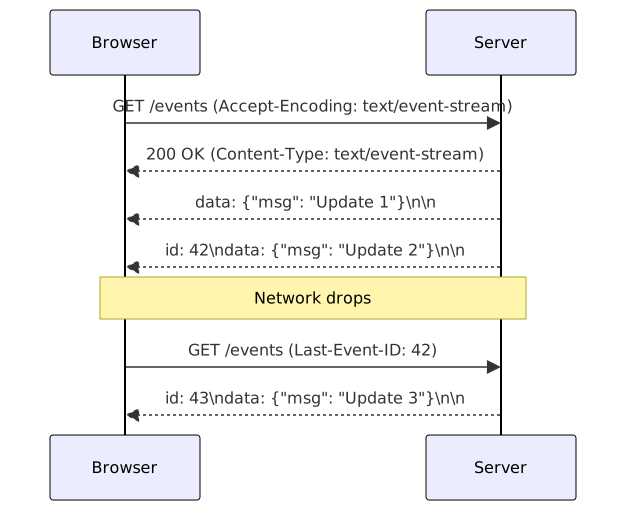
Key fields:
data— the payload. You can send two or moredata:lines; the browser concatenates them with\nbetween each.event— the named event type. The browser dispatches it toaddEventListener("event-name", ...)instead of the defaultonmessagehandler.id— used by the browser asLast-Event-IDon reconnect. This is how you implement resumable streams: the server reads the header and replays missed events.retry— reconnection delay in milliseconds. This tells the browser how long to pause before it tries to reconnect after a drop.: comment— a heartbeat line. It keeps the connection alive on proxies and load balancers without delivering any data to the client.
If the connection drops, the browser waits the retry interval and reconnects,
sending the last received id. The server can use that header to resume from the right
point. I once debugged an SSE stream that kept reconnecting every 30 seconds — turned out
Nginx was buffering the response because I forgot X-Accel-Buffering: no. The browser
saw no data arriving, assumed the connection was dead, and reconnected. Classic mistake.
Debugging SSE connections
The fastest way to test an SSE endpoint is curl -N:
# -N disables curl's output buffering so you see events in real-time
curl -N -H "Accept: text/event-stream" http://localhost:3000/events
If you see events arriving one at a time, your server and proxy are configured correctly.
If you see a burst of events after a delay, something is buffering — check Nginx
proxy_buffering, Cloudflare’s “Rocket Loader”, or any CDN that sits in front of your
origin.
For production monitoring, track these metrics:
- Active connections — how many
EventSourceclients are connected per server instance. - Events per second — how much throughput each endpoint handles.
- Reconnection rate — if clients reconnect frequently, your proxy or heartbeat config is wrong.
- Memory per connection — each SSE connection holds a response object in memory. At 10k concurrent clients, that adds up fast.
Scaling SSE with Redis pub/sub
When you’ve got two or more server instances behind a load balancer, each instance only knows about its own local clients. To broadcast to all clients across all instances, use a pub/sub layer — Redis works well for this:
import redis
import json

r = redis.Redis(host="localhost", port=6379)

def broadcast_to_all_instances(channel, data):
    r.publish(channel, json.dumps(data))

# Each server instance subscribes and pushes to local SSE clients
pubsub = r.pubsub()
pubsub.subscribe("sse-broadcast")

for message in pubsub.listen():
    if message["type"] == "message":
        for q in list(clients):
            q.put(json.loads(message["data"]))
This pattern scales horizontally — you can add more server instances and they all subscribe to the same Redis channel. I’ve run this in production with 10k+ concurrent clients across 4 Node.js instances, and Redis pub/sub handled the fan-out without breaking a sweat.
Variants
| Approach | Transport | Direction | Best for |
|---|---|---|---|
| SSE | HTTP | Server → client | Notifications, live feeds, progress bars |
| WebSocket | TCP upgrade | Bidirectional | Chat, gaming, collaborative editing |
| Long polling | HTTP | Client request → server push | Legacy browsers, simple updates |
| HTTP/2 SSE | HTTP/2 | Server → client | Shared streams, lower overhead |
Best Practices
- Set
X-Accel-Buffering: noto prevent Nginx and other proxies from buffering messages. - Use
Cache-Control: no-cacheso browsers and proxies don’t cache the live stream. - Send heartbeat comments (
: ping\n\n) every 15-30 seconds to keep idle connections open. - Handle disconnects immediately (
req.on("close")oronCompletion) to avoid memory leaks in the broadcast registry. - Use
eventtypes for routing on the client side. Don’t stuff the type inside the JSON payload — that forces every client to parse JSON just to decide which handler to call.
Common Mistakes
- Forgetting
X-Accel-Buffering: noorCache-Control: no-cache, which causes delayed batched delivery. - Not cleaning up disconnected clients, leading to memory leaks.
- Sending SSE data without the final
\n\nterminator; the browser waits forever. - Using SSE for two-way chat — switch to WebSockets instead. SSE is one-way only.
- Sending binary data directly; SSE only supports UTF-8 text.
See Also
- MDN: Server-Sent Events — browser API reference
- HTML Living Standard: Server-sent events — protocol specification
- Spring: SseEmitter Javadoc — Java server-side SSE
- Flask: Streaming responses — Python streaming patterns
- Cloudflare: Understanding SSE — CDN considerations
- WebSocket server — bidirectional alternative to SSE
- Real-time notifications — notification system patterns
Frequently Asked Questions
How is SSE different from WebSockets?
SSE runs over standard HTTP, is uni-directional, has built-in auto-reconnection with
Last-Event-ID, and works through most firewalls and proxies. WebSockets need a protocol
upgrade, support two-way communication, and you've got to write your own reconnection logic.
Why does my SSE connection drop every 30 seconds?
You're probably behind a proxy or CDN that buffers the response. Set
X-Accel-Buffering: no for Nginx, disable proxy buffering in your CDN, and send heartbeat
comments (: ping\n\n) every 15-30 seconds to keep the connection alive. I spent two days
debugging this once — the fix was one header.
What's the maximum number of SSE connections per browser?
Browsers limit SSE to 6 concurrent connections per domain on HTTP/1.1. HTTP/2 removes that limit by running concurrent streams over a single TCP connection. If you need more than 6 SSE endpoints on HTTP/1.1, use a single endpoint with named events instead of opening separate connections.
How do I resume after a network interruption?
The browser tracks the last received id and sends it as the Last-Event-ID header when
reconnecting. The server reads that header and resumes from that point. If no id was sent, the browser can't resume — the stream just starts over. That's fine
for ephemeral data like live scores, but bad for ordered event logs.
How do I scale SSE to many clients?
Use a message broker or pub/sub system to fan out events. Each server instance keeps a
registry of local EventSource or SseEmitter connections. The broker pushes new events
to all instances, which then broadcast to their local clients.
Related Resources
API Versioning: URL, Header & Media Type Strategies
How to version REST APIs with URL path, header, and media-type strategies while keeping backward compatibility for existing clients.
RecipeCall a REST API: Python, JavaScript, Java & Go Examples
How to make HTTP requests to a REST API and handle the JSON response in Python, JavaScript, Java, and Go.
RecipegRPC API with Protocol Buffers
Implement a gRPC API with Protocol Buffers. Covers service definition, code generation, client/server examples in Python, Java, and Go.
RecipeHandle API Errors with RFC 7807 and HTTP Status Codes
Patterns for consistent, predictable API error handling across multiple languages and frameworks.
RecipeBuild Real-Time Notifications with WebSockets
Implement a real-time notification system using WebSockets and Redis pub/sub for broadcasting messages across clients.
RecipeImplement Server-Sent Events in Go for Real-Time Updates
Build a production-ready Server-Sent Events endpoint in Go with connection management, heartbeat pings, and graceful client disconnect handling.