Database Schema Documentation Template
A template for documenting database schemas with entity relationships, field definitions, and migration history.
Overview
Database schemas evolve constantly. Without documentation, every new developer spends hours reverse-engineering table relationships, guessing why a column exists, and wondering whether an index is still used. This template gives you a structure for documenting schemas that stays useful as the database grows.
The template covers four areas:
- Entity documentation: table purpose, column definitions, business meaning
- Relationship mapping: foreign keys, ER diagrams, cascade rules
- Indexing strategy: what each index serves, when it was added, what query it optimizes
- Migration tracking: schema versions, change history, rollback notes
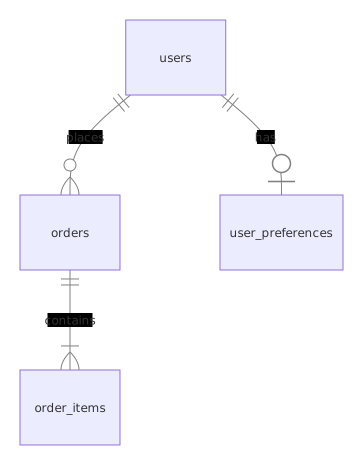
The example below documents a small e-commerce schema. Here’s what it looks like as an ER diagram:
Pair this template with the Database Migration Runbook for operational change tracking.
Template
# Schema Documentation: [Database Name]

## Overview
- **Engine:** PostgreSQL 16 / MySQL 8 / etc.
- **Purpose:** One paragraph describing what this database stores and which services read/write to it.
- **Owner team:** [team name]
- **Replication:** [none / streaming / logical]
- **Backup schedule:** [daily / hourly / continuous]

## Entities

### Table: users

**Purpose:** Stores authenticated user accounts for the application.

| Column | Type | Nullable | Default | Description |
|--------|------|----------|---------|-------------|
| id | uuid | NO | gen_random_uuid() | Primary key, generated server-side |
| email | varchar(255) | NO | — | Unique, lowercase on insert via trigger |
| password_hash | varchar(255) | NO | — | Argon2id hash, never log or expose |
| display_name | varchar(100) | YES | NULL | User-chosen name, shown in UI |
| status | smallint | NO | 1 | 0=deleted, 1=active, 2=suspended, 3=pending_verification |
| metadata | jsonb | YES | '{}' | Flexible key-value store for feature flags, preferences |
| created_at | timestamptz | NO | now() | Row creation timestamp |
| updated_at | timestamptz | NO | now() | Updated via trigger on every UPDATE |
| deleted_at | timestamptz | YES | NULL | Soft delete marker; filtered by application queries |

**Constraints:**
- `users_email_key` — UNIQUE on `email`
- `users_status_check` — CHECK (status >= 0 AND status <= 3)

**Indexes:**
| Name | Columns | Type | Purpose | Added in migration |
|------|---------|------|---------|-------------------|
| users_pkey | id | btree | Primary key | 001_initial |
| users_email_key | email | btree | Login lookup, uniqueness | 001_initial |
| users_status_idx | status | btree | Filter active users in admin panel | 014_admin_dashboard |
| users_created_at_idx | created_at | btree | Pagination by creation date | 022_pagination |

**Business rules:**
- Email is lowercased on insert and update via a trigger
- `status = 0` (deleted) is set by the application, never by a direct SQL update
- `metadata` must not contain PII — enforced by application validation, not DB constraint
- `deleted_at` is set when status changes to 0; both fields must agree

### Table: orders

**Purpose:** Stores customer orders, linked to the user who placed them.

| Column | Type | Nullable | Default | Description |
|--------|------|----------|---------|-------------|
| id | uuid | NO | gen_random_uuid() | Primary key |
| user_id | uuid | NO | — | FK to users.id, CASCADE DELETE |
| total_cents | integer | NO | 0 | Total in cents, never float |
| currency | char(3) | NO | 'USD' | ISO 4217 currency code |
| status | smallint | NO | 0 | 0=pending, 1=paid, 2=shipped, 3=delivered, 4=cancelled, 5=refunded |
| placed_at | timestamptz | NO | now() | When the order was placed |
| shipped_at | timestamptz | YES | NULL | When the order was shipped |

**Constraints:**
- `orders_user_id_fkey` — FOREIGN KEY (user_id) REFERENCES users(id) ON DELETE CASCADE
- `orders_total_check` — CHECK (total_cents >= 0)
- `orders_currency_check` — CHECK (currency IN ('USD', 'EUR', 'GBP', 'JPY'))

**Indexes:**
| Name | Columns | Type | Purpose | Added in migration |
|------|---------|------|---------|-------------------|
| orders_pkey | id | btree | Primary key | 001_initial |
| orders_user_id_idx | user_id | btree | List orders by user | 001_initial |
| orders_status_placed_at_idx | status, placed_at | btree | Admin dashboard: filter by status, sort by date | 014_admin_dashboard |

**Business rules:**
- `total_cents` is stored as integer to avoid floating-point errors
- Orders with `status >= 2` can't be cancelled (application enforces)
- `shipped_at` must be null when `status < 2` (application enforces)

## Relationships

```
users 1───∞ orders
  │              │
  │              └── order_items (line items per order)
  │
  └── user_preferences (1:1, optional)
```

- **users → orders**: One user can have many orders. CASCADE DELETE removes orders when a user is hard-deleted (rare; soft delete is preferred).
- **orders → order_items**: One order has many line items. CASCADE DELETE.
- **users → user_preferences**: One-to-one, LEFT JOIN. Preferences are optional.

## Enum Reference

| Table | Column | Value | Meaning |
|-------|--------|-------|---------|
| users | status | 0 | Deleted (soft) |
| users | status | 1 | Active |
| users | status | 2 | Suspended (admin action) |
| users | status | 3 | Pending email verification |
| orders | status | 0 | Pending payment |
| orders | status | 1 | Paid, awaiting shipment |
| orders | status | 2 | Shipped |
| orders | status | 3 | Delivered |
| orders | status | 4 | Cancelled |
| orders | status | 5 | Refunded |

## Migration History

| Version | Date | Description | Author | Rollback notes |
|---------|------|-------------|--------|----------------|
| 001 | 2026-01-15 | Initial schema (users, orders, order_items) | Mathias | Drop all tables |
| 014 | 2026-03-02 | Add admin dashboard indexes | Mathias | DROP INDEX orders_status_placed_at_idx; DROP INDEX users_status_idx; |
| 022 | 2026-05-10 | Add pagination index on users.created_at | Mathias | DROP INDEX users_created_at_idx; |

## Deprecated Columns

| Table | Column | Deprecated on | Removal target | Replacement |
|-------|--------|---------------|----------------|-------------|
| users | legacy_id | 2026-04-01 | 2026-07-01 | Migrated to `id` (uuid) in migration 018 |

## Notes

- All timestamps are stored as `timestamptz` in UTC. Application converts to user timezone on display.
- Monetary values are stored as integer cents, never as float or numeric.
- Soft deletes use `deleted_at` + `status = 0`. Hard deletes require a documented reason and a migration.
- The `metadata` jsonb column is for non-structured data only. If a key becomes queried regularly, promote it to a real column.
What Works
- Document every table and column: future developers (including yourself) will thank you. Pair schema docs with a Migration Runbook for change tracking.
- Explain business meaning, not just types:
statusis obvious; whymetadataexists isn’t - Include the “why” for indexes: indexes have a cost; document what query each one serves. See the SQL Performance Tuning Guide for indexing strategy.
- Version your schema docs: track what changed and when, just like code
- Keep the ER diagram updated: a visual reference is faster than reading SQL when you’re learning the model
- Mark deprecated columns: don’t delete docs for dropped columns immediately; mark them deprecated with a removal date
- Document enum values in a reference table: magic numbers like
status = 3are meaningless without context - Record migration rollback notes: when a deployment fails, you need to roll back fast
Common Mistakes
- Documenting the schema once and never updating it: stale documentation is worse than none
- Only documenting tables, ignoring indexes and constraints: indexes reveal query patterns
- Using vague column names without explanation:
dataorvaluetells you nothing - Not documenting soft delete patterns: new developers often miss
deleted_atfilters - Forgetting to document enum values: what does
status = 3mean? - Storing money as float: use integer cents or a dedicated decimal type
- Not documenting cascade rules:
ON DELETE CASCADEcan silently remove data - Mixing UTC and local timestamps: pick one (UTC) and enforce it with
timestamptz - Skipping the “business rules” section: SQL constraints don’t capture application-level rules
- Copying the template verbatim: delete the sections that don’t apply to your schema instead of leaving placeholders behind
Variants
| Variant | Context | Approach | Notes |
|---|---|---|---|
| Auto-generated (tbls/dbdocs) | Large schema, frequent changes | Extract DDL, generate diagrams | Layer narrative docs on top |
| Markdown in-repo | Small team, PR-based changes | Docs alongside code | PR review keeps docs in sync |
| Wiki/Confluence | Org with existing wiki | Adapt sections to wiki pages | Link migrations and postmortems |
| DBML/ERD visual | Fast onboarding, stakeholders | Visual diagram + minimal docs | Update on every migration |
Auto-generated docs (tbls / dbdocs)
Tools like tbls and dbdocs generate schema documentation from the live database. They produce ER diagrams, column listings, and constraint summaries automatically. Use them for the structural baseline, then layer narrative documentation (business rules, enum meanings, indexing rationale) on top — auto-generated docs can’t tell you why a column exists.
Markdown in-repo docs
Keep schema docs as Markdown files in the same repository as the application code. Docs get reviewed in PRs alongside schema changes, so they can’t drift silently. Use the template above as a starting point.
Wiki / Confluence
For organizations with existing wiki infrastructure, adapt the template sections into wiki pages. Link each table to its corresponding migration history and postmortem entries.
DBML / ERD tools
dbml.dbdiagram.io lets you define the schema in DBML and renders the ER diagram alongside it. Useful when stakeholders need the visual more than the prose — but keep the narrative sections somewhere, or you’ll end up with a diagram nobody can interpret.
Detailed Scenario: Documenting a Schema Migration
System: Orders database (PostgreSQL 16)
Change: Add shipping_address_id column to orders
Migration: 023_add_shipping_address

Step 1 - Write the migration:
  -- 023_add_shipping_address.sql
  ALTER TABLE orders ADD COLUMN shipping_address_id uuid;
  ALTER TABLE orders ADD CONSTRAINT orders_shipping_address_id_fkey
    FOREIGN KEY (shipping_address_id) REFERENCES addresses(id)
    ON DELETE SET NULL;

  CREATE INDEX orders_shipping_address_id_idx
    ON orders(shipping_address_id)
    WHERE shipping_address_id IS NOT NULL;

Step 2 - Update schema documentation:
  Table: orders
  | Column | Type | Nullable | Default | Description |
  |---------|------|----------|---------|-------------|
  | shipping_address_id | uuid | YES | NULL | FK to addresses.id, SET NULL on delete |

  Indexes:
  | orders_shipping_address_id_idx | shipping_address_id | btree | Lookup orders by address | 023_add_shipping_address |

  Constraints:
  | orders_shipping_address_id_fkey | FK (shipping_address_id) REFERENCES addresses(id) ON DELETE SET NULL |

Step 3 - Update migration history:
  | 023 | 2026-07-11 | Add shipping_address_id to orders | Mathias | ALTER TABLE orders DROP COLUMN shipping_address_id; |

Step 4 - Update ER diagram:
  orders --- addresses (N:1, SET NULL on delete)

Step 5 - Rollback notes:
  - Column is nullable, does not break existing queries
  - Rollback: DROP COLUMN (index and FK drop in cascade)
  - Data: column is lost, but derivable from order_items

Step 6 - Communicate to team:
  - PR with migration + updated docs
  - Slack note: "New shipping_address_id column on orders"
  - Update ORM models (Prisma, TypeORM, SQLAlchemy)
Further Reading
- Downloadable companion — the template as a ready-to-fill Markdown file plus a DBML version of the example schema
- tbls — CI-friendly database documentation generator
- dbdocs — database documentation built on DBML
- DBML spec — database markup language
- PostgreSQL COMMENT — document objects inside the database
Frequently Asked Questions
Should I auto-generate schema docs from the database?
Yes, for the structural baseline. Tools like tbls, dbdocs, or pg_dump comments are a great starting point, and they never go stale. But always add narrative documentation — the "why" behind design decisions can't be extracted from DDL.
How do I keep schema docs in sync with the database?
Generate the structural parts automatically in CI. Reserve manual sections (business meaning, indexing rationale) for human curation. Review docs in the same PR that changes the schema, and add a CI check that fails if a migration file exists without a corresponding doc update.
How do I document computed or virtual columns?
Document the formula or calculation logic in the table's business rules section, and note whether the column is stored or computed at read time. For PostgreSQL generated columns (GENERATED ALWAYS AS), include the SQL expression and note that the column can't be written to directly.
What if a table has more than 50 columns?
Split the documentation by logical column groups. In a users table, for example: authentication (email, password_hash, status), profile (display_name, avatar_url), and metadata (jsonb, timestamps). The doc stays readable without losing completeness.
What level of detail is too much?
Document anything that would confuse a new team member or that you've explained more than twice in Slack. Skip self-documenting names like id on a primary key unless there's a non-obvious default or generation rule.
Should I document every index?
Yes. Every index has a cost — storage and write latency. If you can't explain why an index exists, it's a candidate for removal. Document the migration that added it and the query pattern it serves.
How do I document views and materialized views?
Treat views like tables. For each one, document the underlying tables, the query logic, whether it's materialized, and the refresh schedule. Materialized views also need their refresh strategy (manual, scheduled, trigger-based).
What about stored procedures and functions?
Document them in a separate API section of the schema docs. For each function: name, parameters, return type, purpose, and side effects (writes, notifications, etc.). If a function is called from application code, link to the calling service.
How do I handle schema branching for feature development?
Document the base schema normally. For feature branches that add tables or columns, add a "Branch schema changes" section listing the temporary objects and their cleanup plan. When the feature merges, move the changes into the main documentation and remove the branch section.
Related Resources
Database Migration Runbook Template
A database migration runbook template for executing schema changes safely with rollback procedures, verification steps, and communication plans.
DocSystem Diagram Template
A template for creating C4 model and architecture diagram standards.
DocTechnical Specification Template
Use this technical specification template to document requirements, design decisions, architecture, API contracts, and acceptance criteria.
GuideDatabase Design Guide
A practical guide to designing relational databases with normalization, indexing, and relationship modeling.
GuideSQL Performance Tuning — Indexes, Queries, and Explain Plans
A practical guide to optimizing SQL queries: indexing strategies, query rewriting, EXPLAIN plan analysis, and common anti-patterns to avoid.
RecipeZero-Downtime Column Rename Migration
Rename columns or change data types without locking tables by using views, triggers, and backfill strategies.