Database Design Guide
A practical guide to designing relational databases with normalization, indexing, and relationship modeling.
Introduction
A well-designed database is the foundation of reliable applications. Poor design leads to data inconsistencies, slow queries, and migrations that hurt. I’ve watched teams spend weeks untangling schemas that a few decisions early on would have prevented — most of them around keys, relationships, and normalization.
This guide covers the essentials for designing relational databases that scale: how to model entities and relationships, when each normal form matters (and when to relax it), how indexing actually works in practice, and how to keep the schema evolvable once it’s in production.
Entity-Relationship Modeling
Start every database design by identifying entities and their relationships. Draw it before you write any DDL — a sketch catches cardinality mistakes that are painful to fix later. Fifteen minutes with a diagram beats a week of migrations.
Steps
- Identify entities: Users, Orders, Products, Categories
- Define attributes: What data does each entity hold?
- Map relationships: One-to-one, one-to-many, many-to-many
- Assign keys: Primary keys, candidate keys, composite keys
Relationship Types
| Type | Example | Implementation |
|---|---|---|
| One-to-One | User → Profile | Foreign key with unique constraint |
| One-to-Many | Category → Products | Foreign key on the “many” side |
| Many-to-Many | Students ↔ Courses | Junction table with two foreign keys |
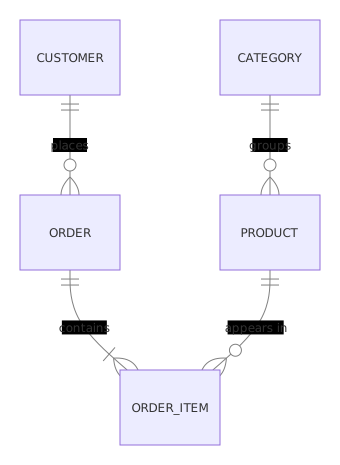
The many-to-many trap is the one I see most: teams put a comma-separated list of IDs in a column instead of a junction table, then can’t query or constraint it. If a relationship can hold more than one value on either side, it needs its own table — no exceptions.
Normalization
Normalization reduces redundancy and prevents anomalies. Follow these forms progressively — each builds on the previous one.
First Normal Form (1NF)
- Atomic values: no multi-valued attributes
- Each row is unique (has a primary key)
-- Violation: multiple phone numbers in one column
CREATE TABLE bad_users (
  id INT PRIMARY KEY,
  name VARCHAR(255),
  phones VARCHAR(500) -- '555-1234,555-5678'
);

-- Fix: separate table for phone numbers
CREATE TABLE users (
  id INT PRIMARY KEY,
  name VARCHAR(255)
);

CREATE TABLE user_phones (
  user_id INT REFERENCES users(id),
  phone VARCHAR(20),
  PRIMARY KEY (user_id, phone)
);
Second Normal Form (2NF)
- Must be in 1NF
- No partial dependency: non-key attributes depend on the full primary key
-- Violation: order_date depends only on order_id, not on (order_id, product_id)
CREATE TABLE bad_order_items (
  order_id INT,
  product_id INT,
  order_date DATE,  -- depends only on order_id
  quantity INT,
  PRIMARY KEY (order_id, product_id)
);

-- Fix: split into orders and order_items
CREATE TABLE orders (
  id INT PRIMARY KEY,
  order_date DATE
);

CREATE TABLE order_items (
  order_id INT REFERENCES orders(id),
  product_id INT,
  quantity INT,
  PRIMARY KEY (order_id, product_id)
);
Third Normal Form (3NF)
- Must be in 2NF
- No transitive dependency: non-key attributes depend only on the primary key
-- Violation: city_name depends on zip_code, not on user_id
CREATE TABLE bad_users (
  id INT PRIMARY KEY,
  name VARCHAR(255),
  zip_code VARCHAR(10),
  city_name VARCHAR(100)  -- depends on zip_code
);

-- Fix: separate table for zip → city mapping
CREATE TABLE users (
  id INT PRIMARY KEY,
  name VARCHAR(255),
  zip_code VARCHAR(10)
);

CREATE TABLE zip_cities (
  zip_code VARCHAR(10) PRIMARY KEY,
  city_name VARCHAR(100)
);
When to Denormalize
3NF is the right default, not a dogma. You denormalize when a measured performance problem justifies the maintenance cost — not before. A monthly report that’s slow is a reporting problem; you solve it with a materialized view or a replica, not by corrupting the OLTP schema.
The legitimate cases: counters you read thousands of times per second (posts.like_count vs counting rows), audit snapshots where the data must stay frozen at write time (invoice line item prices, shipping addresses on orders), and query-time aggregates that are too expensive to compute per read. When you do denormalize, record which column is derived and which is the source of truth — the next person needs to know where to write. For a deeper treatment, see the denormalization guide.
Indexing Strategies
Indexes speed up reads but slow down writes. Every index is a data structure the database maintains on each INSERT, UPDATE, and DELETE — so each one needs to pay for itself in actual query traffic.
When to Index
| Scenario | Index Type |
|---|---|
| Primary lookups | B-Tree on primary key |
| Foreign key columns | B-Tree on FK columns |
| Full-text search | Full-text index |
| Range queries | B-Tree on the column |
| Geospatial data | GiST / SP-GiST |
Composite Index Ordering
Column order in a composite index matters: the leftmost columns are usable alone, the ones to the right only when the left ones are filtered. Put the equality columns first and the range column last.
-- Good: status has fewer distinct values than created_at
CREATE INDEX idx_orders_created ON orders(created_at, status);

-- Better if querying by status + date range
CREATE INDEX idx_orders_status_date ON orders(status, created_at);
That second index serves WHERE status = 'pending' AND created_at > now() - interval '7 days' — the query engine uses status for equality, then scans the date range inside it. Reverse the order and the engine has to scan the whole date range to filter status.
Two things I check before adding an index: does the table even need it (small tables get sequential scans anyway), and is there already an index whose leftmost columns cover this query. Duplicate or near-duplicate indexes are common in long-lived schemas — pg_stat_user_indexes shows which ones are never read. For the full index-type catalog, the PostgreSQL indexes documentation is the reference.
Common Index Mistakes
- Over-indexing: every index slows down INSERT/UPDATE/DELETE
- Indexing low-cardinality columns alone
- Ignoring covering indexes for frequently read queries
- Indexing a foreign key that never appears in a join or a WHERE clause
Constraints and Data Integrity
Constraints are the schema’s last line of defense — the application layer can be bypassed by a script, a migration, or a bug; the database can’t.
CREATE TABLE products (
  id SERIAL PRIMARY KEY,
  sku VARCHAR(50) UNIQUE NOT NULL,
  name VARCHAR(255) NOT NULL,
  price DECIMAL(10,2) CHECK (price >= 0),
  category_id INT REFERENCES categories(id) ON DELETE RESTRICT,
  created_at TIMESTAMP DEFAULT CURRENT_TIMESTAMP
);| Constraint | Purpose |
|---|---|
PRIMARY KEY | Unique identifier for each row |
UNIQUE | Ensures no duplicate values |
NOT NULL | Prevents missing values |
CHECK | Validates data with expressions |
FOREIGN KEY | Maintains referential integrity |
Two decisions matter more than the rest. First, NOT NULL by default: nullable columns create invisible states (“does empty mean unknown, unset, or pending?”) and make queries harder to reason about — allow NULL only where absence genuinely means something. Second, ON DELETE behavior: CASCADE for owned children (order_items of an order), RESTRICT for referenced catalog data (products in categories), SET NULL for optional references. If you haven’t chosen, you haven’t decided what happens when something is deleted.
Data Types and Naming Conventions
Type choice is cheap at design time and expensive afterwards. DECIMAL for money — never FLOAT, which loses cents silently on rounding. TIMESTAMPTZ over TIMESTAMP: storing local time without a zone is a recurring source of “why is this report off by five hours”. TEXT over unbounded-length VARCHAR on Postgres, where they perform identically and the length limit buys nothing. BIGINT for IDs on tables you expect to grow — migrating INT to BIGINT on a large orders table means a long lock.
For naming, pick a convention and keep it consistent: snake_case for table and column names, plural table names (orders, users) or singular (order, user) — teams split on this, but mixing both inside one schema is what actually breaks muscle memory. Prefix foreign keys with the referenced table name (customer_id, not fk_1). Name indexes idx_{table}_{columns} and constraints chk_{table}_{rule} so an error message tells you where to look.
Transactions and Isolation Levels
Schema design and concurrency are linked: the constraints and indexes you choose decide what can go wrong when two transactions touch the same rows. Transactions give you atomicity (all writes or none), but isolation levels decide what concurrent transactions can see.
| Level | Prevents | Allows | Cost |
|---|---|---|---|
| Read Committed | Dirty reads | Non-repeatable reads, phantom reads | Lowest |
| Repeatable Read | + non-repeatable reads | Phantom reads (Postgres: none) | Medium |
| Serializable | Everything above | Serialization failures you must retry | Highest |
Design consequences: unique constraints do the work isolation can’t (UNIQUE prevents two concurrent inserts of the same email regardless of level); SELECT ... FOR UPDATE on a row serializes writers without escalating the whole transaction; and serializable mode trades throughput for correctness — use it on the few critical flows (payments, inventory) rather than globally. See database transactions for the mechanics.
Soft Deletes and Audit Columns
Most schemas eventually need to answer “what did this row look like last Tuesday.” Three columns cover 80% of it: created_at, updated_at, and created_by/updated_by for accountability. Add them at design time — retrofitting audit columns onto forty tables later is a chore nobody enjoys.
Soft delete (deleted_at IS NOT NULL) versus hard DELETE is a real decision, not a default. Soft delete wins when the row is referenced from outside (orders referencing a “deleted” product), when recovery is a real product need, or when compliance requires traceability. It loses when it bloats hot tables — every query needs WHERE deleted_at IS NULL, and unique constraints must become partial (UNIQUE (email) WHERE deleted_at IS NULL). Hard delete plus an archive/audit table is often the better split for high-volume tables; soft delete for entities users expect to undelete. Whatever you pick, document it in the schema comments.
Schema Migrations in Production
Schemas change. Design for it: every change goes through a versioned migration file (Flyway, Liquibase, Alembic — pick one and keep it in version control), and the rule that saves you is backward compatibility. Add a nullable column, backfill it, then add the constraint — never the other way around, because old app versions still run against the new schema during rolling deploys.
Renames are two deploys, not one: add the new column, sync it with a trigger or dual-write, migrate the code, then drop the old column in the next release. On Postgres, CREATE INDEX CONCURRENTLY avoids the table lock; on any engine, long-running migrations on large tables need to be tested against production-sized data in staging first.
What Works
- Use surrogate keys (auto-increment integers or UUIDs) instead of natural keys
- Avoid nullable foreign keys — use junction tables for optional relationships
- Choose data types carefully:
VARCHAR(255)vsTEXT,DECIMALvsFLOAT - Document your schema with comments and ER diagrams — the schema documentation template gives you the structure
- Plan for growth: partition large tables before they become a problem
Common Mistakes
- Skipping normalization for “performance” without evidence. See SQL performance tuning.
- Using
ENUMfor values that change frequently — a lookup table is easier to update than a migration - Missing
ON DELETE/ON UPDATErules on foreign keys. See data validation principles. - Storing derived/calculated data instead of computing on read
- Using
FLOATorDOUBLEfor money — rounding errors accumulate silently - Natural keys as primary keys — emails and SKUs change, surrogate keys don’t
Schema Review Checklist
Before merging a schema change, run through the same short list every time:
- Every table has a primary key, and every foreign key points at a real one.
- Every
FOREIGN KEYhas an explicitON DELETEdecision, not the default. - Money is
DECIMAL, timestamps areTIMESTAMPTZ, IDs areBIGINTwhere growth is expected. NOT NULLon everything except columns where absence is meaningful.- New foreign keys and lookup columns have supporting indexes.
- Unique business rules exist as constraints (
UNIQUE,CHECK), not just application code. - New enum-like values went into a lookup table, not a hardcoded type.
- The migration is versioned, backward-compatible, and tested against production-sized data in staging.
Five minutes against this list catches the failures that take days to unwind later — missing FK indexes, accidental cascade deletes, and float money columns are all silent until they’re expensive. Keep the checklist next to the migration tooling so it runs on every schema change, not just the ones that feel risky; the changes that look trivial are exactly the ones that slip a nullable timestamp or a default cascade into production.
Troubleshooting
- Over-normalized schema slows every query: if a routine list query needs five joins, you’re past the useful point. Denormalize the specific read path or add a materialized view — don’t flatten the whole schema.
- Foreign key without index: deletes and updates on the parent lock-scan the child table. Index every FK that participates in joins or cascades.
ENUMcan’t take a new value without a migration: replace with a lookup table + foreign key.- Deadlocks under concurrency: transactions that touch tables in different orders deadlock. Establish a consistent write order — parent first, children second — and keep transactions short. See database deadlocks and retries.
- TIMESTAMP values shift between servers: application servers in different zones write local times. Switch the column to
TIMESTAMPTZ— the migration rewrites the table, so plan it.
Advanced Topics
Scenario: E-commerce Schema Design
-- System: 10M products, 500K orders/day
-- ACID for orders, fast catalog search, inventory accuracy

CREATE TABLE customers (
    id BIGSERIAL PRIMARY KEY,
    email VARCHAR(255) UNIQUE NOT NULL,
    first_name VARCHAR(100) NOT NULL,
    last_name VARCHAR(100) NOT NULL,
    phone VARCHAR(20),
    created_at TIMESTAMPTZ DEFAULT NOW()
);

CREATE TABLE addresses (
    id BIGSERIAL PRIMARY KEY,
    customer_id BIGINT NOT NULL REFERENCES customers(id) ON DELETE CASCADE,
    line1 VARCHAR(255) NOT NULL, city VARCHAR(100) NOT NULL,
    state VARCHAR(50) NOT NULL, postal_code VARCHAR(20) NOT NULL,
    country CHAR(2) DEFAULT 'US', is_default BOOLEAN DEFAULT FALSE
);

CREATE TABLE categories (
    id BIGSERIAL PRIMARY KEY,
    parent_id BIGINT REFERENCES categories(id) ON DELETE SET NULL,
    name VARCHAR(100) NOT NULL, slug VARCHAR(100) UNIQUE NOT NULL
);

CREATE TABLE products (
    id BIGSERIAL PRIMARY KEY,
    sku VARCHAR(50) UNIQUE NOT NULL,
    name VARCHAR(255) NOT NULL, description TEXT,
    category_id BIGINT REFERENCES categories(id) ON DELETE RESTRICT,
    price DECIMAL(10,2) NOT NULL CHECK (price >= 0),
    is_active BOOLEAN DEFAULT TRUE,
    created_at TIMESTAMPTZ DEFAULT NOW()
);

CREATE TABLE orders (
    id BIGSERIAL PRIMARY KEY,
    customer_id BIGINT NOT NULL REFERENCES customers(id),
    status VARCHAR(20) DEFAULT 'pending',
    subtotal DECIMAL(10,2) NOT NULL,
    shipping_cost DECIMAL(10,2) DEFAULT 0,
    tax DECIMAL(10,2) DEFAULT 0,
    total DECIMAL(10,2) NOT NULL,
    created_at TIMESTAMPTZ DEFAULT NOW()
);

CREATE TABLE order_items (
    id BIGSERIAL PRIMARY KEY,
    order_id BIGINT NOT NULL REFERENCES orders(id) ON DELETE CASCADE,
    product_id BIGINT NOT NULL REFERENCES products(id),
    quantity INT NOT NULL CHECK (quantity > 0),
    unit_price DECIMAL(10,2) NOT NULL,
    line_total DECIMAL(10,2) GENERATED ALWAYS AS (quantity * unit_price) STORED
);

-- Indexes for common queries
CREATE INDEX idx_orders_customer ON orders(customer_id, created_at DESC);
CREATE INDEX idx_products_category ON products(category_id) WHERE is_active = true;
CREATE INDEX idx_order_items_product ON order_items(product_id);
CREATE INDEX idx_products_search ON products USING GIN(to_tsvector('english', name || ' ' || description));
Note the design choices: line_total as a generated column (derived data without stored duplication), the partial index on is_active (index only what you query), ON DELETE CASCADE for owned children and RESTRICT for referenced catalog data, and DECIMAL on every money column. This is 3NF plus one deliberate denormalization: addresses stores the shipping address as it was at order time — the order must not change if the customer later edits their address book.
Frequently Asked Questions
What normalization form should a database design reach?
Most applications should normalize to Third Normal Form (3NF). It removes transitive dependencies and keeps data consistent without scattering entities. Go further (BCNF, 4NF) only when the model demands it, and denormalize only with measured evidence of a performance problem.
When should I use a composite index?
When queries filter on multiple columns together — WHERE status = 'pending' AND created_at > X benefits from (status, created_at). Put equality columns first and the range column last, and skip composite indexes where each column already has its own index and the optimizer can combine them.
Should I use UUID or auto-increment for primary keys?
Auto-increment integers for most OLTP apps — smaller indexes, better locality, readable in logs. UUIDs when you generate IDs in multiple places (distributed writers, mobile clients creating records offline, merged databases). UUIDv7 keeps the sortable-timestamp benefit if you want both.
How do I keep inventory from overselling?
SELECT ... FOR UPDATE in a transaction, or an atomic decrement with a check constraint:
BEGIN;
UPDATE product_variants SET stock = stock - 1
WHERE id = ? AND stock > 0;
-- If affected rows = 0, out of stock
COMMIT;
The atomic version needs no explicit lock — the statement succeeds or returns zero rows.
What's the right order for normalizing an existing messy schema?
Start by adding the missing primary keys and foreign keys — integrity first. Then split the clearest 1NF violations (multi-valued columns) because they block everything else. Finish with 2NF/3NF cleanup of partial and transitive dependencies, one table group at a time, with a migration per step.
When does a lookup table beat an ENUM?
As soon as the set of values can change at runtime, is user-editable, or needs metadata (display name, ordering, active flag). An ENUM requires a migration for every new value; a lookup table is a INSERT away and can carry extra columns. ENUM is fine for truly closed sets like days of the week.
Related Resources
SQL Joins — Visual Guide with Examples
A visual guide to SQL joins: INNER, LEFT, RIGHT, FULL OUTER, CROSS, and SELF joins with practical examples, performance tips, and common pitfalls.
RecipeDatabase Transactions: Python, JavaScript & Java Examples
How to use ACID transactions to ensure data integrity across Python, JavaScript, and Java with SQL examples.
GuideDatabase Denormalization: Storage for Read Speed
A practical guide to database denormalization: when to trade storage for read performance, common patterns, and how to keep derived data consistent.
GuideSQL Performance Tuning — Indexes, Queries, and Explain Plans
A practical guide to optimizing SQL queries: indexing strategies, query rewriting, EXPLAIN plan analysis, and common anti-patterns to avoid.
DocDatabase Schema Documentation Template
A template for documenting database schemas with entity relationships, field definitions, and migration history.
GuideNoSQL Database Selection — MongoDB, DynamoDB, Cassandra
A practical guide to choosing the right NoSQL database. Compare document, key-value, wide-column, and graph stores with selection criteria and migration tips.